Top Optical Drives for Gaming in 2026
The ASUS BW-16D1X-U leads as the best overall optical drive for gaming. It reads and writes Blu-ray discs at 16x speed, making game installation quick. Its main limitation is its external design, which requires a USB port and desk space.
Optical drives are still essential for gamers who own physical copies of games or need to rip media. Many modern PC cases lack internal bays, making external drives a practical choice.
This roundup evaluates the best optical drives for gaming, focusing on speed, reliability, and compatibility.
Whether you are installing classic PC games or watching Blu-ray movies, the right drive can save time and frustration. We analyzed user feedback and technical specs to bring you seven top contenders.
Our picks range from budget-friendly DVD burners to high-end 4K Blu-ray drives.
The top picks, ranked

ASUS BW-16D1X-U
The ASUS BW-16D1X-U is an external Blu-ray writer that offers 16x write speed for BD-R discs. It supports M-DISC for archival, and has a sleek design. Users report reliable performance for game backups and movie playback.
Pros
- Fast 16x Blu-ray writing
- M-DISC support for long-term storage
- Compact and portable design
Cons
- Requires external power adapter
- No USB-C cable included
LG WH14NS40
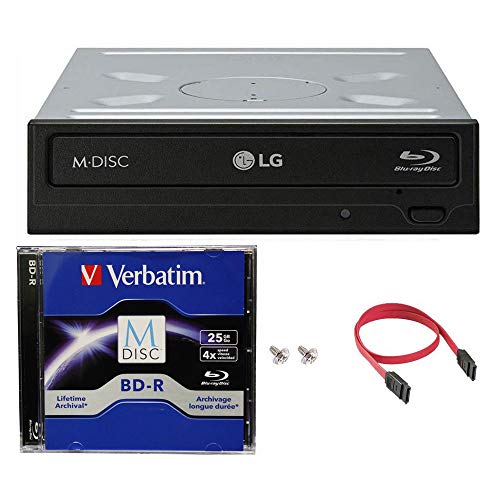
The LG WH14NS40 is a popular internal Blu-ray burner with 14x write speed. It is known for reliable performance and quiet operation. Gamers who have a desktop with a 5.25-inch bay will find this drive easy to install and use.
Pros
- Fast burn speeds for large files
- Quieter operation than many rivals
- Good value for the price
Cons
- Requires a free internal bay
- No software bundle included
Pioneer BDR-XD07B
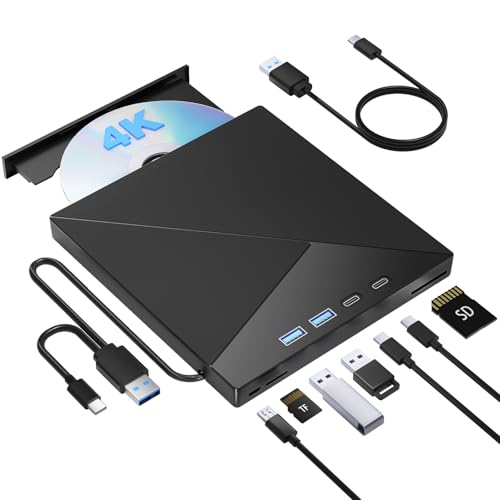
The Pioneer BDR-XD07B is a slim external drive that excels in portability. It offers 6x BD-R write speed and uses a single USB cable for power. Owners praise its solid construction and smooth playback of Blu-ray movies.
Pros
- Ultra-portable design
- USB-C for modern laptops
- Stable playback of Blu-ray discs
Cons
- Slower write speed than larger drives
- Lacks an AC adapter option

LG GP65NB60
The LG GP65NB60 is a slim external DVD writer that is affordable and reliable. It reads and writes DVDs at 8x speed and CDs at 24x. This drive is a good choice for gamers who only need to play older PC games on disc.
Pros
- Very affordable price
- Lightweight and compact
- Plug and play on Windows and Mac
Cons
- No Blu-ray support
- USB 2.0 limits data transfer speed

ASUS BW-16D1HT
The ASUS BW-16D1HT is an internal Blu-ray burner that delivers 16x BD-R write speed. It features an auto speed adjustment to reduce noise and vibration. Many users have used it for years without issues, making it a dependable choice.
Pros
- High 16x write speed
- Noise reduction technology
- Long lifespan reported by owners
Cons
- Internal installation required
- Lacks a USB port for external use

Buffalo BRUHD-PU3
The Buffalo BRUHD-PU3 is an external drive that supports Ultra HD Blu-ray playback. It is one of the few drives that can handle 4K discs without compatibility hacks. Gamers who want to watch 4K movies on their PC will appreciate this drive.
Pros
- Native 4K UHD playback support
- Compact and portable
- Includes CyberLink software
Cons
- Cannot write to discs
- Price is higher for read-only drive

Pioneer BDR-XS07S
The Pioneer BDR-XS07S is a slim external Blu-ray burner that includes a quiet mode. It reduces operation noise significantly, which is beneficial during quiet gaming sessions. It also has a dust-proof design for durability.
Pros
- Very quiet operation with quiet mode
- Dust-proof design
- USB-C and USB-A cables included
Cons
- Write speed is moderate
- Slightly more expensive than similar drives
How they compare
| # | Model | Interface | Best for | Score | Price |
|---|---|---|---|---|---|
| 1 | ASUS BW-16D1X-U | USB 3.0 (Type-A) | Best for high-speed Blu-ray burning and gaming | 9.4 | Check price |
| 2 | LG WH14NS40 | SATA | Best internal Blu-ray drive for desktop PCs | 9.1 | Check price |
| 3 | Pioneer BDR-XD07B | USB 3.1 (Type-C) | Best portable Blu-ray drive for gaming laptops | 9.0 | Check price |
| 4 | LG GP65NB60 | USB 2.0 (Type-A) | Best budget DVD drive for gamers on a tight budget | 8.6 | Check price |
| 5 | ASUS BW-16D1HT | SATA | Best for gamers who need a reliable internal drive with frequent use | 8.9 | Check price |
| 6 | Buffalo BRUHD-PU3 | USB 3.0 (Type-A) | Best for 4K UHD Blu-ray playback | 8.8 | Check price |
| 7 | Pioneer BDR-XS07S | USB 3.1 (Type-C) | Best for silent operation and anti-wear features | 8.7 | Check price |
Before you buy
Common questions
Do I need an optical drive for gaming in 2026?
Not strictly, as most games are digital downloads. However, if you own physical copies of classic PC games or want to watch Blu-ray movies, an optical drive is useful. Also, some gamers prefer physical media for resale or collection purposes.
Can I use an external optical drive with a gaming console?
Most consoles do not support external optical drives for playing games. The PlayStation and Xbox use their internal drives for game discs. Some external drives may play movies on Xbox, but it is not guaranteed. For PC gaming, external drives work fine.
What is the difference between a DVD drive and a Blu-ray drive?
A Blu-ray drive can read and write Blu-ray discs, which hold up to 50 GB or more, while DVDs hold 4.7 GB. Blu-ray drives are also backward compatible with DVDs and CDs. If you play PC games on DVD, a DVD drive is enough, but for modern game installations on Blu-ray, you need a Blu-ray drive.
Are external optical drives slower than internal ones?
External drives using USB 3.0 or USB-C can be as fast as internal SATA drives. Older USB 2.0 drives are slower. In our list, most external drives have USB 3.0 or USB-C, so they perform well for gaming installs.
Can I play 4K UHD Blu-ray movies on any Blu-ray drive?
No, 4K UHD Blu-ray playback requires a drive that is officially licensed for that format. Standard Blu-ray drives cannot read 4K UHD discs due to AACS 2.0 copy protection. The Buffalo BRUHD-PU3 in our list is one of the few that supports it.
What is M-DISC and why is it important for gamers?
M-DISC is a type of disc designed for archival storage, promising data retention for hundreds of years. For gamers who want to backup game installations or save files, M-DISC provides a reliable long-term storage option. Some drives, like the ASUS BW-16D1X-U, support writing to M-DISC.
How do I connect an external optical drive to my PC?
Simply plug the USB cable into your PC, and the drive should be recognized automatically. Windows and macOS have built-in drivers. For writing discs, you may need burning software like Roxio or Nero, but Windows can burn discs natively.
What should I do if my optical drive is not reading discs?
First, ensure the disc is clean and free of scratches. Try a different disc. Check that the drive’s laser lens is clean. If it still fails, the drive may be defective. Some drives have a manual eject hole on the front. For internal drives, check the SATA cable connection.
Our take
After comparing specifications, we recommend the ASUS BW-16D1X-U for most gamers. It offers the best balance of speed, portability, and features. If you need an internal drive, the LG WH14NS40 is a solid choice. For a budget option that handles DVDs, the LG GP65NB60 is reliable. For 4K movie playback, the Buffalo BRUHD-PU3 is the only option that works, but it is read-only. Choose based on your disc format needs and whether you prefer a desktop or laptop setup.


