Top Painting and Drawing Tools for Artists
For most artists, the Wacom Intuos Pro is the top pick because it offers professional-grade pressure sensitivity and a durable build, though it comes with a higher price tag and requires a computer setup.
Choosing the right painting and drawing tools can transform your creative work, whether you sketch traditionally or paint digitally. The market is packed with options, so we narrowed down seven standout products based on performance, user feedback, and value.
From beginner-friendly sets to professional-grade tablets, this roundup covers a range of needs. Each product is analyzed for its strengths and limitations, so you can make an informed choice.
The top picks, ranked
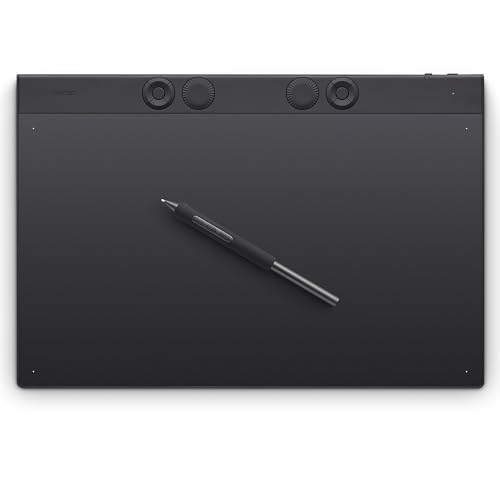
Wacom Intuos Pro (Large)
The Wacom Intuos Pro is a top-tier graphics tablet with 8192 levels of pressure sensitivity and multi-touch support. It offers a spacious drawing area and customizable ExpressKeys for efficient workflow. Built to last, it connects via USB or Bluetooth, making it versatile for studio or on-the-go use.
Pros
- Excellent pressure sensitivity
- Durable and responsive
- Customizable shortcuts
Cons
- Expensive compared to others
- Requires separate computer
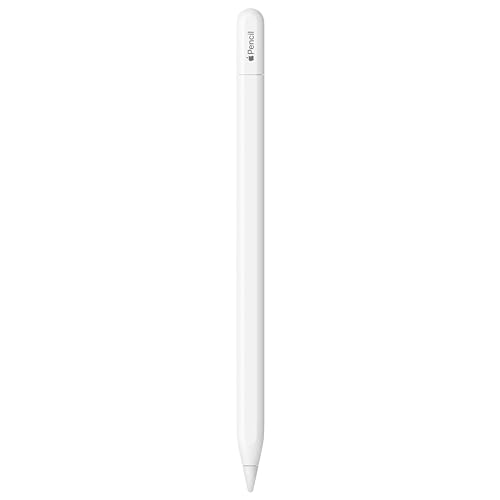
Apple iPad Pro (12.9-inch) with Apple Pencil 2
The iPad Pro paired with Apple Pencil 2 delivers a fluid drawing experience with minimal lag. Its Liquid Retina XDR display offers accurate colors, and the device runs powerful apps like Procreate. The combination is portable and eliminates the need for a computer, though the cost is high.
Pros
- Portable and all-in-one
- Stunning display
- Huge app ecosystem
Cons
- High cost
- Apple Pencil sold separately

Huion Kamvas Pro 16 (2.5K)
The Huion Kamvas Pro 16 offers a 2.5K resolution display with 120% sRGB color gamut, providing vivid colors. It features 8192 pressure levels and a laminated screen for reduced parallax. This pen display is a solid alternative to pricier brands, though it lacks some software features.
Pros
- Affordable for quality
- Clear, vibrant screen
- Low parallax
Cons
- Requires computer connection
- Stand not included

Prismacolor Premier Colored Pencils (150 Count)
Prismacolor Premier colored pencils are known for their soft, thick cores that blend and layer smoothly. The 150-count set offers an extensive range of vibrant colors, ideal for detailed illustrations. They are wax-based and can break if dropped, but they remain a favorite among artists.
Pros
- Smooth blending
- Rich pigments
- Large color selection
Cons
- Leads can break easily
- Wax bloom may occur

Faber-Castell 114900 Pitt Artist Pen Set
Faber-Castell Pitt Artist Pens are waterproof, lightfast, and available in various tip sizes. This set includes 10 pens with different nibs, from superfine to brush, making it versatile for sketching, lettering, and detail work. The India ink is archival quality.
Pros
- Waterproof and fade-resistant
- Versatile tip variety
- Archival quality ink
Cons
- Limited color options
- Pens can dry out if uncapped

Arteza Professional Acrylic Paint Set (60 Colors)
Arteza provides 60 vibrant acrylic paints in generous 2 oz tubes. The paints are thick, highly pigmented, and blend well. They dry quickly and are suitable for canvas, wood, and paper. The set includes a variety of colors, making it great for beginners and hobbyists.
Pros
- Large color variety
- Thick consistency
- Good value for quantity
Cons
- Some colors may be less lightfast
- Tubes can be messy

Ohuhu Alcohol Markers Set (320 Colors)
The Ohuhu marker set includes 320 vibrant alcohol-based markers with fine and chisel tips. They blend smoothly and are refillable, offering excellent coverage. The set comes with a durable case and includes a colorless blender. Some users report color variation between batches.
Pros
- Large selection
- Smooth blending
- Refillable
Cons
- Ink can bleed through thin paper
- Color consistency may vary
How they stack up
| # | Model | Active Area | Best for | Score | Price |
|---|---|---|---|---|---|
| 1 | Wacom Intuos Pro (Large) | Large (12.1 x 8.4 inches) | Professional digital artists | 9.4 | Check price |
| 2 | Apple iPad Pro (12.9-inch) with Apple Pencil 2 | 12.9-inch Liquid Retina XDR | Versatile artists who want a standalone device | 9.2 | Check price |
| 3 | Huion Kamvas Pro 16 (2.5K) | 15.8 inches | Budget-conscious digital artists wanting a pen display | 8.7 | Check price |
| 4 | Prismacolor Premier Colored Pencils (150 Count) | 150 pencils | Traditional color artists | 8.8 | Check price |
| 5 | Faber-Castell 114900 Pitt Artist Pen Set | 10 pens | Ink and illustration work | 8.5 | Check price |
| 6 | Arteza Professional Acrylic Paint Set (60 Colors) | 60 tubes, 2 oz each | Acrylic painters who want a wide palette | 8.4 | Check price |
| 7 | Ohuhu Alcohol Markers Set (320 Colors) | 320 markers | Marker artists and illustrators | 8.3 | Check price |
How to pick the right one
Questions worth asking
What is the best painting and drawing tool for beginners?
For beginners, a set of Prismacolor Premier colored pencils or an affordable digital tablet like a Huion are great starting points. They are easy to use and not too expensive.
Should I buy a drawing tablet or a pen display?
A drawing tablet (like Wacom Intuos) is more affordable and ergonomic, but you must look at the computer screen. A pen display (like Huion Kamvas) lets you draw directly on the screen, which is more intuitive but costs more.
Can I use an iPad Pro for professional digital art?
Yes, the iPad Pro with Apple Pencil is used by many professionals due to its powerful apps and portability. It is a viable alternative to desktop setups.
Are expensive paints worth the cost?
Higher-quality paints often have more pigment and better lightfastness, resulting in more vibrant and durable artwork. However, mid-range options like Arteza provide good quality at a lower price for practice.
How do I choose the right paper for markers?
Alcohol markers bleed through thin paper. Use marker-specific paper or cardstock that prevents bleed and allows blending. Many brands offer sketchbooks designed for markers.
What is the difference between wax-based and oil-based colored pencils?
Wax-based pencils (like Prismacolor) are softer and blend easily but can produce wax bloom. Oil-based pencils are harder and less prone to bloom, but they blend differently and may require solvents for smooth effects.
Do I need a computer for the Huion Kamvas Pro?
Yes, the Huion Kamvas Pro is a pen display that must be connected to a computer (Windows or Mac) to function. It is not a standalone device.
How many markers do I need to start?
A set of 24 to 36 markers is sufficient for beginners to learn blending and shading. You can expand later as you find your style.
Are Ohuhu markers comparable to Copic?
Ohuhu markers are often compared to Copic due to their alcohol-based ink and refillability. While they are more affordable, some users note color variations and slightly different nib quality.
What is the best way to clean a drawing tablet?
Use a soft, lint-free cloth slightly dampened with water. Avoid harsh chemicals. For pen displays, use a screen cleaner designed for electronics.
The bottom line
If you are a digital artist seeking professional results, invest in the Wacom Intuos Pro for its precision and reliability. If you prefer a standalone device, the iPad Pro offers unmatched versatility. For traditional artists, the Prismacolor pencils provide the best color range and blendability. Ultimately, the best tool is the one that fits your workflow and budget, so prioritize what matters most to you.


