Smart Pencils for Every Screen and Sketchbook
For most people, the Apple Pencil 2 is the top pick. It pairs instantly, charges wirelessly, and offers near-zero lag. But it only works with newer iPads. If you need a budget option for older iPads, the Logitech Crayon is a smart choice.
A smart pencil turns your tablet into a digital notebook or canvas. The best ones feel natural, respond instantly, and don’t drain your battery. Whether you are a student, artist, or professional, there is a stylus that fits your workflow.
This roundup covers seven top-rated smart pencils. We break down what each does best, from the Apple Pencil 2 for iPad pros to the affordable Metapen for note takers. Our goal is to help you pick the right one without overspending.
The shortlist, ranked

Apple Pencil (2nd Generation)
The Apple Pencil 2 is the gold standard for iPad styluses. It magnetically attaches to the side of compatible iPads, charges wirelessly, and features double-tap to switch tools. Owners report flawless palm rejection and pixel-perfect precision.
Pros
- Lag-free writing and drawing
- Wireless charging and magnetic attachment
- Double-tap gesture for quick tool switch
Cons
- Only works with recent iPad models
- Pricey compared to alternatives

Apple Pencil (1st Generation)
The original Apple Pencil remains a solid choice for many iPads. It plugs into the Lightning port to pair and charge, which can be awkward but works. It offers the same precision and pressure sensitivity as its successor, minus the magnetic charging.
Pros
- Same drawing quality as the newer model
- Works with a wider range of iPads
- Often discounted
Cons
- Easy to misplace the cap
- Charging method is cumbersome

Logitech Crayon
The Logitech Crayon is a durable, flat stylus designed for education. It works with many iPads and offers pixel-perfect precision without pairing. It has a 7-hour battery life and charges via Lightning. Owners like its comfortable grip and rugged build.
Pros
- No pairing needed, just turn on and use
- Flat design prevents rolling
- Durable and kid-friendly
Cons
- No pressure sensitivity
- Requires Lightning cable for charging

Metapen A8 (2nd Gen)
The Metapen A8 is a third-party stylus that mimics the Apple Pencil experience for a fraction of the cost. It features palm rejection, tilt sensitivity, and a magnetic attachment for charging on iPad Pro and Air models. It works with many iPad models and offers a USB-C charging option.
Pros
- Much cheaper than Apple Pencil
- Magnetic charging on compatible models
- Good pressure and tilt sensitivity
Cons
- Not officially licensed by Apple
- Some users report occasional connectivity hiccups

Adonit Note+
The Adonit Note+ is a precision stylus with a 1.9mm fine tip and two customizable shortcut buttons. It works with iPad and iPhone (with iOS 12.2 or later) and offers palm rejection and tilt support. It charges via USB-C and provides about 10 hours of use.
Pros
- Fine tip for detailed work
- Shortcut buttons speed up workflow
- Works with both iPad and iPhone
Cons
- Battery life is shorter than others
- Some users find the tip too delicate

Samsung S Pen (for Galaxy Tab S9 Series)
The Samsung S Pen comes included with Galaxy Tab S9 series, but you can buy a replacement. It offers Air Actions, Bluetooth remote control, and excellent pressure sensitivity. It snaps to the back of the tablet for charging and storage.
Pros
- Included with tablet purchase
- Extremely responsive
- Bluetooth remote features
Cons
- Only works with Samsung devices
- Smaller than some alternatives
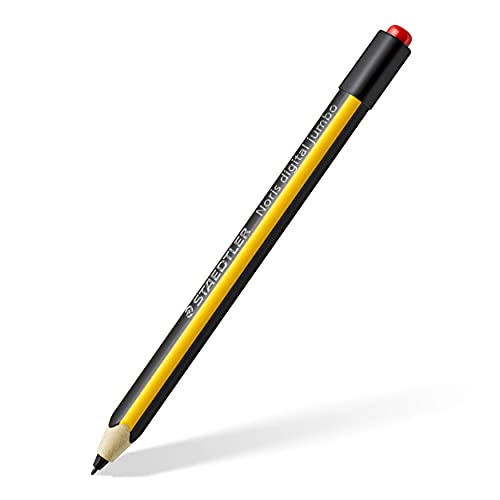
Staedtler Noris Digital Pencil
The Staedtler Noris Digital Pencil is a stylus that feels like a real pencil. It is compatible with many touchscreen devices, including iPads and Android tablets, using AES technology. It has an eraser end that works as an eraser on supported apps. It uses a micro USB charging port.
Pros
- Realistic pencil grip and feel
- Eraser tip works naturally
- Works on multiple platforms
Cons
- Charging port is outdated
- No palm rejection on all devices
Side by side
| # | Model | Compatibility | Best for | Score | Price |
|---|---|---|---|---|---|
| 1 | Apple Pencil (2nd Generation) | iPad Pro 11-inch (1st gen and later), iPad Pro 12.9-inch (3rd gen and later), iPad Air (4th gen and later), iPad mini (6th gen) | iPad Pro, iPad Air, and iPad mini users who want the best experience | 9.6 | Check price |
| 2 | Apple Pencil (1st Generation) | iPad (6th gen and later), iPad Air (3rd gen), iPad mini (5th gen), iPad Pro (1st and 2nd gen) | Owners of older iPad models that don’t support the 2nd gen | 9.2 | Check price |
| 3 | Logitech Crayon | iPad (6th gen and later), iPad Pro 11-inch and 12.9-inch (2018 and later) | Students and teachers using iPads (6th gen and later) or iPad Pro | 9.0 | Check price |
| 4 | Metapen A8 (2nd Gen) | iPad Pro (3rd gen or later), iPad Air (4th gen or later), iPad (6th gen or later), iPad mini (5th gen or later) | Budget-conscious iPad users who want Apple Pencil features | 8.8 | Check price |
| 5 | Adonit Note+ | iPad (2018 and later), iPhone (XR and later) | Artists who want a fine point and extra shortcut buttons | 8.7 | Check price |
| 6 | Samsung S Pen (for Galaxy Tab S9 Series) | Galaxy Tab S9, S9+, S9 Ultra, and S8 series | Samsung Galaxy Tab S9, S9+, and S9 Ultra owners | 9.1 | Check price |
| 7 | Staedtler Noris Digital Pencil | iPad (2018 and later), Surface Pro, some Android devices | Note takers who want a realistic pencil feel | 8.5 | Check price |
What matters most
Good to know
What is a smart pencil?
A smart pencil is a stylus designed for tablets and touchscreens. It uses advanced technology to provide precise input, pressure sensitivity, and palm rejection, making it ideal for writing, drawing, and navigation.
Do smart pencils work with any tablet?
No. Smart pencils are often proprietary. Apple Pencil works only with iPads, Samsung S Pen only with Galaxy Tabs. Some third-party styluses like the Logitech Crayon and Staedtler Noris support multiple devices, but you must check compatibility.
What is the difference between active and passive styluses?
Active styluses contain electronics that communicate with the tablet, enabling features like pressure sensitivity and palm rejection. Passive styluses are just rubber-tipped pens, which offer no advanced features. Smart pencils are always active.
Can I use a smart pencil with my iPhone?
Some styluses, like the Adonit Note+, support iPhones, but the Apple Pencil does not work with iPhone. For iPhone, you need a stylus that explicitly lists iPhone compatibility. However, most are designed for tablets due to the larger screen.
How do I charge a smart pencil?
Charging methods vary. Apple Pencil 2 uses magnetic wireless charging on the iPad. Apple Pencil 1 uses Lightning. Others use USB-C or micro USB. Check the product specifications. Some, like the Logitech Crayon, offer fast charging.
Do all smart pencils have palm rejection?
Most modern smart pencils do, but it depends on the software and device. The Apple Pencil and S Pen have excellent palm rejection. Third-party styluses may require apps that support it. Always test palm rejection before buying.
What is the battery life of a smart pencil?
Battery life ranges from 7 to 12 hours of continuous use. The Apple Pencil 2 lasts about 12 hours, while the Logitech Crayon offers 7. Many styluses have quick charging features. Standby time is usually longer.
Can I replace the tip of a smart pencil?
Yes, most smart pencils have replaceable tips. Apple sells tip replacements, and third-party options exist. Over time, tips can wear down, especially with heavy use. Replacing them is cheaper than buying a new stylus.
Are cheap smart pencils worth it?
Budget styluses like the Metapen offer many features at a lower price. They may lack the polish of first-party options, but for note taking and casual drawing, they are a great value. Read reviews to ensure reliability.
How do I know which smart pencil is right for me?
First, check compatibility with your device. Then consider your primary use: note taking, art, or navigation. For artists, pressure and tilt are crucial. For note takers, palm rejection and battery life matter. Our roundup highlights the best for each scenario.
The bottom line
If you own a compatible iPad, get the Apple Pencil 2. It is the best overall and worth the investment for its seamless integration and performance. For a budget alternative, the Metapen A8 offers nearly identical features at a fraction of the cost. For non-iPad users, the Samsung S Pen is excellent if you have a Galaxy Tab, while the Logitech Crayon is a solid choice for classrooms. For artists who want extra buttons, the Adonit Note+ is a great pick. Avoid the older Apple Pencil 1 unless you have no other choice, as its charging method is outdated. The Staedtler Noris is best for those who want a realistic pencil feel, but its compatibility is limited. Ultimately, your choice should align with your device and your main use case.


