Phone Photo Printers Worth Your Desk Space
For most people, the Canon Selphy CP1500 is the best phone photo printer. It delivers lab quality prints with dye sublimation, supports multiple phone platforms, and offers borderless options. Its main limitation is size; it is not pocketable. If you need a truly portable printer, consider the HP Sprocket Plus, which prints stickable 2.3 x 3.4 inch photos via ZINK.
Smartphone cameras have replaced dedicated point and shoots, but physical photos still hold a special place. Phone photo printers bridge that gap, letting you turn digital memories into tangible keepsakes within minutes.
Choosing the right one involves trade offs between print size, quality, and portability. Some use dye sublimation for true photographic prints, while others rely on ZINK zero ink technology for instant, peel and stick fun.
The top picks, ranked

Canon Selphy CP1500 Wireless Compact Photo Printer
The Canon Selphy CP1500 offers exceptional print quality with dye sublimation, producing vibrant, long lasting photos. It supports borderless printing and has a 3.5 inch LCD screen for easy editing. Its compact design fits on a desk, and it connects via Wi Fi, USB, and SD card. Owners praise its consistent color accuracy and durability.
Pros
- Lab quality prints
- Borderless photo option
- Multiple connectivity choices
Cons
- Larger than pocket printers
- Requires dedicated paper and ink

HP Sprocket Plus 2×3 Photo Printer
The HP Sprocket Plus is a pocket sized printer that uses ZINK sticky paper. It produces 2.3 x 3.4 inch prints with a vintage feel. The companion app offers filters and frames. Its Bluetooth connection makes it easy to print from your phone anywhere. Owners love its compact size and fun, shareable prints.
Pros
- Truly pocketable
- Sticky back for scrapbooking
- No ink cartridges needed
Cons
- Small print size
- Limited color range

Kodak Mini 3 Retro 2.1×3.4 Photo Printer
The Kodak Mini 3 Retro prints 2.1 x 3.4 inch photos with 4Pass technology for smudge proof, water resistant results. It features a built in battery and connects via Bluetooth. The Kodak app includes AR effects and editing tools. This printer stands out for its affordable price and consistent quality.
Pros
- Smudge proof prints
- AR video integration
- Affordable price
Cons
- Small prints only
- App can be slow
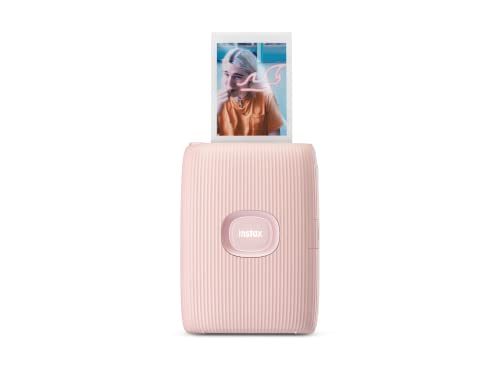
Fujifilm Instax Mini Link 2 Smartphone Printer
The Fujifilm Instax Mini Link 2 prints classic Instax Mini format photos (2.4 x 3.5 inches) that develop in about 90 seconds. It connects via Bluetooth and offers unique features like Party mode and a remote printing function. Owners appreciate the authentic instant film aesthetic and the ability to print from social media.
Pros
- Authentic film look
- Unique interaction modes
- Compact and stylish design
Cons
- Film is expensive per print
- Prints take time to develop

HP Sprocket Studio Plus 4×6 Photo Printer
The HP Sprocket Studio Plus prints true 4×6 inch photos using dye sublimation for rich, lasting colors. It works with the HP app and offers borderless printing. Its design is sleek and compact, though it is not portable. Owners report high quality prints that rival professional services.
Pros
- Full size prints
- Borderless option
- High color accuracy
Cons
- Bulky for travel
- Requires proprietary paper

Canon Ivy 2 Mini Photo Printer
The Canon Ivy 2 is an affordable pocket printer that uses ZINK paper with a sticky back. It prints 2 x 3 inch photos and connects via Bluetooth. Its app offers customizable frames and filters. Owners find it a great entry point for instant printing, though quality is not top tier.
Pros
- Very affordable
- Sticky back
- Compact
Cons
- Lowest resolution
- Small prints

Kodak Step Wireless Mobile Photo Printer
The Kodak Step is a rugged, pocket sized printer with a built in battery that charges via USB. It uses ZINK paper and prints 2 x 3 inch photos. Its Bluetooth connection works with iOS and Android. Travelers like its durability and long battery life, but print quality is similar to other ZINK printers.
Pros
- Durable design
- Long battery life
- Easy to carry
Cons
- Basic app features
- Average print quality
Side by side
| # | Model | Print Technology | Best for | Score | Price |
|---|---|---|---|---|---|
| 1 | Canon Selphy CP1500 Wireless Compact Photo Printer | Dye Sublimation | Best Overall | 9.4 | Check price |
| 2 | HP Sprocket Plus 2×3 Photo Printer | ZINK Zero Ink | Best for Portability | 8.9 | Check price |
| 3 | Kodak Mini 3 Retro 2.1×3.4 Photo Printer | 4Pass Dye Sublimation | Best for Smartphone Integration | 8.7 | Check price |
| 4 | Fujifilm Instax Mini Link 2 Smartphone Printer | Instax Film | Best for Instant Camera Fans | 8.5 | Check price |
| 5 | HP Sprocket Studio Plus 4×6 Photo Printer | Dye Sublimation | Best for Full Size Prints | 8.9 | Check price |
| 6 | Canon Ivy 2 Mini Photo Printer | ZINK Zero Ink | Best Budget Option | 8.2 | Check price |
| 7 | Kodak Step Wireless Mobile Photo Printer | ZINK Zero Ink | Best for Travel | 8.0 | Check price |
How to choose
Good to know
Which phone photo printer has the best print quality?
For the best print quality, dye sublimation printers like the Canon Selphy CP1500 or HP Sprocket Studio Plus are top choices. They produce true photographic prints with vibrant colors and sharp details.
Are ZINK printers good quality?
ZINK printers are convenient and affordable, but their print quality is generally lower than dye sublimation. Colors can be less vibrant, and prints may fade over time. They are great for casual, fun photos.
Can I print from social media directly?
Many companion apps allow printing directly from social media platforms. For example, the Kodak Mini 3 app supports printing from Facebook and Instagram. Check the app features for compatibility.
Do phone photo printers require ink?
Dye sublimation printers use a ribbon that contains ink, while ZINK printers use special paper with embedded dye crystals, so no separate ink is needed. Both require specific consumables.
How long do prints last?
Dye sublimation prints are known for their longevity, often lasting decades without fading when kept out of direct sunlight. ZINK prints are less durable and may fade within a few years.
Are these printers portable?
Many are designed to be portable. The HP Sprocket Plus, Canon Ivy 2, and Kodak Step are pocket sized. Larger ones like the Canon Selphy are meant for desk use but are still compact enough to carry in a bag.
What is the cost per print?
Cost varies by printer. Dye sub printers typically cost around 50 to 80 cents per print, including paper. ZINK paper packs may bring the cost down to 30 to 50 cents per print, but quality may be lower.
Do these printers work with iPhone and Android?
Yes, all the printers we compared support both iOS and Android devices via Bluetooth or Wi Fi. Make sure your phone’s operating system is up to date for compatibility.
Can I print without a smartphone?
Some printers, like the Canon Selphy, have USB and SD card slots, allowing you to print from a camera or computer. Others rely solely on the phone app, so a smartphone is required.
Which phone photo printer is best for scrapbooking?
The HP Sprocket Plus and Canon Ivy 2 feature sticky backed paper, making them ideal for scrapbooking. They produce small, peel and stick photos that are easy to add to albums.
The verdict
For a balance of quality and value, the Canon Selphy CP1500 is the clear winner. It offers professional grade prints, flexible connectivity, and an affordable price for its output. If you prioritize portability above all, choose the HP Sprocket Plus for its pocket size and sticky back photos. Avoid the Canon Ivy 2 if you expect high resolution prints; its quality is noticeably lower. Ultimately, the Canon Selphy delivers the best overall experience for most users.


