Photo Printers for Prints That Hold Their Color
The Canon PIXMA PRO-200 leads for large gallery prints with its eight-dye ink set. For quick pocket prints, the Canon SELPHY CP1500 dye-sub is cheapest per photo. Instant-film fans should look at the Fujifilm Instax Mini Link 2.
The Canon PIXMA PRO-200 is the pick for anyone printing large, lasting photos at home, using an eight-color dye ink set that renders smooth gradients up to a wide format. It is a desktop machine with running costs to match, so casual users wanting cheap 4 by 6 prints will do better with the Canon SELPHY CP1500 dye-sublimation printer. People who value the physical instant-film look should choose a Fujifilm Instax printer instead. Decide by print size and how often you print.
Photo printer choice hinges on the technology, because each type suits a different job. Inkjet photo printers handle the largest sizes and finest detail but cost more to run. Dye-sublimation gives lab-like 4 by 6 prints with a predictable per-print cost and no clogging. Instant printers produce small film keepsakes from a phone. We compared ink or film type, maximum print size, wireless and app support, cost per print and stated fade resistance, alongside owner reports on color accuracy and setup.
How to pick the right one
What to look for in a photo printer Start with the technology, since it defines the print. Inkjet handles the biggest sizes and finest detail. Dye-sublimation gives consistent 4 by 6 prints with a set cost and no clogging. Instant and Zink printers make small keepsakes from a phone. Then weigh maximum print size against what you actually frame, the connectivity you need, and above all the cost per print, because a cheap printer with dear ink gets expensive fast.
Understanding cost per print The sticker price hides the real cost. Cartridge inkjets like the PIXMA TS8320 print beautifully but ink adds up. Refillable tanks on the Epson EcoTank ET-8550 cut per-page cost dramatically for heavy users, offsetting a higher upfront price. Dye-sub printers such as the SELPHY CP1500 have a fixed cost since paper and ribbon match one to one. Estimate how many photos you print a year, then let that guide the choice more than the box price.
Dye-sublimation versus inkjet versus instant Dye-sub bonds dye into the paper for smudge- and water-resistant 4 by 6 prints with no nozzles to clog, ideal for occasional use. Inkjet reaches the largest sizes and the finest gradients for framing and portfolios, at higher running cost and with maintenance if left idle. Instant and Zink printers trade quality and size for the fun of a physical film or sticker straight from a phone. Pick by the job, not the badge.
How long do photo prints last? Fade resistance varies by ink and paper. Pigment inkjet prints resist fading longest, often rated for many decades behind glass. Dye inks, as in the PIXMA PRO-200, look vivid but fade sooner over long spans. Dye-sub prints include a protective overcoat that resists water and fingerprints well. Instant film and Zink prints are keepsakes rather than archival, so store any print out of direct sun to slow fading whatever the type.
The best picks, ranked

Canon PIXMA PRO-200
This desktop inkjet uses eight dye-based inks to print rich color photos up to 13 by 19 inches, suiting framing and portfolios. Wireless printing and a dedicated layout app handle borderless prints and panoramas. Dye inks give vivid color out of the gate, though pigment printers edge ahead on very long-term fade resistance.
Pros
- Eight inks render smooth, vivid gradients
- Prints up to 13 by 19 inches for framing
- Wireless with a strong layout app
Cons
- Running costs are high for casual use
- Dye inks fade sooner than pigment over decades

Canon SELPHY CP1500
A compact dye-sublimation printer that turns out lab-quality 4 by 6 prints with a fixed, predictable cost per photo since paper and ribbon come as a set. There are no nozzles to clog, so it prints reliably even after sitting unused. Wi-Fi and card slots let you print from a phone or camera without a computer.
Pros
- Predictable low cost per 4 by 6 print
- No nozzles to clog after idle periods
- Prints from phone or memory card directly
Cons
- Limited to 4 by 6 inch prints
- Not for large or fine-art output

Epson EcoTank Photo ET-8550
Refillable ink tanks slash the cost per page compared with cartridges, and a six-ink set including gray improves photo tonality. It prints wide-format photos up to 13 inches and doubles as a document printer with a flatbed scanner. The upfront price is higher, but bottled ink makes heavy printing far cheaper over time.
Pros
- Refill tanks cut long-term ink costs sharply
- Six inks with gray for better tonality
- Also scans and prints documents
Cons
- Higher upfront purchase price
- Larger footprint than a photo-only printer
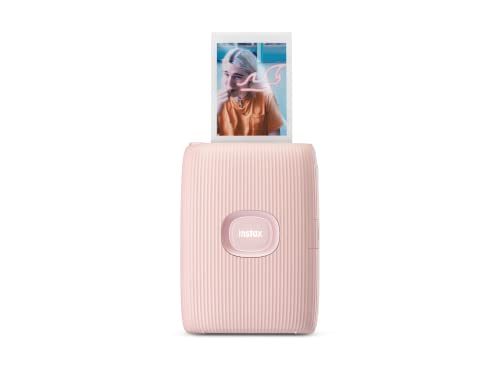
Fujifilm Instax Mini Link 2
This pocket printer makes credit-card-size Instax Mini film prints straight from a phone over Bluetooth. An app adds frames, collages and simple edits before printing. The film gives the physical, slightly nostalgic look people love for parties and gifts, though the prints are small and each one carries a film cost.
Pros
- Physical instant-film look from a phone
- Fun app frames and collage layouts
- Truly pocket-sized and portable
Cons
- Small prints not for framing detail
- Per-print film cost adds up

HP Sprocket Portable Photo Printer
Using inkless Zink paper, this pocket printer produces small peel-and-stick photos with no ribbons or cartridges to load. It pairs with a phone app over Bluetooth for quick 2 by 3 prints at events. Color is less accurate than dye-sub, but the sticker backing and tiny size make it a fun, casual option.
Pros
- Inkless Zink paper, nothing to load
- Sticker backing for scrapbooks
- Very small and portable
Cons
- Color accuracy trails dye-sub printers
- Tiny 2 by 3 prints only

Canon PIXMA TS8320
A six-ink all-in-one that prints good photos while also handling documents, scanning and copying for a home office. A touchscreen and card slots make photo printing simple without a computer. It is a jack-of-all-trades, so dedicated photo printers still beat it on the largest, most color-critical prints.
Pros
- Prints photos plus documents and scans
- Six inks improve photo color over four-ink units
- Touchscreen and card slots for easy printing
Cons
- Not for wide-format or fine-art prints
- Cartridge ink costs more than tanks over time

Kodak Dock Plus Instant Photo Printer
A home dye-sublimation dock that prints 4 by 6 photos and can charge or connect a phone directly on the cradle. Bundled paper-and-ribbon kits give a fixed per-print cost, and prints come out dry and water resistant. It is a simpler, home-focused alternative to the SELPHY for family snapshots.
Pros
- Water-resistant 4 by 6 dye-sub prints
- Phone docks directly for printing
- Predictable per-print cost
Cons
- Limited to 4 by 6 size
- App and dock feel more consumer than pro
Side by side
| # | Model | Technology | Best for | Score | Price |
|---|---|---|---|---|---|
| 1 | Canon PIXMA PRO-200 | Eight dye-based inks | Best for large prints | 9.3 | Check price |
| 2 | Canon SELPHY CP1500 | Dye-sublimation | Best value per print | 9.0 | Check price |
| 3 | Epson EcoTank Photo ET-8550 | Six-ink refillable EcoTank | Best running cost | 9.1 | Check price |
| 4 | Fujifilm Instax Mini Link 2 | Instax Mini instant film | Best instant prints | 8.6 | Check price |
| 5 | HP Sprocket Portable Photo Printer | Zink inkless, peel-and-stick | Best portable sticker prints | 8.3 | Check price |
| 6 | Canon PIXMA TS8320 | Six-ink inkjet | Best all-in-one | 8.5 | Check price |
| 7 | Kodak Dock Plus Instant Photo Printer | Dye-sublimation | Best 4 by 6 dye-sub value | 8.4 | Check price |
Questions worth asking
What is the difference between dye-sub and inkjet photo printers?
Dye-sublimation heats dye into the paper for smudge-resistant prints at a fixed cost, usually at 4 by 6, with no nozzles to clog. Inkjet sprays ink and handles much larger sizes and finer detail, but costs more to run and can clog if left idle.
Which photo printer is cheapest to run?
For heavy printing, a refillable-tank model like the Epson EcoTank ET-8550 has the lowest cost per page. For occasional 4 by 6 prints, dye-sub printers like the Canon SELPHY have a predictable, low fixed cost since paper and ribbon match one to one.
Can I print photos directly from my phone?
Yes. Most current photo printers support Wi-Fi or Bluetooth and a companion app. Instant printers like the Instax Mini Link 2 are phone-only, while desktop models like the SELPHY and EcoTank also accept memory cards and USB.
What size photos can these printers make?
It ranges widely. The PIXMA PRO-200 and EcoTank ET-8550 reach 13 inches wide for framing. Dye-sub units print 4 by 6. Instant and Zink printers make small credit-card-size or 2 by 3 keepsakes.
Do photo prints fade over time?
All prints fade eventually, but the rate differs. Pigment inkjet prints last longest, dye inks look vivid but fade sooner, and instant and Zink prints are keepsakes rather than archival. Keeping prints out of direct sunlight slows fading for every type.
Is an all-in-one printer good enough for photos?
For casual family photos, a six-ink all-in-one like the PIXMA TS8320 does well and also scans and copies. For large, color-critical or portfolio prints, a dedicated photo printer with more inks and wide-format support is the better tool.
Why do inkjet printers clog if not used?
Ink can dry in the nozzles when a printer sits idle, causing gaps or banding. Running an occasional print or a cleaning cycle helps. Dye-sublimation printers avoid this entirely since they use ribbon and heat rather than liquid ink.
Are instant film printers worth it?
For fun, gifts and events, yes. An Instax printer gives a physical film photo people enjoy handing out. They are not for detailed or framed prints, and each film sheet carries a cost, so they complement rather than replace a photo printer.
Do I need special paper for a photo printer?
Yes. Inkjet photo printers need photo paper matched to the ink for best results. Dye-sub and instant printers use their own dedicated paper and ribbon or film, which you buy as a set for that specific model.
Our take
If you frame prints or build a portfolio, the Canon PIXMA PRO-200 is the buy, since eight inks and wide-format output deliver the detail large photos need. Print mostly 4 by 6 snapshots? The Canon SELPHY CP1500 costs less per photo, never clogs and is the smarter pick for casual use. Heavy printers should weigh the refillable Epson EcoTank ET-8550 to slash ink costs. The mistake to avoid is buying on sticker price alone, because cheap hardware with pricey ink is the costliest choice over a year.


