Top Portable Flight Sticks for Gamers on the Move
The Thrustmaster T-Flight Hotas X is our top pick for most players because it combines affordability with a full throttle and joystick setup that breaks apart for storage. Its main advantage is the all-in-one design with a reliable twist rudder, but its plastic build and bulkier footprint may not suit extreme portability. For a truly pocketable option, the GameSir T1s offers a compact, foldable form factor, though it lacks a separate throttle.
Portable flight sticks let you enjoy flight sims anywhere, from a cramped desk to a hotel room. They prioritize a smaller footprint, lighter weight, and sometimes foldable designs without sacrificing essential controls. This roundup focuses on sticks that are easy to pack or fit into tight spaces, while still offering precise control for games like Microsoft Flight Simulator and War Thunder.
We evaluated each stick on portability, build quality, button layout, and compatibility. We looked at real user feedback and specifications to identify the strengths and weaknesses of each model. Our picks cover various budgets and platforms, ensuring you can find a stick that fits your travel needs and gaming setup.
What we recommend

Thrustmaster T-Flight Hotas X
This is a full HOTAS setup that splits into two separate units for easy transport. It offers a realistic feel with a wide grip and responsive controls. The twist rudder works well for yaw control. Many owners praise its durability and value for the price.
Pros
- Full HOTAS functionality
- Detachable components for easier packing
- Programmable buttons
Cons
- Plastic build feels less premium
- Large footprint even when detached

Logitech Extreme 3D Pro
A classic joystick with a sturdy, weighted base that keeps it stable during intense maneuvers. It features 12 programmable buttons and a throttle lever. Its compact size makes it easy to pack. Users appreciate its plug-and-play simplicity and reliable performance.
Pros
- Stable base
- Affordable
- Twist rudder for yaw
Cons
- No separate throttle unit
- Design is dated
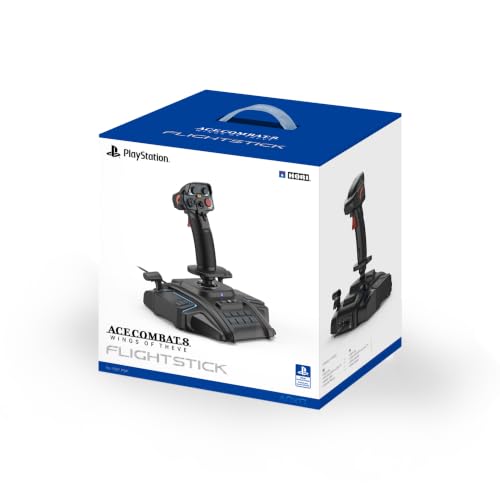
HORI Flight Stick for PS4/PS5
This officially licensed stick for PlayStation offers a realistic flight experience. It features a throttle lever, analog stick, and responsive buttons. The build is solid and the grip is comfortable. It works seamlessly with PS4 and PS5 games, though it is not compatible with PC.
Pros
- Official PlayStation license
- Comfortable grip
- Good button layout
Cons
- No PC support
- Bulky for travel

Turtle Beach VelocityOne
The VelocityOne is a high-end flight stick with a built-in display and a wealth of controls. It offers a realistic throttle and many customizable buttons. While it is larger and heavier, it still fits in a backpack. Owners love the immersive features but note the higher price.
Pros
- Lots of programmable controls
- Built-in display
- Works with Xbox and PC
Cons
- Expensive
- Heavy and bulky

CH Products Flightstick Pro
A no-frills joystick known for its precision and reliability. It features a metal gimbal mechanism, which provides smooth and accurate movements. The stick is compact and sits flat on a desk. It lacks a throttle, but many users prefer its simplicity and durability.
Pros
- Extremely precise
- Durable construction
- Compact design
Cons
- No throttle
- Basic button layout

GameSir T1s
This foldable gamepad is not a traditional flight stick but offers a compact joystick mode for mobile flight games. It connects via Bluetooth and is highly portable. The T1s is ideal for casual sims on Android or PC. Its small size makes it easy to slip into a pocket.
Pros
- Very small and lightweight
- Wireless
- Works with mobile devices
Cons
- Not a dedicated flight stick
- Limited precision for sims

PXN 2113 Flight Stick
This affordable joystick offers compatibility with PC, PS3, PS4, and Switch. It includes a throttle, rudder twist, and several programmable buttons. The design is ergonomic and the base is stable. Some users report it is not as durable as more expensive options, but it is a good entry-level choice.
Pros
- Works on multiple platforms
- Low cost
- Comfortable grip
Cons
- Build quality is average
- Software can be finicky
Before you buy
How they compare
| # | Model | Connectivity | Best for | Score | Price |
|---|---|---|---|---|---|
| 1 | Thrustmaster T-Flight Hotas X | USB wired | Best overall for PC and PS4 | 9.4 | Check price |
| 2 | Logitech Extreme 3D Pro | USB wired | Budget-friendly PC option | 9.0 | Check price |
| 3 | HORI Flight Stick for PS4/PS5 | USB wired | Console players | 8.8 | Check price |
| 4 | Turtle Beach VelocityOne | USB wired | Feature-rich simulation | 8.6 | Check price |
| 5 | CH Products Flightstick Pro | USB wired | Desktop precision | 8.3 | Check price |
| 6 | GameSir T1s | Bluetooth | Travel and Android | 8.1 | Check price |
| 7 | PXN 2113 Flight Stick | USB wired | Multi-platform flexibility | 8.0 | Check price |
Common questions
Can I use a flight stick for games other than flight sims?
Yes, many flight sticks work as generic joysticks for games that support them, such as space sims, mech games, or even some driving games, though they are not ideal for all genres.
What is the difference between a flight stick and a HOTAS?
A flight stick is just the joystick, while a HOTAS (Hands On Throttle And Stick) includes a separate throttle unit. HOTAS setups offer more realistic control but are often larger.
Do all portable flight sticks work with laptops?
Most USB wired sticks work with laptops that have USB ports. Bluetooth sticks also work with many laptops, but check system requirements for compatibility.
Are expensive flight sticks worth the cost?
Higher priced sticks typically offer better build quality, more controls, and extra features like displays. If you are a serious sim enthusiast, they can enhance your experience, but budget sticks can still perform well.
Can I use a console flight stick on PC?
Some console sticks are PC compatible, but many are not. The HORI Flight Stick for PS4/PS5 is not PC compatible, while the Thrustmaster T-Flight Hotas X works on both PC and PS4.
How do I clean and maintain my flight stick?
Keep the stick free of dust and debris. Use a soft cloth to wipe the exterior. Avoid using harsh chemicals. Periodically check screws and connections for tightness.
What is the best way to pack a flight stick for travel?
Detach any removable parts and wrap them in protective material. Place the stick in a padded bag or case. Ensure that the stick is not under heavy pressure to prevent damage to the gimbal.
Can I use a flight stick with a tablet?
Some sticks with Bluetooth can connect to Android or iOS devices, but support may be limited. The GameSir T1s is designed for mobile, but traditional sticks usually require a USB connection and are better suited for computers.
Are there wireless flight sticks?
Yes, some models like the GameSir T1s are wireless via Bluetooth. However, wireless flight sticks can have input lag, which may affect precision in sims.
What is the warranty on flight sticks?
Warranties vary by brand. Most manufacturers offer at least a one year limited warranty. Check the product listing for specifics.
The verdict
If you want the best balance of portability, features, and value, choose the Thrustmaster T-Flight Hotas X. It offers a full HOTAS experience that can be split in half for easier packing, and it works on both PC and PS4. For a budget-friendly PC stick, the Logitech Extreme 3D Pro is a reliable choice, but it lacks a separate throttle. If you are a console player, the HORI Flight Stick is your best bet. For those who need to travel ultra light, the GameSir T1s is the most portable, but it is not a dedicated flight stick and may not satisfy hardcore simmers.