Top Portable Network Adapters for On-the-Go Connectivity
The TP-Link USB-C to RJ45 Gigabit Ethernet Adapter is our top pick for most travelers because it offers reliable gigabit speeds in a compact, bus-powered design. Its main advantage is plug-and-play compatibility with both USB-C and Thunderbolt laptops. The main limitation is that it lacks a USB-A option, so older devices may need an extra adapter.
A portable network adapter saves you when Wi-Fi is weak or unavailable. Whether you are in a hotel room, a conference center, or a coffee shop, a wired connection often delivers faster and more stable internet. These small devices plug into your laptop’s USB or USB-C port and provide an Ethernet jack.
We compared the most popular portable network adapters on Amazon. Our focus is on real-world performance, build quality, and ease of use. We avoided overpriced models and highlighted those that offer the best value for different needs.
The top picks, ranked

TP-Link USB C to RJ45 Gigabit Ethernet Adapter
This compact adapter delivers full gigabit speeds through a USB-C port. It works with MacBook, Surface, and many Windows laptops. Owners report that it is truly plug and play with no driver installation on most systems.
Pros
- Plug and play, no drivers needed
- Compact and lightweight design
- Supports gigabit speeds for fast transfers
Cons
- Only USB-C, no USB-A version included
- Lacks a cable management clip

Anker USB 3.0 to Gigabit Ethernet Adapter
Anker’s adapter is a reliable choice for devices with traditional USB-A ports. It uses the Realtek chipset for broad compatibility. Many users report stable connections for streaming and gaming.
Pros
- Works with virtually any USB-A port
- Sturdy aluminum housing
- Supports gigabit speeds
Cons
- Bulky compared to USB-C models
- No USB-C connectivity for future devices

Cable Matters SuperSpeed 10Gbps USB C Network Adapter
This adapter supports 10 Gbps USB-C data transfer and gigabit Ethernet. It is designed for professionals who need fast network access. The braided cable adds durability.
Pros
- Fast USB 3.1 Gen 2 transfer speeds
- Durable braided cable
- Compact and light
Cons
- Slightly more expensive
- Some users report driver issues on older macOS
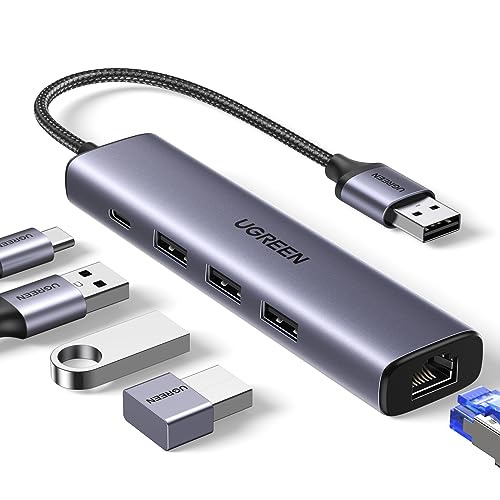
UGREEN USB C Hub with Ethernet, 3 USB 3.0 Ports
This hub adds three USB-A ports and an Ethernet port to your USB-C laptop. It is ideal for connecting peripherals and a wired network simultaneously. The aluminum body matches MacBook aesthetics.
Pros
- Adds extra USB ports
- Sleek aluminum design
- Supports gigabit Ethernet
Cons
- Not bus-powered for high-power devices
- Some users report HDMI output not supported (but this model has no HDMI)

CableCreation USB C to Ethernet Adapter with 3.5mm Audio Jack
This adapter combines gigabit Ethernet with a 3.5mm audio jack, useful for headsets on devices without audio ports. It is compact and plug and play.
Pros
- Adds audio output
- Stable gigabit connection
- No external power needed
Cons
- Audio quality is basic
- Limited to USB-C only

Plugable USB C and USB 3.0 Dual Adapter
This adapter offers both USB-C and USB-A connectors, so you can use it with any laptop. It is a bit bulkier but provides maximum compatibility.
Pros
- Works with both USB-C and USB-A
- No driver installation on most systems
- Durable construction
Cons
- More expensive than single interface models
- Heavier and larger than others

StarTech.com USB 3.0 to Gigabit Ethernet NIC Adapter
StarTech is known for commercial-grade networking gear. This adapter offers a robust metal housing and a 2-year warranty. It is designed for heavy daily use.
Pros
- Industrial-grade durability
- 2-year warranty
- Consistent performance
Cons
- No USB-C option
- Premium price
What matters most
The lineup, side by side
| # | Model | Interface | Best for | Score | Price |
|---|---|---|---|---|---|
| 1 | TP-Link USB C to RJ45 Gigabit Ethernet Adapter | USB-C to RJ45 | Most travelers | 9.4 | Check price |
| 2 | Anker USB 3.0 to Gigabit Ethernet Adapter | USB-A to RJ45 | Older laptops with USB-A | 9.2 | Check price |
| 3 | Cable Matters SuperSpeed 10Gbps USB C Network Adapter | USB-C to RJ45 | High-speed file transfers | 9.0 | Check price |
| 4 | UGREEN USB C Hub with Ethernet, 3 USB 3.0 Ports | USB-C to RJ45 + 3x USB-A 3.0 | MacBooks with limited ports | 8.9 | Check price |
| 5 | CableCreation USB C to Ethernet Adapter with 3.5mm Audio Jack | USB-C to RJ45 + 3.5mm audio | Gamers and streamers | 8.5 | Check price |
| 6 | Plugable USB C and USB 3.0 Dual Adapter | USB-C and USB-A to RJ45 | Mixed device households | 8.3 | Check price |
| 7 | StarTech.com USB 3.0 to Gigabit Ethernet NIC Adapter | USB-A to RJ45 | Business professionals | 8.0 | Check price |
Common questions
Do portable network adapters work with all laptops?
Most adapters work with any laptop that has a compatible USB port. However, you need to check if the adapter supports your operating system. Some older OS versions may require driver installation.
Can I use a USB-C network adapter with a USB-A port?
No, a USB-C adapter will not fit into a USB-A port without an additional converter. If you need to use it with both types, consider a dual-interface adapter like the Plugable USB C and USB 3.0 Dual Adapter.
What is the difference between USB 2.0, USB 3.0, and USB-C network adapters?
USB 2.0 adapters usually cap at 100 Mbps, while USB 3.0 and USB-C adapters support gigabit speeds (1000 Mbps). USB-C is the modern connector that is reversible and often faster, but the network speed is still limited by the Ethernet standard.
Do I need a driver for a portable network adapter?
Many adapters are plug and play on Windows 10/11 and macOS. However, some may need a driver download from the manufacturer’s website. Always check the product description for driver requirements.
Can I use a portable network adapter with my Nintendo Switch?
Some adapters work with the Nintendo Switch when it is docked, as the dock has a USB port. However, not all adapters are compatible. Look for adapters that explicitly state Switch compatibility. The TP-Link UE306 is known to work with the Switch.
Will a network adapter improve my internet speed?
If your Wi-Fi is slow due to distance or interference, a wired connection can provide a faster and more stable connection. However, the adapter cannot exceed the speed of your internet plan or the Ethernet port on your router.
How long do portable network adapters last?
With proper care, they can last for several years. The main points of failure are the cable and the connector. Choose a model with a detachable cable to extend its lifespan.
Are portable network adapters safe to leave plugged in?
Yes, they are designed to be used continuously. However, they may draw a small amount of power even when not in use. It is safe to leave them plugged in, but unplugging them when not needed saves a bit of energy.
What is the maximum range of a network adapter?
The adapter itself does not have a range. The range is determined by the Ethernet cable, which can be up to 100 meters. For portable use, you will likely use a short cable.
Can I use a network adapter with a tablet?
Some tablets like the iPad Pro support USB-C and can work with network adapters if they have the appropriate driver. Android tablets may also work if they support USB Ethernet. Check the product specifications for tablet compatibility.
Our take
For most people, the TP-Link USB C to RJ45 Gigabit Ethernet Adapter is the best choice because it offers a perfect balance of portability, performance, and affordability. If you need a USB-A connection, choose the Anker USB 3.0 to Gigabit Ethernet Adapter. For users with multiple devices, the Plugable dual-interface adapter provides maximum flexibility. Avoid models with poor driver support, especially if you use macOS. Always read recent customer reviews to ensure the adapter works with your specific laptop model.


