Portable PlayStation Picks for Gaming on the Go
The PlayStation Portal takes the top spot for most PlayStation owners. It streams games from your PS5 over Wi-Fi, offering a familiar DualSense experience. Its main limitation is that it requires a PS5 and a strong network connection, so it is not fully standalone.
Sony’s ecosystem has expanded beyond the living room. Portable devices now let you tap into your PS5 or stream PlayStation classics anywhere. Choosing the right one depends on how you game on the move.
Some options stream from your console, while others rely on cloud servers. Screen quality, battery life, and ergonomics vary widely. We compared specs and owner feedback to help you match a device to your routine.
Our top picks
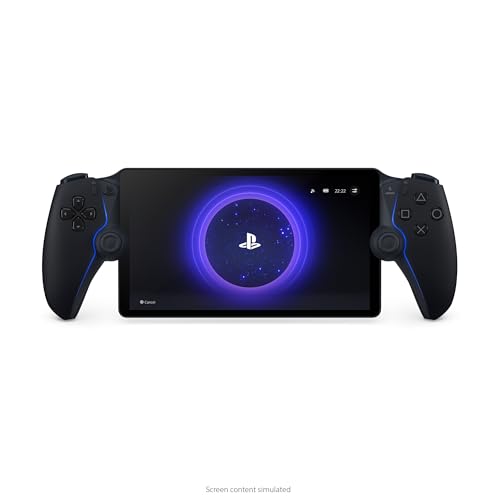
PlayStation Portal Remote Player
Sony’s dedicated handheld streams PS5 games over Wi-Fi. It features an 8-inch LCD and DualSense haptics. Owners praise its comfortable grip and crisp visuals, but it only works with a PS5 and needs a stable network.
Pros
- Authentic DualSense controller features
- Large, sharp display
- Easy setup with PS5
Cons
- Requires a PS5 and internet
- No Bluetooth audio

Backbone One PlayStation Edition
This mobile controller turns your iPhone or Android into a portable PlayStation. It connects via USB-C or Lightning and works with the PS Remote Play app. Owners like the low latency and pass-through charging, but it needs a compatible phone.
Pros
- No battery to charge
- Compact and travel friendly
- Works with cloud gaming too
Cons
- Requires a smartphone
- Phone size limits compatibility

Steam Deck OLED
While not a PlayStation product, the Steam Deck OLED can stream PS5 games using Chiaki or official Remote Play. Its 7.4-inch OLED screen and powerful hardware make it versatile. Owners note the larger footprint and shorter battery for demanding games.
Pros
- Vibrant OLED display
- Runs PC games and emulators
- Excellent ergonomics
Cons
- Heavy and bulky
- Remote Play setup is not official

ASUS ROG Ally
This Windows-based handheld runs PS Remote Play and Xbox Cloud Gaming. It has a 120Hz display and AMD Z1 Extreme processor. Owners report smooth performance but note the short battery life and need for tweaking.
Pros
- High refresh rate screen
- Full Windows compatibility
- Good performance
Cons
- Battery drains quickly
- Requires setup for Remote Play

Logitech G Cloud Gaming Handheld
Logitech’s handheld runs Android and is optimized for cloud gaming. It works with PS Remote Play from the Google Play Store. The 7-inch 1080p screen is bright, and battery life is excellent. Owners appreciate the light weight, but it lacks high-end processing power.
Pros
- Long battery life
- Lightweight design
- Comfortable for long sessions
Cons
- Modest performance for local games
- No official PlayStation app preloaded

Sony Xperia 1 V with DualSense Controller
The Xperia 1 V offers a 4K OLED display and powerful chip, making it a strong Remote Play device. When paired with a DualSense via Bluetooth, it becomes a portable PlayStation. Owners report excellent visuals, but the phone is expensive and not a dedicated console.
Pros
- Stunning 4K display
- Great performance
- Expandable storage
Cons
- High price
- Controller sold separately
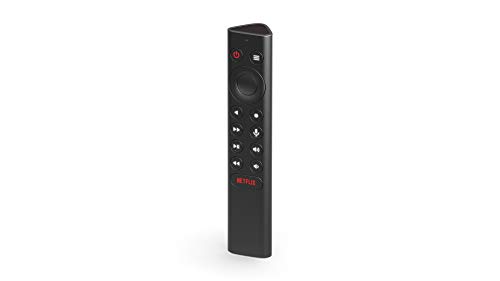
NVIDIA SHIELD TV Pro with Remote Play
This streaming box is not portable, but it offers a way to play PS5 games on another TV via Remote Play. It supports 4K HDR and has excellent upscaling. Owners value its versatility, but it is not meant for travel.
Pros
- Supports 4K streaming
- Works with multiple services
- Compact design
Cons
- Not truly portable
- Requires PS5 and network
What to look for
Side by side
| # | Model | Screen | Best for | Score | Price |
|---|---|---|---|---|---|
| 1 | PlayStation Portal Remote Player | 8 inch LCD, 1080p | PS5 owners who want seamless Remote Play | 9.4 | Check price |
| 2 | Backbone One PlayStation Edition | iPhone and Android | Smartphone gamers using PS Remote Play | 9.0 | Check price |
| 3 | Steam Deck OLED | 7.4 inch OLED, 1280×800 | Accessing PlayStation classics via remote play and emulation | 8.8 | Check price |
| 4 | ASUS ROG Ally | 7 inch, 1080p, 120Hz | Windows handheld with multiple game stores | 8.6 | Check price |
| 5 | Logitech G Cloud Gaming Handheld | 7 inch, 1080p, 60Hz | Cloud streaming and Remote Play with long battery | 8.4 | Check price |
| 6 | Sony Xperia 1 V with DualSense Controller | 6.5 inch 4K OLED | Mobile users who want a premium phone and controller combo | 8.2 | Check price |
| 7 | NVIDIA SHIELD TV Pro with Remote Play | 4K HDR, up to 60fps | Turning your TV into a portable-ish streaming hub | 8.0 | Check price |
Frequently asked questions
Can I play PlayStation games on a portable device without a PS5?
Yes, you can use cloud streaming services like PlayStation Plus Premium on compatible devices. However, the device must support the app, and a strong internet connection is required.
Is the PlayStation Portal worth it?
If you already own a PS5 and have reliable Wi-Fi, the Portal offers a seamless Remote Play experience with a big screen and DualSense features. It is not for travelers without internet access.
Can I use a Backbone One with an iPhone?
Yes, the Backbone One has versions for both iPhone (Lightning or USB-C) and Android. Check compatibility with your specific phone model.
How do I set up PS Remote Play on a Steam Deck?
You can use the third-party app Chiaki or install the official PS Remote Play via Windows compatibility. Guides are available online, but the process is not official.
What internet speed do I need for Remote Play?
Sony recommends at least 5 Mbps for a stable experience, but higher speeds reduce lag. For 1080p streaming, 15 Mbps or more is better.
Can I play PS4 games on these devices?
Remote Play supports PS4 and PS5 games. Cloud streaming may include PS4 titles depending on your subscription tier.
Do these devices support Bluetooth headphones?
The PlayStation Portal does not support Bluetooth audio, but it has a 3.5mm jack. Some Android handhelds and phones do support Bluetooth.
Which portable option has the longest battery life?
The Logitech G Cloud offers up to 12 hours of streaming, while the PlayStation Portal lasts around 7 hours. The Steam Deck and ROG Ally have shorter battery life under load.
The verdict
For most PS5 owners, we recommend the PlayStation Portal because it delivers a dedicated, high-quality Remote Play experience with minimal setup. If you want a multi-purpose device, the Steam Deck OLED offers more versatility despite its weight. Choose the Backbone One if you prefer using your smartphone.