Portable Presentation Remotes That Keep Audiences Engaged
The Logitech R500s tops our list for its reliable wireless range and presentation timer, though it lacks a free-form pointer. For budget-conscious presenters, the DOITOP wireless presenter offers solid performance at a low price.
Delivering a memorable presentation often hinges on smooth navigation and confident delivery. A portable presentation remote frees you from the podium, letting you move around and engage your audience directly.
Whether you are pitching to clients, teaching a class, or presenting at a conference, the right remote can make a significant difference. We have analyzed the top models to help you find the perfect companion for your next talk.
What we recommend
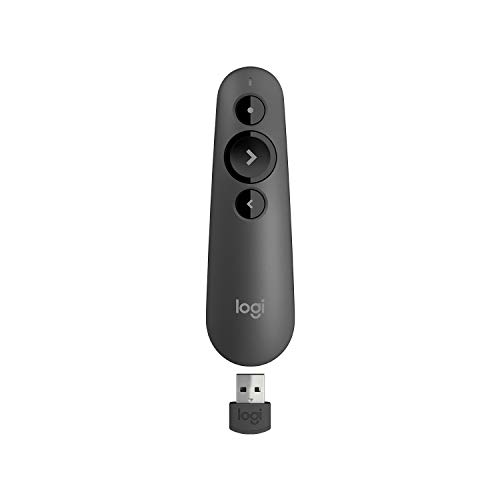
Logitech R500s
The Logitech R500s is a premium presentation remote with a 20-meter wireless range and a bright red laser. It features a presentation timer and vibration alerts, making it ideal for professional speakers who need to stay on schedule. Its plug-and-play USB receiver works seamlessly with Windows, macOS, and most presentation software.
Pros
- Long wireless range
- Vibration alerts for time management
- Works with multiple operating systems
Cons
- No slide volume control
- Requires USB receiver (not Bluetooth)

DOITOP Wireless Presenter
The DOITOP Wireless Presenter offers a 30-meter range and a simple plug-and-play design. It includes a red laser pointer and works with PowerPoint, Keynote, and Google Slides. Its compact size and low price make it a great choice for students and occasional presenters.
Pros
- Very affordable
- Long range for the price
- No software installation required
Cons
- Build quality feels less premium
- Laser is not as bright as class 2

Logitech Spotlight
The Logitech Spotlight is a premium presentation remote known for its unique highlighting and magnification features. It uses a precise cursor control and a 30-meter range, making it perfect for large venues. The remote has a rechargeable battery and works with a USB receiver or Bluetooth.
Pros
- Digital highlight and magnify functions
- Can connect via Bluetooth or USB
- Rechargeable battery lasts up to 3 months
Cons
- Expensive
- No physical laser pointer

Kensington Wireless Presenter with Laser Pointer
The Kensington Wireless Presenter features a 2.4GHz connection and a red laser pointer. It has a 50-foot range and works with Windows and macOS. The remote includes a slide volume control and a convenient storage slot for the USB receiver.
Pros
- Slide volume control on the remote
- USB receiver storage
- Ergonomic design
Cons
- Range is shorter than others
- No rechargeable battery
SMARTDOI Wireless Presenter
The SMARTDOI Wireless Presenter combines a presentation remote with an air mouse, allowing you to control the cursor by moving the remote in the air. It also has a red laser and a 100-foot range. This remote is ideal for those who want to navigate websites or applications during their presentation.
Pros
- Air mouse functionality
- Rechargeable battery
- Very long range
Cons
- Learning curve for air mouse
- Laser brightness may be lower

VANCO Presentation Remote
The VANCO Presentation Remote is a straightforward clicker with a 30-meter range and a red laser. It works with all major presentation software and requires no drivers. The remote is powered by a single AAA battery and includes a USB receiver that stores inside the device.
Pros
- Plug and play, no software needed
- Compact design
- Affordable price
Cons
- No advanced features like timer
- Battery not rechargeable
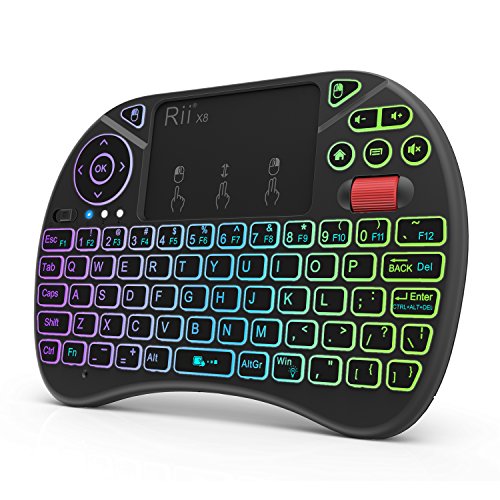
Rii i4 Mini Wireless Presenter
The Rii i4 Mini is a 2.4GHz wireless presenter that also functions as a media remote for videos and audio. It has a red laser, a range of 30 meters, and works with Windows and macOS. The remote is tiny and includes a USB receiver that can be stored in a slot.
Pros
- Media control buttons for video playback
- Very small and portable
- Low price
Cons
- Not compatible with mobile devices
- Limited range compared to some
What matters most
How they compare
| # | Model | Wireless Range | Best for | Score | Price |
|---|---|---|---|---|---|
| 1 | Logitech R500s | 20 m | Best overall for reliable performance | 9.4 | Check price |
| 2 | DOITOP Wireless Presenter | 30 m | Best budget pick | 8.8 | Check price |
| 3 | Logitech Spotlight | 30 m | Best for large presentations | 9.2 | Check price |
| 4 | Kensington Wireless Presenter with Laser Pointer | 15 m (50 ft) | Best for versatility | 8.6 | Check price |
| 5 | SMARTDOI Wireless Presenter | 30 m (100 ft) | Best for air mouse features | 8.4 | Check price |
| 6 | VANCO Presentation Remote | 30 m | Best for simplicity | 8.2 | Check price |
| 7 | Rii i4 Mini Wireless Presenter | 30 m | Best for media control | 8.0 | Check price |
Common questions
What is the difference between a presentation remote and a presenter mouse?
A presentation remote typically has buttons for navigating slides and a laser pointer. A presenter mouse may include an air mouse function that lets you control the cursor by moving the remote, which is useful for desktop navigation. Some remotes combine both features.
Can I use a presentation remote with a Mac?
Yes, most presentation remotes are compatible with macOS. Always check the product specifications to ensure it works with your version of macOS and your presentation software, such as Keynote or PowerPoint.
Do presentation remotes work with Google Slides?
Many presentation remotes work with Google Slides because they emulate keyboard keys like Page Up and Page Down. However, some advanced features like digital highlighting may not work unless the remote’s software supports it.
How far can a presentation remote work?
The wireless range varies by model. Most remotes have a range of 15 to 30 meters, which is sufficient for most conference rooms. Some higher-end models offer up to 30 meters or more.
Are rechargeable presentation remotes worth it?
Rechargeable remotes save money on batteries and are more environmentally friendly. They are convenient if you present often. However, you need to remember to charge them, and they may have a higher upfront cost.
What is a class 2 laser?
Class 2 lasers are low-power lasers that are safe for normal use. They emit visible light and are typically used in presentation pointers. They are not harmful to eyes under normal conditions, but you should still avoid direct eye exposure.
Can I use a presentation remote with a smart TV?
Some presentation remotes can connect to smart TVs via USB receiver if the TV supports USB input. However, compatibility is limited. For presentations on a TV, consider using a remote with Bluetooth or a dedicated streaming device.
Do presentation remotes require software installation?
Most basic remotes are plug-and-play and do not require software. Advanced remotes like the Logitech Spotlight may need software for features like highlighting but can still work without it for basic navigation.
What should I do if my presentation remote is not working?
First, check the battery and ensure the USB receiver is properly connected. Try plugging the receiver into a different USB port. If the remote uses Bluetooth, check the pairing. Also, verify that the remote is compatible with your operating system.
Can I use a presentation remote to control video playback?
Some remotes have media control buttons that can play, pause, or adjust volume. These are useful when presenting with video content. Not all remotes have this feature, so check the product description.
The bottom line
If you want a reliable, professional-grade remote with a timer and long range, choose the Logitech R500s. For budget presenters, the DOITOP offers great value. For those who need advanced highlighting, the Logitech Spotlight is worth the extra cost.


