Portable Retro Consoles Worth Your Money
The Anbernic RG35XX SP leads as the top pick for most players thanks to its clamshell design, solid build, and broad game support. It offers a great balance of portability, performance, and price, though its setup requires some tinkering for newcomers.
Retro gaming on the go has never been more appealing, with a wave of handheld consoles that let you revisit childhood favorites. These devices vary widely in price, power, and usability, so picking the right one can be overwhelming.
We compared seven of the most popular portable retro consoles currently on the market. Our focus was on game library, screen quality, controls, and how easy they are to set up, using specifications and owner feedback to guide our recommendations.
Our top picks

Anbernic RG35XX SP
The RG35XX SP is a clamshell handheld that pays homage to the Game Boy Advance SP. It runs on a powerful chip that handles up to PlayStation 1 and some Nintendo 64 games smoothly. The 3.5 inch IPS screen is bright and sharp, and the device feels sturdy in hand. Owners praise its pocket friendly size and long battery life, though the initial setup requires flashing a custom firmware for the best experience.
Pros
- Compact clamshell design protects screen
- Excellent build quality
- Great battery life
Cons
- Setup requires custom firmware
- Analog sticks not included

Miyoo Mini Plus
The Miyoo Mini Plus has become a community favorite for its low price and excellent performance. It features a 3.5 inch screen and runs on a chip that handles up to PlayStation 1 games. The device is incredibly light and fits easily in a pocket. Owners love the pre installed Onion OS, which is user friendly and constantly updated. The main drawbacks are the small size, which may be uncomfortable for large hands, and the lack of analog sticks, limiting some N64 and PSP titles.
Pros
- Very affordable
- Lightweight and pocketable
- Great community firmware support
Cons
- Small size may cause hand cramps
- No analog sticks

Retroid Pocket 4 Pro
The Retroid Pocket 4 Pro is a more powerful handheld that can emulate PSP, Dreamcast, and even some GameCube and Wii games. It has a 4.7 inch 750p touchscreen and dual analog sticks, making it comfortable for 3D games. The device runs on Android, giving access to a wide range of emulators and apps. Owners report that it handles most PSP titles flawlessly, but GameCube performance varies by game. The learning curve is steeper due to Android setup, but the performance is impressive for the price.
Pros
- Strong performance for PSP and N64
- Dual analog sticks and touchscreen
- Android OS offers flexibility
Cons
- Setup requires Android knowledge
- Battery drains faster on demanding games
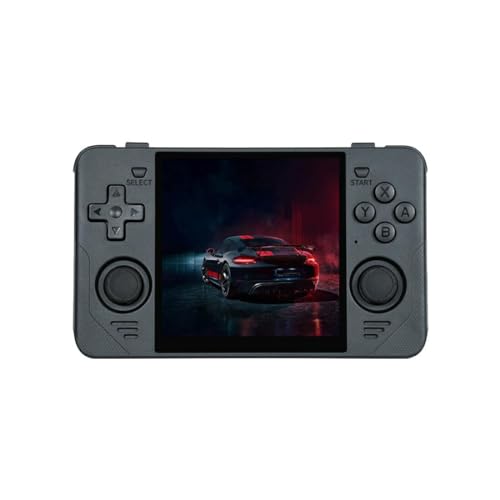
PowKiddy RGB30
The RGB30 features a unique 4 inch square display that is perfect for playing arcade, PCE, and vertical shooters. It runs on a Rockchip RK3566 chip, which handles up to PlayStation 1 and some N64. The device is lightweight and has a sturdy plastic build. Owners love the screen for its crispness and the ability to display retro games without black bars. However, the square screen is not ideal for widescreen games, and the firmware can be inconsistent requiring tweaks.
Pros
- Unique square screen perfect for arcade
- Good for vertical games
- Great price
Cons
- Not suited for widescreen games
- Firmware can be glitchy

TrimUI Smart Pro
The TrimUI Smart Pro is a slim and stylish handheld with a 4.96 inch 720p screen. It runs on a chip that handles up to Dreamcast and some N64. The device has a minimalist design with a metal front plate and comes with a protective case. Owners praise the screen quality and the comfortable controls, though the battery is smaller than some competitors. The operating system is intuitive, making it easy for beginners.
Pros
- Large and sharp display
- Sleek, pocket friendly design
- User friendly interface
Cons
- Battery life is shorter
- No touchscreen

Analogue Pocket
The Analogue Pocket is a premium handheld designed for playing original Game Boy, Game Boy Color, and Game Boy Advance cartridges. It features a stunning 3.5 inch 615 ppi LCD screen with perfect scaling and pixel accuracy. The device also supports link cable and has a dock for TV output (sold separately). Owners rave about the build quality and screen, but the price is high and it does not emulate other consoles out of the box. However, a jailbreak firmware allows ROM playback.
Pros
- Perfect screen for original cartridges
- Exceptional build quality
- FPGA accuracy with zero lag
Cons
- Very expensive
- Only plays Game Boy family cartridges

Steam Deck OLED
The Steam Deck OLED is a full fledged PC gaming handheld that also excels at emulation. With its powerful AMD APU, it can run emulators for GameCube, Wii, PS2, PS3, and even some Switch games. The 7.4 inch OLED screen is vibrant and the controls are comfortable. Owners appreciate the massive game library and the flexibility of SteamOS. The device is large and heavy, and the price is higher than dedicated retro consoles, but for those who want everything, it is a top choice.
Pros
- Can emulate almost everything
- Huge game library via Steam
- High quality OLED screen
Cons
- Large and heavy
- High price
How they compare
| # | Model | Display | Best for | Score | Price |
|---|---|---|---|---|---|
| 1 | Anbernic RG35XX SP | 3.5 inch IPS, 640×480 | Best overall for most retro gamers | 9.4 | Check price |
| 2 | Miyoo Mini Plus | 3.5 inch IPS, 640×480 | Best budget pick | 9.0 | Check price |
| 3 | Retroid Pocket 4 Pro | 4.7 inch IPS, 750p | Best for playing PSP and some GameCube | 9.1 | Check price |
| 4 | PowKiddy RGB30 | 4 inch IPS, 720×720 | Best for retro gaming with a square screen | 8.5 | Check price |
| 5 | TrimUI Smart Pro | 4.96 inch IPS, 720p | Best for a premium budget experience | 8.7 | Check price |
| 6 | Analogue Pocket | 3.5 inch LTPS LCD, 615 ppi | Best for playing real cartridges | 9.2 | Check price |
| 7 | Steam Deck OLED | 7.4 inch OLED, 1280×800 | Best for emulating up to PS3 and Switch | 9.0 | Check price |
What to look for
Common questions
Can these consoles play games from all retro systems?
No, each console has its own limits. Budget models typically handle up to 16 bit and some 32 bit. Mid range devices like the Retroid Pocket 4 Pro can emulate PSP and some GameCube. The Steam Deck OLED can emulate up to PS3 and some Switch games, but its performance varies by game.
Do I need to download ROMs to use these devices?
Yes, for emulation based devices you must provide your own ROM files. You can rip them from cartridges you own or download from sites, but only if you own the original game. The Analogue Pocket plays cartridges directly, so no ROMs are needed unless you install jailbreak firmware.
Are these devices legal?
The devices themselves are legal, but downloading copyrighted ROMs without owning the original game is illegal in many regions. Emulation is legal, but the source of ROMs is a gray area. Always use ROMs from games you own.
Which console has the best screen?
The Analogue Pocket boasts the highest resolution per inch, making it the sharpest for pixel perfect Game Boy games. The Steam Deck OLED offers a large, vibrant display, while the TrimUI Smart Pro has a great 720p screen for the price.
How long do the batteries last?
Battery life varies. The Anbernic RG35XX SP lasts around 6 to 8 hours. The Miyoo Mini Plus gets 5 to 7 hours. The Retroid Pocket 4 Pro lasts about 4 to 6 hours on demanding games. The Steam Deck OLED lasts 4 to 8 hours depending on usage.
Can I connect these to a TV?
Many support video output via mini HDMI or USB C, but you may need a separate dock or cable. The Analogue Pocket has an optional dock. The Steam Deck can connect to a TV via USB C to HDMI. Check each product’s specifications.
Are these suitable for kids?
Some are, depending on the child’s age. Simpler devices like the Miyoo Mini Plus are easy to use but small. The Anbernic RG35XX SP has a durable clamshell design. The Steam Deck is more complex and expensive. Always supervise younger children online.
Which is the best for playing PSP games?
The Retroid Pocket 4 Pro is excellent for PSP due to its higher resolution screen and powerful processor. The Steam Deck also handles PSP perfectly, but it is heavier and more expensive.
Do I need to be tech savvy to set these up?
Most devices come with pre installed emulators, but you need to add ROMs. Some require custom firmware for the best experience, which can be technical. The TrimUI Smart Pro and Miyoo Mini Plus have user friendly interfaces, while Android based devices like Retroid Pocket require more setup.
Which console has the most comfortable controls for long sessions?
The Steam Deck offers full sized controls and ergonomic grips, making it very comfortable, but it is heavy. The Retroid Pocket 4 Pro also has good ergonomics with dual analog sticks. Smaller devices like the Miyoo might cause fatigue for large hands.
The bottom line
For most people, the Anbernic RG35XX SP is the best portable retro console because it delivers a perfect balance of price, performance, and portability. If you want to play PSP and GameCube, the Retroid Pocket 4 Pro is a strong choice. For cartridge purists, the Analogue Pocket is unmatched but expensive. The Steam Deck OLED is the ultimate all in one, but its size and cost may be overkill for retro only. Choose the RG35XX SP first, and upgrade if you need more power.


