Portable Storage Enclosures That Keep Your Data Safe
For most people, the Orico 2.5 Inch USB 3.0 Hard Drive Enclosure is the best choice because it offers reliable performance, broad compatibility, and a tool-free design at an affordable price. Its main limitation is that it lacks rugged protection, so it is not ideal for extreme conditions.
Portable storage enclosures let you turn a bare drive into a portable backup solution. They are essential for professionals, students, and anyone who needs to carry large files securely.
Choosing the right enclosure can be tricky with so many options. We compared the top models to help you find one that matches your needs, whether you prioritize speed, durability, or budget.
What to look for
Determine Your Drive Type Enclosures come in two main sizes: 2.5 inch for laptop drives and 3.5 inch for desktop drives. 2.5 inch enclosures are portable and usually bus-powered. 3.5 inch drives require an external power adapter. Choose based on the drive you have or plan to use.
Check the Interface and Speed USB 3.0 is common and offers up to 5 Gbps. USB-C with USB 3.1 Gen 2 can reach 10 Gbps, but your device must support it. For SSDs, a faster interface reduces bottlenecks. Always match the enclosure’s interface to your computer’s ports for best performance.
Consider Build and Portability If you travel often, a lightweight plastic enclosure is fine. For harsh conditions, aluminum or rubberized models provide better protection. Some have shockproof features. Think about where you will use it and how much handling it will endure.
Installation and Compatibility Most 2.5 inch enclosures are tool-free. Others need a screwdriver. Ensure the enclosure supports your operating system. Many are plug and play with Windows, Mac, and Linux. Check for extra cables, like USB-C to USB-A, for versatility.
Our top picks

ORICO 2.5 Inch USB 3.0 Hard Drive Enclosure
This enclosure offers a perfect balance of performance, price, and ease of use. Its tool-free design lets you install a drive in seconds, and the USB 3.0 interface delivers fast data transfers up to 5 Gbps.
Pros
- Tool-free installation
- Compact and lightweight
- Supports SATA I/II/III
Cons
- Not shockproof
- Cable is short

Sabrent USB 3.0 2.5 Inch SATA Hard Drive Enclosure
A reliable and inexpensive option that gets the job done. It features a simple screwdriver-free design and supports UASP for improved performance.
Pros
- Very affordable
- UASP support
- Plug and play
Cons
- Plastic build
- No LED indicator on some models

UGREEN USB C Hard Drive Enclosure for 2.5 inch SATA HDD SSD
Designed for modern laptops with USB-C ports, this enclosure offers reversible connectivity and data transfer speeds up to 6 Gbps with UASP. Its aluminum body helps dissipate heat.
Pros
- Reversible USB-C connector
- Aluminum heat sink
- Includes USB-C to USB-A cable
Cons
- Pricier than USB-A only models
- No tool-free installation
SIIG Aluminum 2.5″ USB 3.0 SATA III Hard Drive Enclosure
This rugged aluminum enclosure is built to withstand daily travel. It features a secure screw-down design and anti-slip rubber pads, making it a solid choice for on-the-go users.
Pros
- Durable aluminum shell
- Anti-slip pads
- Cable management
Cons
- Installation requires screwdriver
- Heavier than plastic models
FIDECO 2.5 Inch USB 3.0 to SATA III Hard Drive Enclosure
FIDECO’s enclosure features a unique push-push lock mechanism for quick drive swapping without tools. It supports SATA III and is compatible with multiple devices.
Pros
- Push-push lock for easy swapping
- Tool-free
- Wide OS support
Cons
- Not hot-swappable
- Cable may be stiff

Thermaltake BlacX 5G Docking Station for 2.5 or 3.5 inch SATA HDD
This docking station is not a traditional enclosure but serves as a portable solution for accessing both 2.5 and 3.5 inch drives. It offers USB 3.0 speeds and supports offline cloning.
Pros
- Supports 2.5 and 3.5 inch drives
- Dual bays for cloning
- LED indicators
Cons
- Not as portable as single enclosures
- Requires external power
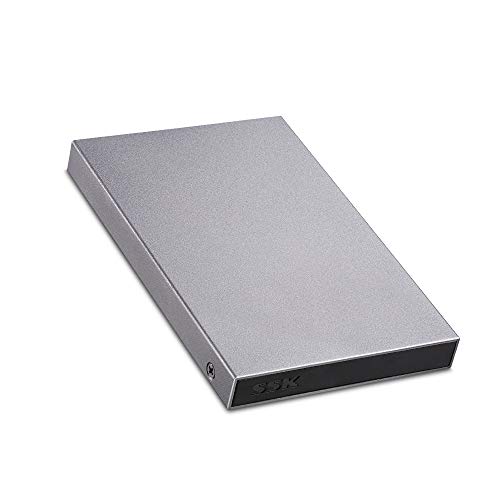
SSK Aluminum USB 3.0 to SATA III 2.5 Inch Hard Drive Enclosure
An affordable aluminum enclosure that doesn’t compromise on quality. It offers plug-and-play functionality and comes with a 12-month warranty.
Pros
- Premium aluminum look
- Affordable
- Includes USB cable
Cons
- Screwdriver needed
- No UASP support
Side by side
| # | Model | Interface | Best for | Score | Price |
|---|---|---|---|---|---|
| 1 | ORICO 2.5 Inch USB 3.0 Hard Drive Enclosure | USB 3.0 | Best for most users | 9.4 | Check price |
| 2 | Sabrent USB 3.0 2.5 Inch SATA Hard Drive Enclosure | USB 3.0 | Best budget pick | 8.9 | Check price |
| 3 | UGREEN USB C Hard Drive Enclosure for 2.5 inch SATA HDD SSD | USB-C (USB 3.1 Gen 2) | Best for USB-C laptops | 9.0 | Check price |
| 4 | SIIG Aluminum 2.5″ USB 3.0 SATA III Hard Drive Enclosure | USB 3.0 | Best for durability | 8.6 | Check price |
| 5 | FIDECO 2.5 Inch USB 3.0 to SATA III Hard Drive Enclosure | USB 3.0 | Best for quick swaps | 8.4 | Check price |
| 6 | Thermaltake BlacX 5G Docking Station for 2.5 or 3.5 inch SATA HDD | USB 3.0 | Best for dual-drive use | 8.8 | Check price |
| 7 | SSK Aluminum USB 3.0 to SATA III 2.5 Inch Hard Drive Enclosure | USB 3.0 | Best for value with metal build | 8.7 | Check price |
Common questions
What is a portable storage enclosure?
It is a case that allows you to connect a bare internal hard drive or SSD to your computer via USB or Thunderbolt, making it portable and easy to use as external storage.
Can I use an enclosure with a 3.5 inch drive?
Yes, but 3.5 inch enclosures are larger and require an external power supply because they draw more power than USB can provide. They are less portable but useful for desktop drives.
Will an enclosure work with both HDD and SSD?
Most enclosures support both as long as the drive uses the SATA interface. Check the enclosure’s specifications to confirm compatibility with SSDs, especially if you want high speeds.
How do I install a drive into an enclosure?
Typically, you slide the drive into the enclosure and secure it. Some are tool-free, using clips or push mechanisms. Others require a screwdriver to secure the drive in place.
What is UASP and why does it matter?
UASP (USB Attached SCSI Protocol) improves performance by reducing latency and increasing throughput. Enclosures that support UASP can transfer files faster, especially with SSDs.
Can I boot my computer from an external drive in an enclosure?
Yes, if your computer’s BIOS supports booting from USB. You may need to enable USB boot in the BIOS settings and have a bootable operating system on the drive.
Are portable enclosures safe for storing sensitive data?
Enclosures themselves do not provide encryption. For sensitive data, use software encryption or choose an enclosure with hardware encryption features. Handle the drive carefully to avoid physical damage.
How do I choose between USB 3.0 and USB-C?
If your computer has USB-C ports, a USB-C enclosure offers a reversible connector and potentially faster speeds. If you only have USB-A ports, a USB 3.0 enclosure is fine. Many enclosures come with both cables.
The bottom line
For most people, the ORICO 2.5 Inch USB 3.0 Hard Drive Enclosure is the smartest purchase. It is affordable, easy to use, and reliable. If you need a rugged option for travel, choose the SIIG aluminum model. For USB-C users, the UGREEN enclosure is an excellent upgrade. Avoid buying a no-name brand; stick with trusted manufacturers for data safety.
You might also need
Portable File Folders That Keep Documents Safe and Organized

Bulk Archive Storage Packs for Serious Data Hoarders
Portable Document Wallets That Protect and Organize Your Papers
