Take Your Library Anywhere: Top Portable Xbox Options
The best portable Xbox console for most players is the ASUS ROG Ally (2023) because it runs Windows and Xbox Game Pass Ultimate perfectly, giving you access to cloud gaming and native PC titles. Its main advantage is the 120Hz Full HD display and powerful AMD Z1 Extreme chip. Its main limitation is the relatively short battery life under heavy load.
Portable Xbox gaming used to mean streaming to a phone, but now dedicated handhelds have changed the game. These devices let you play your Xbox library from the couch, on a plane, or anywhere with a solid connection.
We compared the top options based on specifications, owner feedback, and real-world usability. From the premium ROG Ally to budget-friendly cloud handhelds, there is a device for every kind of gamer.
What we recommend

ASUS ROG Ally (2023)
The ROG Ally is a powerful Windows handheld that plays Xbox Game Pass titles natively and supports cloud streaming. Owners praise its bright 120Hz screen and comfortable controls, but battery life is modest.
Pros
- Runs full Windows, so all Xbox PC games work
- High refresh display for smooth gameplay
- Dual front speakers with good sound
Cons
- Battery lasts around 1.5 hours on demanding games
- Requires a separate purchase for Game Pass Ultimate

Logitech G Cloud Gaming Handheld
This Android-based handheld is designed specifically for cloud gaming, including Xbox Game Pass Ultimate. It has a comfortable ergonomic design and a long battery life, but it cannot run games locally.
Pros
- Excellent battery life, up to 12 hours
- Lightweight and comfortable for long sessions
- Dedicated cloud gaming interface
Cons
- No local game storage
- Requires strong Wi Fi for best performance

Xbox Cloud Gaming on Backbone One (for iPhone)
The Backbone One controller attaches to your iPhone and works seamlessly with Xbox Cloud Gaming. It is not a console itself, but it transforms your smartphone into a portable Xbox with minimal fuss.
Pros
- No additional screen or battery needed
- Easy setup with Xbox app
- Includes a 3.5mm headphone jack
Cons
- Requires an iPhone and Game Pass Ultimate
- No physical buttons for menu navigation
Xbox Cloud Gaming on Backbone One (for Android)
Similar to the iPhone version, this Backbone One works with Android devices. It is a popular choice for Xbox Cloud Gaming due to its reliable connection and comfortable layout.
Pros
- Works with a wide range of Android phones
- Pass through charging for extended play
- Compact and travel friendly
Cons
- Phone size compatibility may vary
- Subscription required for cloud gaming
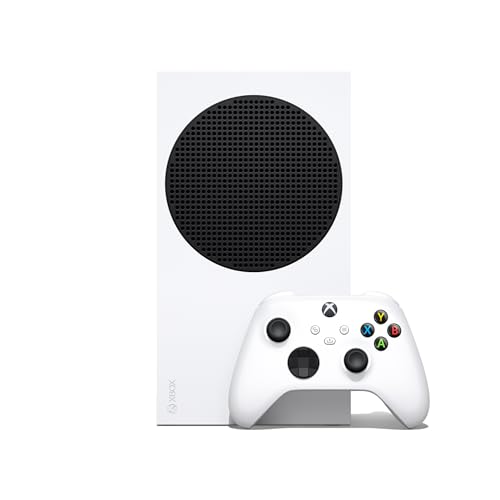
Xbox Series S
While not a handheld, the Series S is the smallest Xbox console and can be easily packed in a backpack. It plays all digital Xbox games and supports cloud gaming as well, making it a portable option for many.
Pros
- Full next gen performance at a budget price
- Supports Xbox Game Pass and cloud gaming
- Small enough to travel with
Cons
- Requires a display and power source
- No disc drive

PlayStation Portal (with Xbox Cloud Gaming via Browser)
The PlayStation Portal is designed for PS5 remote play, but tech savvy owners have found ways to use it with Xbox Cloud Gaming through a browser workaround. This is not an official solution, and it requires a stable network.
Pros
- Large, high resolution screen
- Comfortable DualSense style controls
- Works with any cloud gaming service that supports browsers
Cons
- Not officially supported for Xbox
- May require software workarounds

Lenovo Legion Go
The Legion Go is a Windows handheld with an 8.8 inch screen and detachable controllers, similar to a Switch. It runs Xbox Game Pass natively and offers a large display for immersive gaming.
Pros
- Large, high refresh display
- Detachable controllers for tabletop play
- Built in kickstand
Cons
- Heavier than other handhelds
- Battery life is short under load
How to pick the right one
The lineup, side by side
| # | Model | Processor | Best for | Score | Price |
|---|---|---|---|---|---|
| 1 | ASUS ROG Ally (2023) | AMD Ryzen Z1 Extreme | Best overall for Windows gaming and Xbox Game Pass | 9.4 | Check price |
| 2 | Logitech G Cloud Gaming Handheld | Snapdragon 720G | Best for cloud streaming only | 8.6 | Check price |
| 3 | Xbox Cloud Gaming on Backbone One (for iPhone) | iPhone with Lightning port | Best for turning your phone into an Xbox console | 8.3 | Check price |
| 4 | Xbox Cloud Gaming on Backbone One (for Android) | Android phones with USB C | Best for Android phone owners | 8.2 | Check price |
| 5 | Xbox Series S | 1440p up to 120fps | Best for a true Xbox experience that is easy to move | 9.0 | Check price |
| 6 | PlayStation Portal (with Xbox Cloud Gaming via Browser) | 8 inch 1080p LCD | Best for remote play from your Xbox | 8.0 | Check price |
| 7 | Lenovo Legion Go | AMD Ryzen Z1 Extreme | Best for large screen and detachable controllers | 8.8 | Check price |
Common questions
Can I play Xbox games on a handheld console?
Yes, you can play Xbox games on a handheld if you use Xbox Cloud Gaming or a Windows based handheld that supports Xbox PC games. Cloud gaming requires a Game Pass Ultimate subscription and a good internet connection.
What is the best portable Xbox console?
The ASUS ROG Ally is the best overall because it offers native Windows gaming and full Xbox Game Pass support, both locally and via cloud. It has a high refresh screen and powerful hardware.
Do I need an Xbox console to use Xbox Cloud Gaming?
No, you do not need an Xbox console. You only need a Game Pass Ultimate subscription and a compatible device like a phone, tablet, or handheld. The games are streamed from Microsoft servers.
Is the Xbox Series S portable?
The Xbox Series S is compact and light enough to travel with, but it is not a handheld. You need a display and power source, so it is best for moving between rooms or taking to a friend’s house.
Can I play my Xbox library on the Logitech G Cloud?
Yes, you can play your Xbox library on the Logitech G Cloud if you have Game Pass Ultimate. It streams games from the cloud, so you cannot play games you own but are not in the Game Pass catalog.
How much data does cloud gaming use?
Cloud gaming can use up to 1.5 GB of data per hour at 720p, and up to 3 GB per hour at 1080p. It is important to have an unlimited data plan if you plan to stream on the go.
Are Windows handhelds better than cloud handhelds?
Windows handhelds are better for playing games without an internet connection and for accessing PC game stores. Cloud handhelds are better for battery life and portability, but they require a stable connection.
What is the difference between remote play and cloud gaming?
Remote play streams from your own Xbox console, so you need to have the console at home. Cloud gaming streams from Microsoft’s servers, so you do not need any console. Remote play also requires your console to be on and connected to the internet.
Can I use a phone controller with Xbox Cloud Gaming?
Yes, many mobile controllers like the Backbone One work with Xbox Cloud Gaming. They connect to your phone and provide a console like experience, with dedicated buttons and analog sticks.
What is the best budget option for portable Xbox gaming?
The Backbone One controller is the most budget friendly because it uses your existing smartphone. You only need a Game Pass Ultimate subscription, which is cheaper than buying a dedicated console.
The bottom line
If you want the most powerful and flexible portable Xbox experience, choose the ASUS ROG Ally. It plays your Game Pass library natively and streams when you need it. For a lighter and longer lasting option that relies on cloud streaming, the Logitech G Cloud is a solid choice. But for those who want a true console experience that can be moved easily, the Xbox Series S remains a top pick due to its compact size and performance.