Premium 2 in 1 Laptops That Redefine Versatility
The HP Spectre x360 14 stands out as the top premium 2 in 1 for most people, blending a gorgeous OLED display with solid performance and a sleek design. Its main limitation is the relatively short battery life compared to some rivals. For those who prioritize battery endurance, the Lenovo Yoga 9i offers a longer runtime, though it is slightly heavier.
Premium 2 in 1 laptops combine the power of a traditional laptop with the flexibility of a tablet. They feature high-resolution touchscreens, sturdy hinges, and often include a stylus for note-taking or drawing. The market is crowded, but a few models stand out for their exceptional craftsmanship and performance.
This roundup focuses on the best premium options available today. We evaluated each device based on specifications, user feedback, and value. Whether you need a laptop for creative work, business, or everyday use, our list will help you choose the right one.
How to pick the right one
What to Look for in a Premium 2 in 1 When choosing a premium 2 in 1, consider the display quality. OLED panels offer better contrast and color accuracy than IPS. Also, look at the processor, RAM, and storage to ensure it meets your performance needs. Build quality is crucial for a premium feel, with aluminum or magnesium chassis being common. Finally, battery life is important for portability.
Performance Considerations Most premium 2 in 1s use Intel Core i5 or i7 processors with Intel Iris Xe graphics. This is sufficient for everyday tasks, office work, and light photo editing. For more demanding tasks like video editing, look for models with discrete graphics, but note that they are rare in this category. Also, ensure you get at least 16GB of RAM for smooth multitasking.
Display and Touchscreen A high-resolution touchscreen is a defining feature of 2 in 1 laptops. Many premium models offer OLED or AMOLED panels with 2.8K or 4K resolutions. These provide excellent color reproduction and viewing angles, which is beneficial for creative work. Also, check the aspect ratio: 16:10 or 3:2 offers more vertical space for productivity.
Battery Life and Portability Battery life varies widely among premium 2 in 1s. Some models, like the Lenovo Yoga 9i, can last over 12 hours, while others, like the HP Spectre, may only last around 8 hours. If you travel frequently, prioritize battery life and weight. Laptops under 1.2 kg are easier to carry, but they may have smaller screens.
The top picks, ranked
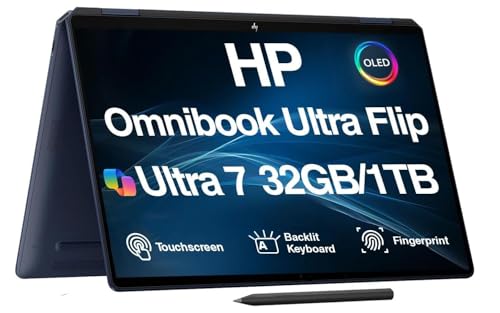
HP Spectre x360 14
The HP Spectre x360 14 is a stunning convertible with a 3K2K OLED display that delivers vibrant colors and deep blacks. Its gem-cut design is both elegant and durable, and the performance is snappy for everyday tasks and light creative work. The battery life is decent but not class-leading.
Pros
- Stunning OLED display with high resolution
- Premium, durable build with unique design
- Includes active pen and USB-C charging
Cons
- Battery life shorter than some competitors
- Limited port selection (only USB-C)

Lenovo Yoga 9i 14
The Lenovo Yoga 9i 14 impresses with a long-lasting battery that easily gets through a full day of work. It features a beautiful 4K OLED display with a 16:10 aspect ratio, and the rotating soundbar provides excellent audio. The design is sleek, though it is a bit heavier than some rivals.
Pros
- Excellent battery life (up to 12 hours)
- Vivid 4K OLED display with touch
- Superb audio from rotating soundbar
Cons
- Heavier and thicker than some competitors
- No HDMI port

Microsoft Surface Pro 9
The Surface Pro 9 is a premium 2 in 1 that excels as a tablet. Its 13 inch PixelSense display is sharp and responsive, and the detachable keyboard makes it easy to switch between laptop and tablet modes. It is powered by Intel’s 12th gen processors and offers reliable performance, but the keyboard and stylus are sold separately.
Pros
- Excellent tablet experience with detachable keyboard
- High refresh rate display for smooth scrolling
- Lightweight and portable
Cons
- Keyboard and pen not included
- Battery life is average

Dell XPS 13 2-in-1 9320
The Dell XPS 13 2-in-1 is one of the most portable premium convertibles, with a compact design and a stunning 3K display. Its build quality is top-notch, and the performance is solid for everyday use. However, it lacks the raw power of full-size laptops and the battery life is moderate.
Pros
- Ultra-thin and light design
- Beautiful OLED display with slim bezels
- Premium aluminum chassis
Cons
- Limited performance for heavy tasks
- Battery life is not outstanding

ASUS Zenbook S 13 OLED
The ASUS Zenbook S 13 OLED is incredibly light at just 1 kg, making it ideal for travelers. Despite its slim profile, it packs a powerful Intel i7 processor and a gorgeous 2.8K OLED display. The battery life is good, but the cooling system can get loud under load.
Pros
- Remarkably lightweight and portable
- Vivid OLED display with accurate colors
- Solid performance for everyday tasks
Cons
- Fan noise can be noticeable under load
- Limited port selection (mostly USB-C)

Lenovo ThinkPad X1 Yoga Gen 8
The ThinkPad X1 Yoga Gen 8 is a business-focused convertible that offers exceptional durability and security features. It has a comfortable keyboard, a bright 2.8K OLED display, and passes MIL-SPEC testing for robustness. The battery life is good, but it is pricier than other options.
Pros
- Durable build with MIL-SPEC testing
- Excellent keyboard for typing
- Includes security features like fingerprint reader
Cons
- Higher price tag
- Average audio quality

Samsung Galaxy Book3 Pro 360
The Samsung Galaxy Book3 Pro 360 features a stunning 16 inch AMOLED display and integrates seamlessly with Samsung phones and tablets. Its performance is reliable for productivity tasks, and the battery life is decent. However, it is large and heavy, which might reduce portability.
Pros
- Excellent AMOLED display with vivid colors
- Seamless integration with Samsung devices
- Strong productivity performance
Cons
- Large and heavy for a 2 in 1
- S Pen not included in the box
How they compare
| # | Model | Display | Best for | Score | Price |
|---|---|---|---|---|---|
| 1 | HP Spectre x360 14 | 13.5 inch 3K2K OLED touchscreen | Best overall for most users | 9.4 | Check price |
| 2 | Lenovo Yoga 9i 14 | 14 inch 4K OLED touchscreen | Best for battery life and multimedia | 9.3 | Check price |
| 3 | Microsoft Surface Pro 9 | 13 inch PixelSense 120Hz touchscreen | Best for tablet-first versatility | 9.1 | Check price |
| 4 | Dell XPS 13 2-in-1 9320 | 13.4 inch 3K OLED touchscreen | Best for portability and design | 9.0 | Check price |
| 5 | ASUS Zenbook S 13 OLED | 13.3 inch 2.8K OLED touchscreen | Best for portability and value | 8.8 | Check price |
| 6 | Lenovo ThinkPad X1 Yoga Gen 8 | 14 inch 2.8K OLED touchscreen | Best for business and durability | 8.7 | Check price |
| 7 | Samsung Galaxy Book3 Pro 360 | 16 inch AMOLED touchscreen | Best for Samsung ecosystem users | 8.5 | Check price |
Common questions
What is a 2 in 1 laptop?
A 2 in 1 laptop, also known as a convertible, has a hinge that allows the screen to rotate 360 degrees or detach, letting you use it as a laptop or a tablet. This versatility makes them popular for users who want both productivity and entertainment in one device.
Are premium 2 in 1 laptops good for gaming?
Most premium 2 in 1s use integrated graphics, which are not designed for heavy gaming. They can handle casual games and older titles, but for modern gaming, a dedicated gaming laptop or a desktop is better. Some high-end models may have discrete graphics, but they are rare and expensive.
What is the difference between OLED and IPS displays?
OLED displays offer deeper blacks, higher contrast, and more vibrant colors because each pixel emits its own light. IPS displays use a backlight and have better viewing angles but lower contrast. For media consumption and creative work, OLED is generally preferred, though it can be more expensive.
How long do 2 in 1 laptop batteries last?
Battery life varies by model and usage. On average, premium 2 in 1s last between 8 and 12 hours on a single charge. Factors like screen brightness, processor load, and display type affect battery endurance. OLED displays can consume more power, but newer panels are more efficient.
Can I use a stylus with any 2 in 1 laptop?
Most premium 2 in 1s support active stylus input, but the stylus may not be included. Some brands like HP and Lenovo include a pen, while others, like Microsoft and Samsung, sell it separately. Check the product specifications to see if a stylus is included or supported.
Are 2 in 1 laptops good for note-taking?
Yes, many users find 2 in 1s excellent for note-taking, especially with a stylus. The ability to fold the screen flat or use it as a tablet makes it easy to write directly on the display. Software like OneNote or Evernote works well with touch input.
What is the best 2 in 1 laptop for business use?
For business use, durability, security, and keyboard comfort are key. The Lenovo ThinkPad X1 Yoga is a top choice because it offers MIL-SPEC durability, a comfortable keyboard, and enterprise-level security features. Other options like the HP Spectre x360 are also suitable if you prioritize style and display.
How much RAM do I need in a 2 in 1 laptop?
For general use, 8GB of RAM is sufficient, but for multitasking and more demanding applications, 16GB is recommended. Since RAM is often soldered in these laptops, you cannot upgrade later, so it is wise to get at least 16GB if you plan to keep the laptop for several years.
Can 2 in 1 laptops be used as a regular laptop?
Absolutely. In laptop mode, they function just like any traditional laptop. The only difference is the touchscreen and the ability to fold the screen back or detach it. You can use them with the keyboard and trackpad as you would with any other laptop.
Are 2 in 1 laptops worth the extra cost?
If you value the flexibility of using your device as both a laptop and a tablet, a 2 in 1 is worth the investment. However, they tend to be more expensive than traditional laptops with similar specs. Consider your usage patterns; if you rarely use touch, a standard laptop might be more cost-effective.
The verdict
After careful comparison, the HP Spectre x360 14 is the best premium 2 in 1 laptop for most people due to its outstanding OLED display, elegant design, and solid performance. If battery life is your top priority, choose the Lenovo Yoga 9i. For a tablet-first experience, the Microsoft Surface Pro 9 is excellent. Buy the HP Spectre x360 14 for a balanced mix of style, performance, and portability.


