Premium Chromebooks That Feel Like High End Laptops
The Google Pixelbook Go stands out as the top pick for most people because it combines an ultraportable design with excellent battery life and a comfortable keyboard. Its main limitation is the lack of a convertible hinge, so you cannot use it as a tablet. For those who want a versatile 2-in-1, the ASUS Chromebook Flip CX5 is a great alternative with a 360 degree hinge and a vivid display.
Premium Chromebooks have evolved far beyond basic laptops. They now feature aluminum chassis, high resolution touchscreens, and powerful processors that handle demanding tasks with ease. Whether you are a professional, student, or creative, a high end Chromebook can serve as your primary device.
In this roundup, we compare seven of the best premium Chromebooks currently on the market. We analyzed specifications, user reviews, and brand reputation to help you choose the right one for your needs. Our focus is on real products you can buy today.
How to pick the right one
Our top picks

Google Pixelbook Go
The Google Pixelbook Go is a clamshell Chromebook with a sleek magnesium alloy body. It weighs just 2.3 pounds and offers up to 12 hours of battery life. The 13.3 inch Full HD touchscreen is vibrant, and the ‘Hush’ keyboard is quiet and comfortable. Powered by an Intel Core m3 or i5 processor, it handles daily tasks smoothly. Owners praise its lightweight design and long battery life, though it lacks a 2-in-1 flexibility.
Pros
- Ultra portable and light
- Excellent keyboard and trackpad
- Great battery life
Cons
- No convertible hinge or stylus support
- Limited to 2 USB-C ports

ASUS Chromebook Flip CX5 (CX5500)
The ASUS Chromebook Flip CX5 features a 15.6 inch 4K UHD NanoEdge touchscreen with a 360 degree hinge. It is powered by an Intel Core i5 processor and includes 8 GB RAM and 128 GB storage. The aluminum body feels premium, and the battery lasts about 10 hours. Users appreciate the bright display and fast performance, but the fan can be audible under load.
Pros
- Stunning 4K display
- Versatile 2-in-1 design
- Strong performance
Cons
- Heavier than some rivals
- Fan noise noticeable

Acer Chromebook Spin 713 (CP713-3W)
The Acer Chromebook Spin 713 is a 13.5 inch 2-in-1 with a 2256×1504 resolution display and a 3:2 aspect ratio. It meets MIL-STD 810H durability standards and has a spill resistant keyboard. Powered by an Intel Core i5 processor with 8 GB RAM and 256 GB NVMe SSD, it delivers fast performance. The battery life reaches 10 hours, and it supports Wi-Fi 6. Owners like the sharp display and robust build, but the speakers are mediocre.
Pros
- Rugged design
- Sharp 3:2 display
- Fast SSD storage
Cons
- Average speakers
- Charger is bulky
Lenovo Chromebook Duet 5
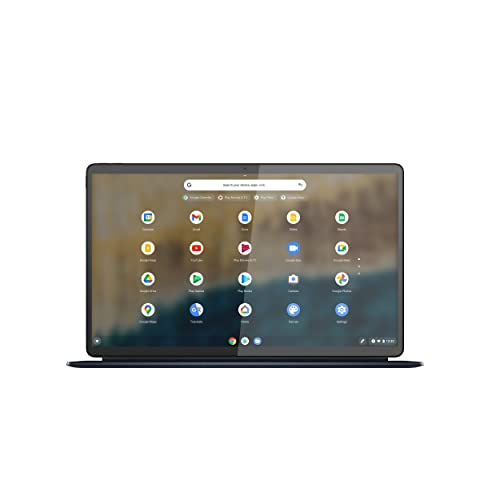
The Lenovo Chromebook Duet 5 is a detachable Chromebook with a 13.3 inch OLED display (1920×1080). It comes with a kickstand and detachable keyboard. Powered by a Qualcomm Snapdragon 7c Gen 2 processor with 8 GB RAM and 128 GB storage, it offers all day battery life up to 15 hours. Its OLED screen provides deep blacks and vibrant colors, making it ideal for streaming. However, the keyboard is compact and the performance is modest for heavy multitasking.
Pros
- OLED display is superb
- Great battery life
- Lightweight and portable
Cons
- Keyboard feels cramped
- Processor is not for heavy tasks

Samsung Galaxy Chromebook 2
The Samsung Galaxy Chromebook 2 is a 13.3 inch 2-in-1 with a QLED display (1920×1080) and a 360 degree hinge. It is available in Fiesta Red or Mercury Gray. Powered by an Intel Core i3 processor with 8 GB RAM and 128 GB storage, it offers smooth performance for everyday tasks. The battery life is around 13 hours, and the device weighs only 2.6 pounds. Users love the vivid display and attractive design, but the processor is less powerful than some competitors.
Pros
- Beautiful QLED screen
- Light and stylish
- Good battery life
Cons
- Core i3 may lag on heavy tasks
- Only 2 USB-C ports
HP Elite Dragonfly Chromebook
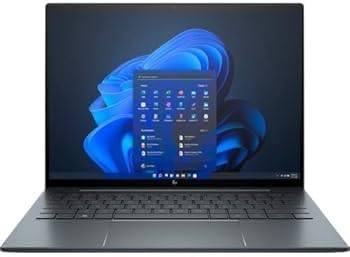
The HP Elite Dragonfly Chromebook is a 13.5 inch convertible with a 3:2 aspect ratio touchscreen (1920×1280 or 4K option). It is powered by an Intel Core i5 or i7 (11th Gen) with up to 16 GB RAM and 256 GB SSD. It includes enterprise grade security features like Titan C security chip and a fingerprint reader. The battery lasts up to 11.5 hours. It is extremely lightweight at 2.2 pounds. However, it is pricey and the webcam is only 720p.
Pros
- Premium lightweight design
- Top notch security features
- Excellent keyboard and trackpad
Cons
- High price
- 720p webcam is subpar

Framework Laptop Chromebook Edition
The Framework Laptop Chromebook Edition is a modular laptop with a 13.5 inch display (2256×1504) and a 3:2 aspect ratio. It features user replaceable parts including memory, storage, and expansion cards. Powered by an Intel Core i5 (12th Gen) with 8 GB RAM and 256 GB SSD, it offers solid performance. The battery life is about 10 hours. Its unique design emphasizes sustainability and repairability. However, the design is not as sleek as others, and the keyboard is average.
Pros
- Easy to repair and upgrade
- High resolution display
- Eco friendly approach
Cons
- Heavier than competitors
- Keyboard lacks travel
How they compare
| # | Model | Display | Best for | Score | Price |
|---|---|---|---|---|---|
| 1 | Google Pixelbook Go | 13.3 inch Full HD Touchscreen (1920×1080) | Everyday productivity and portability | 9.4 | Check price |
| 2 | ASUS Chromebook Flip CX5 (CX5500) | 15.6 inch 4K UHD Touchscreen (3840×2160) | 2-in-1 versatility with a vivid display | 9.1 | Check price |
| 3 | Acer Chromebook Spin 713 (CP713-3W) | 13.5 inch 2K Touchscreen (2256×1504) | Business users who need a durable 2-in-1 | 9.0 | Check price |
| 4 | Lenovo Chromebook Duet 5 | 13.3 inch OLED Touchscreen (1920×1080) | Portable entertainment and media consumption | 8.7 | Check price |
| 5 | Samsung Galaxy Chromebook 2 | 13.3 inch QLED Touchscreen (1920×1080) | Style and portability with a QLED display | 8.5 | Check price |
| 6 | HP Elite Dragonfly Chromebook | 13.5 inch Touchscreen (1920×1280) or 4K | Enterprise users who want top security and performance | 8.9 | Check price |
| 7 | Framework Laptop Chromebook Edition | 13.5 inch Touchscreen (2256×1504) | Repairability and upgradeability | 8.6 | Check price |
Questions worth asking
Can premium Chromebooks run Android apps?
Yes, most premium Chromebooks support Android apps from the Google Play Store. This expands their functionality, allowing you to use a wide range of mobile apps on a larger screen.
Are premium Chromebooks good for programming?
Many developers use Chromebooks for programming by enabling Linux (Crostini). With an Intel Core i5 or i7 processor and 8 GB or more RAM, you can run code editors, terminals, and even local servers. However, resource intensive IDEs may run better on traditional laptops.
Do premium Chromebooks have good build quality?
Yes, premium Chromebooks are constructed with high quality materials like aluminum, magnesium alloy, or sturdy plastic. Many also pass MIL-STD durability tests, ensuring they can withstand drops and spills.
How long do premium Chromebooks receive updates?
Google guarantees automatic updates for Chromebooks until their Auto Update Expiration (AUE) date, which is typically 8 years from the platform’s release. Most premium models launched recently will receive updates until at least 2030.
Can I use a stylus with premium Chromebooks?
Many premium Chromebooks, especially convertibles, support USI stylus pens. Check the specifications for stylus compatibility. Some models, like the ASUS Flip CX5, work with USI styluses, but they may not be included in the box.
Are premium Chromebooks suitable for video editing?
Basic video editing is possible using Android or Linux apps, but heavy editing tasks may be limited due to Chrome OS’s constraints. For occasional edits, a premium Chromebook is fine. For professional work, consider a Windows laptop.
What is the difference between a Chromebook and a regular laptop?
Chromebooks run Chrome OS, which is a lightweight operating system centered around the Chrome browser. They rely on cloud storage and web apps, but now support Android and Linux apps. They are generally more secure and simpler to use, but may not run all traditional desktop software.
Do premium Chromebooks have good keyboards?
Yes, premium Chromebooks often feature comfortable, backlit keyboards. Models like the Google Pixelbook Go and HP Elite Dragonfly are praised for their keyboard feel, making them ideal for long typing sessions.
Final word
If you want the best overall premium Chromebook, choose the Google Pixelbook Go for its unbeatable portability, battery life, and typing experience. If you need a versatile 2-in-1 with a stunning display, the ASUS Chromebook Flip CX5 is an excellent choice. For users who prioritize security and durability, the HP Elite Dragonfly Chromebook is worth the investment. No matter which you pick, these premium Chromebooks deliver a superior experience compared to budget models.