Top Tier RAM Kits for Power Users and Enthusiasts
The Corsair Dominator Platinum RGB DDR5 is the top pick for premium computer memory, offering exceptional performance and striking aesthetics. It is best for gamers and content creators who want top-tier speeds and reliable overclocking. Its main advantage is the combination of high frequency and low latency, but it comes at a premium price.
Premium computer memory is more than just capacity. It is about speed, latency, and reliability for demanding tasks like gaming, video editing, and 3D rendering.
We compared top-tier RAM kits from trusted brands to help you invest wisely. Our picks balance performance, aesthetics, and value for power users.
What matters most
The top picks, ranked

Corsair Dominator Platinum RGB DDR5 32GB (2x16GB) 6000MHz
This kit delivers exceptional DDR5 performance with a sleek design and customizable RGB. It uses hand-screened memory chips for stable overclocking. Owners report impressive speed gains in gaming and rendering.
Pros
- Excellent performance for DDR5
- Premium build with aluminum heat spreader
- Dynamic RGB lighting with software control
Cons
- Premium price tag
- Requires a DDR5 motherboard

G.Skill Trident Z5 RGB 32GB (2x16GB) DDR5 6400MHz
With a high 6400MHz speed and low latency, this kit is built for pushing limits. It features a stylish aluminum heat spreader and vibrant RGB. Overclockers praise its stability at high frequencies.
Pros
- High frequency for demanding workloads
- Reliable XMP 3.0 profiles
- Striking design with RGB
Cons
- May require manual tuning for full speed
- Pricey compared to lower speed kits
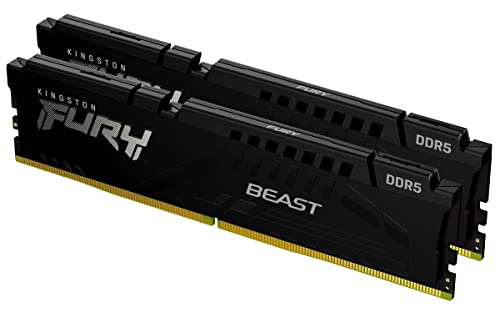
Kingston Fury Beast DDR5 32GB (2x16GB) 5200MHz
This kit offers solid DDR5 performance without the hefty price. It runs at 5200MHz with CL40 latency, making it a great entry into premium memory. Users appreciate its plug-and-play simplicity.
Pros
- Affordable DDR5 option
- Low profile design fits large coolers
- Plug and play with Intel XMP 3.0
Cons
- Higher latency than premium kits
- No RGB lighting

G.Skill Trident Z Royal Elite 32GB (2x16GB) DDR4 4000MHz
For those sticking with DDR4, this kit offers lightning-fast speeds and a dazzling crystalline design. It features gold or silver accents and RGB lighting. Enthusiasts love its performance and looks.
Pros
- Top-tier DDR4 speed
- Unique luxurious aesthetic
- Excellent build quality
Cons
- Expensive for DDR4
- Not compatible with DDR5 boards

Corsair Vengeance RGB Pro 32GB (2x16GB) DDR4 3600MHz
This kit is a top pick for Ryzen systems due to its optimized performance. It runs at 3600MHz with CL18, matching the infinity fabric sweet spot. Users report excellent stability and compatibility.
Pros
- Perfect for Ryzen 5000 series
- Reliable performance
- Customizable RGB via iCUE
Cons
- Speed not as high as some DDR4 kits
- Bulky heat spreaders may obstruct large CPU coolers
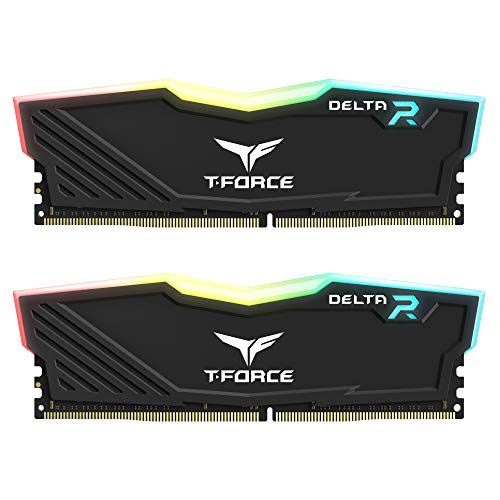
TeamGroup T-Force Xtreem ARGB 16GB (2x8GB) DDR4 3600MHz
This 16GB kit is ideal for ITX builds or those who want less bulk. It offers 3600MHz speed and CL18 latency. Its transparent design with ARGB lighting stands out in any case.
Pros
- Compact size fits small cases
- Vivid ARGB effects
- Good performance for the price
Cons
- Lower capacity for heavy multitasking
- Not as fast as higher-end kits

Crucial Ballistix Max 32GB (2x16GB) DDR4 4000MHz
This kit focuses on raw performance with a minimalist design. It runs at 4000MHz with CL19, making it one of the fastest DDR4 kits available. Enthusiasts appreciate its clean look and reliable overclocking.
Pros
- High frequency for DDR4
- Clean design without RGB
- Good heat spreader
Cons
- Not compatible with DDR5
- No RGB for lighting fans
Compared at a glance
| # | Model | Capacity | Best for | Score | Price |
|---|---|---|---|---|---|
| 1 | Corsair Dominator Platinum RGB DDR5 32GB (2x16GB) 6000MHz | 32GB (2x16GB) | Best overall for high-end gaming and content creation | 9.4 | Check price |
| 2 | G.Skill Trident Z5 RGB 32GB (2x16GB) DDR5 6400MHz | 32GB (2x16GB) | Best for overclocking enthusiasts | 9.2 | Check price |
| 3 | Kingston Fury Beast DDR5 32GB (2x16GB) 5200MHz | 32GB (2x16GB) | Best budget-friendly premium DDR5 | 8.8 | Check price |
| 4 | G.Skill Trident Z Royal Elite 32GB (2x16GB) DDR4 4000MHz | 32GB (2x16GB) | Best for DDR4 builds with premium aesthetics | 9.0 | Check price |
| 5 | Corsair Vengeance RGB Pro 32GB (2x16GB) DDR4 3600MHz | 32GB (2x16GB) | Best for AMD Ryzen builds | 9.1 | Check price |
| 6 | TeamGroup T-Force Xtreem ARGB 16GB (2x8GB) DDR4 3600MHz | 16GB (2x8GB) | Best for compact builds with vibrant lighting | 8.5 | Check price |
| 7 | Crucial Ballistix Max 32GB (2x16GB) DDR4 4000MHz | 32GB (2x16GB) | Best for high-frequency DDR4 without RGB | 8.7 | Check price |
Questions worth asking
What is the difference between DDR4 and DDR5?
DDR5 is the newer standard with higher speeds and better power efficiency. It also has higher capacity per module. However, it requires a compatible motherboard and CPU. DDR4 is still capable for most tasks, but DDR5 is future-proof.
How much RAM do I need for gaming in 2025?
16GB is the minimum for modern games, but 32GB is becoming the sweet spot for high-end gaming and streaming. Some games and multitasking benefit from 32GB. For pure gaming, 16GB is still sufficient, but 32GB ensures smooth performance.
Is higher MHz always better?
Not necessarily. Higher MHz can improve performance, but only if your system supports it and the latency is acceptable. The true latency matters more. A 3600MHz CL16 kit may outperform a 4000MHz CL20 kit in real-world tasks.
What is XMP and should I enable it?
XMP (Extreme Memory Profile) is an Intel technology that allows RAM to run at its rated speed. By default, RAM runs at a lower speed. Enabling XMP in BIOS is safe and recommended to get full performance. For AMD systems, it is called EXPO or DOCP.
Can I mix different RAM brands or speeds?
It is possible but not recommended. Mixing different speeds or latencies forces the system to run at the lowest common speed. For stability and performance, use identical modules from the same kit. If you must mix, ensure they have similar specifications.
Does RAM speed affect FPS in games?
Yes, especially in CPU-bound games. Higher memory speed can improve minimum frame rates and reduce stutters. The impact is more noticeable with Ryzen CPUs. However, the difference is usually small, around 5-10% depending on the game.
What is the best RAM for a Ryzen 5000 series CPU?
For Ryzen 5000, DDR4 3600MHz with CL16 or CL18 is optimal because it matches the Infinity Fabric clock 1:1. This provides the best performance. Some kits like the Corsair Vengeance RGB Pro are popular choices.
Is 32GB of RAM overkill?
For most users, 16GB is enough. But for content creators, virtual machines, or heavy multitasking, 32GB can be beneficial. It also future-proofs your system. If you have the budget, 32GB is a safe investment.
How do I know if RAM is compatible with my motherboard?
Check your motherboard’s QVL (Qualified Vendor List) on the manufacturer’s website. It lists tested RAM models. Also, consider the DDR generation, speed support, and maximum capacity. Most modern boards support a wide range, but verifying is safer.
What does dual channel mean?
Dual channel refers to using two memory modules to double the memory bandwidth. It is achieved by populating two slots that are color-coded on the motherboard. It provides a significant performance boost over single channel, so always use at least two sticks.
Our take
For the best balance of performance and aesthetics, choose the Corsair Dominator Platinum RGB DDR5. If you are on a DDR4 platform, the G.Skill Trident Z Royal Elite offers top-tier speed and looks. For budget-conscious builders, the Kingston Fury Beast provides affordable DDR5 performance. Ultimately, the right pick depends on your platform and budget, but any of these kits will elevate your build.


