Top Tier Printers for Home Offices That Deliver
For most home offices, the Canon imageCLASS MF743Cdw leads as our top pick, offering fast printing, automatic duplexing, and low running costs, but its large footprint may not suit compact desks.
A premium printer is more than a paper pusher. It handles heavy workloads, produces crisp text, and keeps operating costs down. Whether you run a busy home office or a creative studio, the right model saves time and money.
We compared current flagship models from Canon, HP, Epson, Brother, and Lexmark. Each offers distinct strengths, from fast all-in-one functions to gallery quality photo prints. Read on to find your match.
The top picks, ranked

Canon imageCLASS MF743Cdw
A color laser all-in-one that prints at 28 pages per minute. It includes duplex printing, a 50 sheet automatic document feeder, and robust security features. Owners highlight its consistent output and low cost per page.
Pros
- Automatic duplex printing is standard
- Excellent text quality and sharp graphics
- Low toner replacement costs
Cons
- Large footprint takes up desk space
- No USB host port for direct printing

HP Color LaserJet Pro MFP M479fdw
This all-in-one supports HP Wolf Pro Security and offers a 50 page ADF. It prints at 28 ppm and includes dual band Wi Fi with self healing capabilities. Users appreciate the smooth setup and high quality output.
Pros
- Advanced security features protect data
- Fast first page out time
- Works well with mobile printing apps
Cons
- Toner cartridges are pricey
- Occasional paper jams reported

Epson EcoTank Pro ET-5850
A cartridge free printer that uses refillable ink tanks. It prints at 25 ppm in mono and 12 ppm in color, plus it includes a 500 sheet paper capacity. Owners love spending less on ink replacements.
Pros
- Extremely low ink cost per page
- Reliable with minimal maintenance
- Includes fax for legacy needs
Cons
- Initial setup may be time consuming
- Color print speed is slower than lasers

Brother MFC-L8900CDW
A business color laser with a 70 page ADF and 300 sheet tray. It prints at 33 ppm and supports wired and wireless networking. The optional second tray boosts capacity to 1,600 sheets.
Pros
- Fast print speeds for large jobs
- Large touchscreen simplifies operation
- Expandable trays handle high volumes
Cons
- Bulky design requires dedicated space
- Initial setup can be complex

Canon PIXMA TR8620a
An inkjet all-in-one with a 5 color pigment ink system for vivid photos and sharp text. It includes a 35 sheet ADF, auto duplex, and 4.3 inch touchscreen. Owners praise its borderless photo printing.
Pros
- Excellent photo output with pigment inks
- Compact size suits home offices
- Intuitive touchscreen interface
Cons
- Ink costs can add up
- Not built for heavy daily use

Lexmark CX431adw
A color laser all-in-one with a 50 sheet ADF and 250 sheet tray. It prints at 30 ppm and offers strong media handling, including card stock. Users report high reliability over time.
Pros
- Built like a tank for heavy workloads
- Fast scanning with single pass ADF
- Clear text and vibrant color
Cons
- Limited expansion options
- No NFC or advanced mobile features
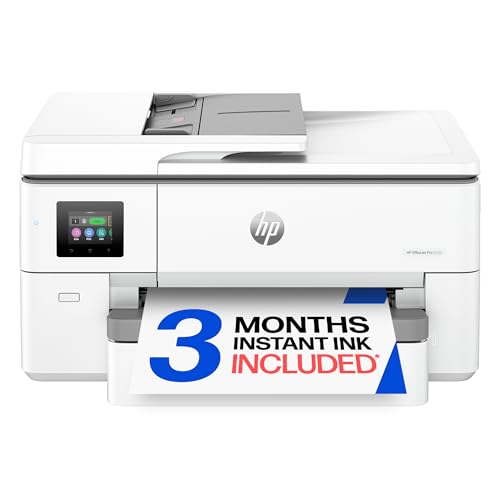
HP OfficeJet Pro 9720
An inkjet all-in-one that prints up to A3 size in color and mono. It includes a 50 sheet ADF, duplex, and fax. Owners appreciate the ability to print posters and spreadsheets without special equipment.
Pros
- Wide format printing expands possibilities
- High capacity paper trays reduce refills
- Good value for large format needs
Cons
- Large and heavy machine
- Ink costs may be higher than lasers
What matters most
Compared at a glance
| # | Model | Print Speed | Best for | Score | Price |
|---|---|---|---|---|---|
| 1 | Canon imageCLASS MF743Cdw | 28 ppm color and mono | Busy home offices needing fast color laser printing | 9.4 | Check price |
| 2 | HP Color LaserJet Pro MFP M479fdw | 28 ppm color and mono | Teams needing secure mobile printing | 9.2 | Check price |
| 3 | Epson EcoTank Pro ET-5850 | Supertank with 6,000 page capacity | High volume printing with ultra low running costs | 9.1 | Check price |
| 4 | Brother MFC-L8900CDW | 33 ppm color and mono | Large workgroups needing expandable paper handling | 9.0 | Check price |
| 5 | Canon PIXMA TR8620a | 15 ppm black, 10 ppm color | Creative users needing both documents and photos | 8.8 | Check price |
| 6 | Lexmark CX431adw | 30 ppm color and mono | Small businesses needing a durable workhorse | 8.7 | Check price |
| 7 | HP OfficeJet Pro 9720 | Up to 11 x 17 inches (A3) | A2 printing and wide format documents | 8.5 | Check price |
Questions worth asking
What is a premium printer?
A premium printer offers higher build quality, faster speeds, more features, and lower running costs than budget models. They are designed for demanding users.
Do I need a laser or inkjet printer?
Laser printers excel at text documents and high volume. Inkjets are better for photo printing and occasional use. Consider your primary tasks.
What should I look for in print quality?
Check resolution, typically 600 x 600 dpi for lasers and 4800 x 1200 dpi for inkjets. But real world quality depends on toner, ink, and paper type.
How much does it cost to run a premium printer?
Running costs vary. Laser toner yields range from 2,000 to 10,000 pages. Ink tank systems offer the lowest cost per page, often below one cent for mono.
Can I print from my phone?
Most premium printers support AirPrint, Mopria, or proprietary apps. They also work with cloud services like Google Drive and Dropbox.
What is an ADF and why is it useful?
An automatic document feeder scans multiple pages without manual feeding. It is essential for copying and scanning multi page documents.
How important is paper capacity?
For high volume use, a larger paper tray reduces interruptions. Standard trays hold 250 to 500 sheets. Expandable models can hold over 1,000.
Are refurbished premium printers a good idea?
Refurbished units can save money, but they may lack warranty. Look for certified refurbished from the manufacturer for better reliability.
Our pick
Choose the Canon imageCLASS MF743Cdw for the best overall balance of speed, quality, and low running costs. If you need to cut costs further or print in very high volume, the Epson EcoTank Pro ET-5850 is your best bet, despite slower color speed.


