Premium Remote Controls That Feel Worth Every Penny
For most people, the SofaBaton U1 is the best premium remote because it combines a sleek metal build with universal control and an app that makes setup simple. Its main advantage is the ability to replace multiple remotes without sacrificing style. However, it lacks the advanced macro support that some home theater enthusiasts want.
A premium remote should feel solid in your hand, with tactile buttons and a design that matches your gear. It should also offer features that justify the higher price, such as backlighting, programmable buttons, and universal compatibility. We have selected seven remotes that stand out in these areas.
Whether you want to streamline your setup or simply enjoy a better remote, this list has options for every preference. From minimal single-device remotes to full universal controllers, each one offers something special. Read on to find your ideal match.
Our top picks

SofaBaton U1
The SofaBaton U1 is a sleek universal remote that controls up to 15 devices. It features a metal body, backlit keys, and a companion app for easy programming. Owners appreciate its ergonomic shape and responsive buttons. The remote uses Bluetooth and IR to communicate with your gear. It is a stylish way to declutter your coffee table.
Pros
- Premium aluminum build
- Intuitive app setup
- Backlit keys
Cons
- No advanced macro support
- Some users find app required for full setup
Logitech Harmony Elite
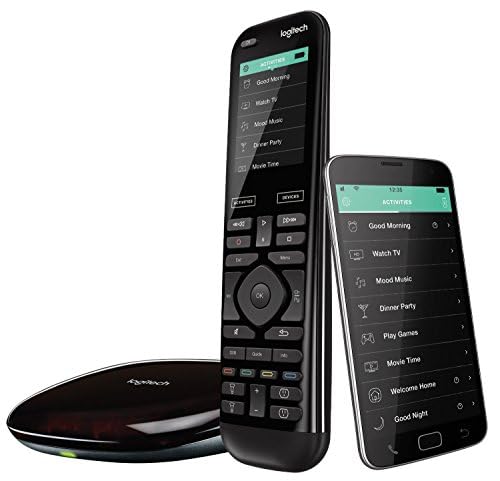
The Logitech Harmony Elite is a high-end remote with a touchscreen and physical buttons. It controls over 270,000 devices and supports activities like ‘Watch TV’ that automate multiple steps. The remote includes a charging station and works with Alexa and Google Assistant. It is ideal for complex setups with many components. Users report a steep learning curve but powerful results.
Pros
- Extensive device compatibility
- Activity based automation
- Touchscreen and physical keys
Cons
- Setup can be complex
- Higher price point
Caavo Control Center
The Caavo Control Center combines a remote with an HDMI switcher box. It unifies multiple devices into one interface, allowing you to search across streaming apps. The remote has simple buttons and includes voice control through the Caavo unit. It is perfect for those who want a clutter free entertainment setup. Owners like the ability to control everything with one hand.
Pros
- Integrates HDMI switching
- Unified search across apps
- Simple remote design
Cons
- Requires Caavo unit
- Limited to 4 HDMI devices

Sevenhugs Smart Remote U1
The Sevenhugs Smart Remote U1 uses motion gestures to automatically change its context based on which device you point at. It has a small e-ink display that shows contextual buttons. The remote integrates with smart home systems and supports voice assistants. It is a unique solution for controlling a variety of devices. However, it requires a connected bridge for full functionality.
Pros
- Contextual awareness
- Elegant design
- Smart home integration
Cons
- Requires separate hub
- Higher learning curve

Roku Voice Remote Pro
The Roku Voice Remote Pro is designed for Roku devices and some Roku TVs. It features a built-in rechargeable battery, hands free voice control, and a headphone jack for private listening. The remote has a find my remote feature that works by voice command. It is a premium upgrade over the standard remote. Users love the convenience of voice commands and the comfortable grip.
Pros
- Rechargeable battery
- Headphone jack
- Remote finder
Cons
- Only works with Roku devices
- No universal control

MX Remote (by URC)
The MX Remote by URC is a professional grade universal remote that offers deep customization. It supports RF and IR control, and can be programmed via PC software. The remote has a full color touchscreen and a robust build. It is often used in custom home theater installations. Owners report a steep learning curve but ultimate control.
Pros
- Extensive customization
- RF capability
- Professional build
Cons
- Requires professional programming
- Expensive

Amazon Alexa Voice Remote Pro
The Amazon Alexa Voice Remote Pro is a premium remote for Fire TV devices. It features a dedicated Alexa button, app shortcuts, and a built-in speaker for Alexa responses. The remote has a find my remote feature and customizable buttons. It is comfortable to hold and responsive. However, it only works with Fire TV devices.
Pros
- Alexa integration
- App shortcuts
- Rechargeable
Cons
- Limited to Fire TV
- No universal control
How they compare
| # | Model | Device Capacity | Best for | Score | Price |
|---|---|---|---|---|---|
| 1 | SofaBaton U1 | 15 devices | Universal replacement with app setup | 9.4 | Check price |
| 2 | Logitech Harmony Elite | Up to 15 devices | Advanced home theater control | 9.2 | Check price |
| 3 | Caavo Control Center | 4 in, 1 out | Simplified HDMI switching and voice control | 8.8 | Check price |
| 4 | Sevenhugs Smart Remote U1 | Unlimited via hub | Contextual control with motion gestures | 8.6 | Check price |
| 5 | Roku Voice Remote Pro | Roku TV and streaming device owners | 8.5 | Check price | |
| 6 | MX Remote (by URC) | Unlimited with programming | Custom installers and advanced users | 8.2 | Check price |
| 7 | Amazon Alexa Voice Remote Pro | Fire TV Stick and Fire TV | Fire TV users who want smart home controls | 8.0 | Check price |
How to pick the right one
Common questions
Are premium remote controls worth the cost?
For many users, yes. Premium remotes offer better build quality, more features, and often replace multiple remotes. They can simplify your setup and provide a more enjoyable experience. If you have a complex home theater or simply value tactile feedback and backlighting, a premium remote is a worthwhile investment.
Can a universal remote control all my devices?
Most universal remotes can control a wide range of devices, including TVs, soundbars, streaming players, and game consoles. However, check compatibility for older or proprietary devices. Some remotes use a database of IR codes, while others learn from existing remotes. Ensure the remote you choose supports the devices you own.
How do I set up a premium universal remote?
Setup varies by brand. Many use a companion app that guides you through adding devices and creating activities. Some, like the Logitech Harmony Elite, require desktop software for full customization. Follow the instructions provided, and be prepared to spend some time on initial configuration. Once set up, they are easy to use daily.
Do these remotes work with smart home devices?
Some do. Remotes like the SofaBaton U1 and Logitech Harmony Elite integrate with Amazon Alexa and Google Assistant. Others, like the Sevenhugs Smart Remote, can control smart home devices through their hub. If smart home control is important, look for remotes that explicitly support it.
What is the difference between IR and RF remotes?
IR (infrared) remotes require line of sight to the device, while RF (radio frequency) remotes can work through walls and cabinets. RF remotes are more flexible but often require a receiver or hub. Many premium remotes use both IR and RF to ensure broad compatibility.
Are there remotes with backlit buttons?
Yes, many premium remotes feature backlit keys. The SofaBaton U1 has motion activated backlighting. The Logitech Harmony Elite has backlit buttons on its physical keypad. Backlighting is a common premium feature that improves usability in dark rooms.
Can I use a premium remote with my Roku or Fire TV?
Yes, but there are dedicated options that work best with those platforms. The Roku Voice Remote Pro is designed for Roku devices, while the Amazon Alexa Voice Remote Pro is for Fire TV. Universal remotes can also control Roku and Fire TV via IR or Wi Fi, but may not access all features like voice search.
How long do the batteries last?
Battery life depends on usage and type. Rechargeable remotes like the SofaBaton U1 and Logitech Harmony Elite can last weeks or months between charges. Remotes with e-ink displays, like the Sevenhugs, can last even longer. Standard AAA powered remotes may need more frequent changes, but backlighting and usage affect longevity.
Final word
If you want a premium remote that balances style, function, and ease of use, choose the SofaBaton U1. It offers excellent build quality, a user friendly app, and universal control at a reasonable price. For complex home theaters, the Logitech Harmony Elite remains the gold standard. But for most people, the SofaBaton U1 delivers the best overall experience.