Top Presentation Remotes for Smooth Slide Control
The Logitech R500s Laser Presentation Remote is the top pick for most presenters, offering a reliable laser pointer, long-range wireless, and broad compatibility. Its main limitation is the lack of a rechargeable battery, requiring a single AA.
Presentation remotes are essential for any speaker who wants to move freely and keep the audience engaged. They allow you to control slides, highlight key points, and manage media without being tied to your laptop.
We analyzed specifications and user feedback for top models to help you find a reliable clicker. Whether you need a simple pointer or advanced features like voice control, this guide covers the best options.
How to choose
The shortlist, ranked
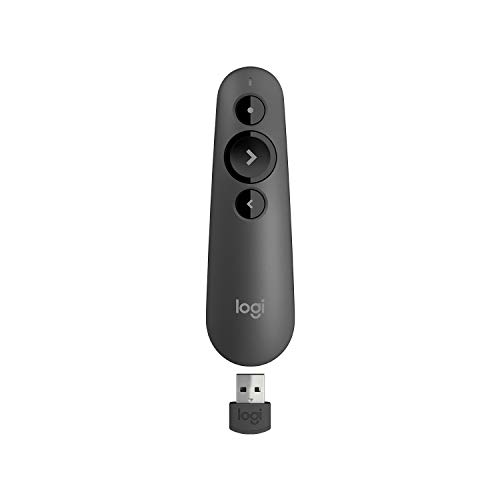
Logitech R500s Laser Presentation Remote
The Logitech R500s offers a bright red laser, up to 20-meter range, and works with Windows, Mac, and most presentation software. It features a comfortable grip and intuitive slide controls. Users appreciate its reliability and ease of use.
Pros
- Long range and bright laser
- Works with multiple devices
- Easy slide navigation
Cons
- Requires AA battery
- No rechargeable option

DOITOP Wireless Presentation Remote
The DOITOP remote offers a 2.4GHz wireless connection with a range of up to 30 meters, making it great for large rooms. It includes a red laser pointer and supports Windows, Mac, and Linux. Its plug-and-play design requires no software.
Pros
- Very affordable
- Extremely long range
- No software needed
Cons
- Build feels less sturdy
- No rechargeable battery

SMARTPHONE Presentation Clicker
This remote pairs via Bluetooth and works with iOS and Android devices, as well as Windows and Mac. It comes with a USB receiver for non-Bluetooth computers. Users like the compact size and the ability to control media playback.
Pros
- Works with phones and tablets
- Rechargeable battery
- Compact and portable
Cons
- No laser pointer
- Shorter range
Seenda Wireless Presenter
The Seenda presenter is designed for seamless integration with PowerPoint, Keynote, and Google Slides. It features a 2.4GHz connection with 30-meter range, a red laser, and a comfortable design. Reviewers find it straightforward to use.
Pros
- Optimized for major software
- Good range
- Comfortable grip
Cons
- Needs USB receiver
- No backlight

Logitech Spotlight Presentation Remote
The Logitech Spotlight is a high-end remote with a unique spotlight and magnifier feature, allowing you to highlight details on slides. It has a rechargeable battery, works with Windows and Mac, and offers a 30-meter range. It is more expensive but well-regarded.
Pros
- Innovative spotlight and magnifier
- Premium build quality
- Rechargeable
Cons
- High price
- No traditional laser

Targus Wireless Presenter Remote
The Targus remote offers a basic design with slide control and a laser pointer. It has a 20-meter range and works with Windows and Mac. Users say it is dependable and easy to use, though it lacks extra features.
Pros
- Simple plug-and-play
- Affordable
- Reliable performance
Cons
- No backlight
- Limited range

Ring Wireless Presenter Remote
The Ring remote is worn on the finger and allows gesture-based control. It connects via 2.4GHz and works with Windows and Mac. It is fun to use but may have a learning curve. Some users find it less precise.
Pros
- Unique gesture control
- Wearable design
- Rechargeable
Cons
- Requires practice
- No laser pointer
How they compare
| # | Model | Range | Best for | Score | Price |
|---|---|---|---|---|---|
| 1 | Logitech R500s Laser Presentation Remote | 20 meters | Best overall for professionals | 9.4 | Check price |
| 2 | DOITOP Wireless Presentation Remote | 30 meters | Best budget pick | 8.8 | Check price |
| 3 | SMARTPHONE Presentation Clicker | 15 meters | Best for smartphone and tablet users | 8.6 | Check price |
| 4 | Seenda Wireless Presenter | 30 meters | Best for PowerPoint and Keynote | 8.7 | Check price |
| 5 | Logitech Spotlight Presentation Remote | 30 meters | Best premium feature set | 9.1 | Check price |
| 6 | Targus Wireless Presenter Remote | 20 meters | Best for simple presentations | 8.3 | Check price |
| 7 | Ring Wireless Presenter Remote | 20 meters | Best for gesture control | 8.0 | Check price |
Questions worth asking
How do I connect a presentation remote to my computer?
Most remotes come with a USB receiver that you plug into your computer. It works immediately without installing software. For Bluetooth remotes, you need to pair them via your device’s Bluetooth settings.
Can I use a presentation remote with Google Slides?
Yes, many presentation remotes work with Google Slides. They act like a keyboard, sending page up and down commands. Check the remote’s compatibility to be sure.
What is the difference between a laser pointer and a spotlight?
A laser pointer projects a red dot on the screen, which can be hard to see in bright rooms. A spotlight highlights an area with a soft glow, making it easier to draw attention without distracting the audience.
How far can a presentation remote work?
Ranges vary from about 10 to 30 meters. For most meeting rooms, a range of 15 to 20 meters is sufficient. For large auditoriums, choose a remote with 30 meters or more.
Do presentation remotes work with Mac computers?
Most do. Many are compatible with both Windows and Mac. Check the product specifications for Mac compatibility before purchasing.
Can I control the volume with a presentation remote?
Some remotes have volume control buttons that adjust the system volume on your computer. This is useful when presenting with videos or audio.
Are presentation remotes rechargeable?
Some models have built-in rechargeable batteries, while others use replaceable AA or AAA batteries. Rechargeable models are more convenient but may cost more.
What is the best budget presentation remote?
The DOITOP Wireless Presentation Remote is a great budget option, offering a long range and basic features at a low price. It is reliable for simple presentations.
How do I use a presentation remote with a smartphone?
You need a remote that supports Bluetooth and works with iOS or Android. Pair it with your phone via Bluetooth, then use apps like PowerPoint or Google Slides to present.
What should I do if my presentation remote stops working?
First, check the battery and replace if needed. Ensure the USB receiver is properly plugged in. If it still doesn’t work, try re-pairing a Bluetooth connection or check for software updates.
Our take
For most presenters, the Logitech R500s offers the best balance of range, laser visibility, and compatibility. It is a dependable choice that will serve you well in any setting. If you need advanced features like spotlight and are willing to invest, the Logitech Spotlight is a worthy upgrade.