Print Servers That Make Old Printers Wireless Again
The TP-Link TL-PS310U is our top pick for most households and small offices. It converts a USB printer into a network printer with broad compatibility. Its main advantage is reliable performance at a budget price point. Its main limitation is that it lacks AirPrint support out of the box.
Print servers let you share a USB or parallel printer across your network without leaving a computer on. They are ideal for older printers that lack Ethernet or Wi-Fi.
Today’s models support a range of protocols, from raw TCP/IP to AirPrint and Google Cloud Print. Choosing the right one depends on your printer’s interface and your network setup.
Our top picks

TP-Link TL-PS310U
A single USB 2.0 port print server that works with a wide range of printers. It supports multiple protocols including IPP, LPR, and raw TCP/IP. Users report easy setup via a web-based utility. It lacks built-in AirPrint, but it works with Apple devices through third-party software.
Pros
- Affordable and reliable
- Simple web-based configuration
- Works with Windows and Mac
Cons
- No AirPrint support
- Single USB port only

D-Link DPR-1260
This print server has both USB 2.0 and parallel ports to connect legacy printers. It supports multiple network protocols and can be managed through a web interface. Owners appreciate its flexibility for older hardware. Some users note that setup can be finicky on modern Windows versions.
Pros
- Two connection options
- Broad protocol support
- Compact design
Cons
- Setup can be tricky
- No wireless capability
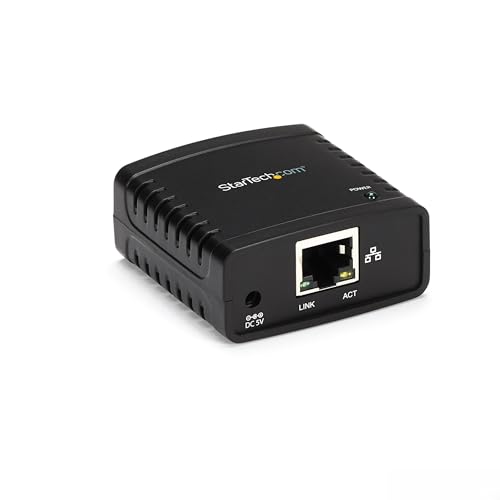
StarTech.com PM1115U2
A durable metal-bodied print server with a single USB 2.0 port. It supports both Ethernet and Wi-Fi connectivity, giving you placement flexibility. It is compatible with major operating systems and supports mobile printing via AirPrint and Google Cloud Print. Users report rock-solid performance in always-on environments.
Pros
- Wireless and wired options
- Supports AirPrint and Google Cloud Print
- Metal case for durability
Cons
- Higher price point
- Wi-Fi setup can be complex
Edimax PS-1208MF
With two USB ports and one parallel port, this print server can connect up to three printers simultaneously. It supports standard network protocols and is easy to configure via a web browser. Some owners find the interface dated but functional. It works best in mixed Windows and Mac environments.
Pros
- Three printer connections
- Affordable for the features
- Web-based management
Cons
- No wireless option
- Interface feels old
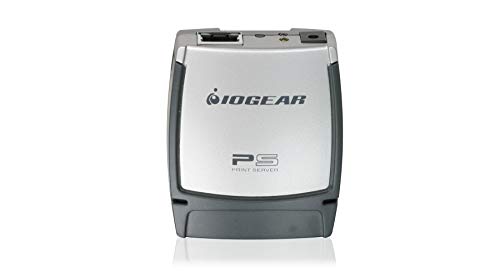
IOGEAR GPSU21
This print server adds AirPrint to any USB printer over your Wi-Fi network. It supports both infrastructure and ad-hoc modes. Users like that it works with iPhone and iPad without extra apps. However, it only supports USB printers and lacks an Ethernet port.
Pros
- Native AirPrint support
- Compact size
- No cable needed
Cons
- No wired Ethernet
- Limited to USB printers

TP-Link TL-PS110P
A simple print server for printers with a parallel port. It connects to your router via Ethernet and supports basic printing protocols. It is a low-cost way to network an old printer. Owners report that it works reliably with Windows and Linux, but it lacks modern features like AirPrint.
Pros
- Very affordable
- Plugs into parallel port
- Stable performance
Cons
- No USB support
- No wireless option

Canon USB Wireless Print Server
Designed for Canon PIXMA and other Canon USB printers, this print server enables wireless printing. It is compact and plugs directly into the printer’s USB port. It supports Windows and Mac, but it does not support AirPrint. Users find setup straightforward with the included CD.
Pros
- Easy setup for Canon printers
- Small footprint
- Wireless freedom
Cons
- Only works with Canon
- No AirPrint support
What matters most
Compared at a glance
| # | Model | Interface | Best for | Score | Price |
|---|---|---|---|---|---|
| 1 | TP-Link TL-PS310U | USB 2.0 (Type B) | Most home users and small offices | 9.4 | Check price |
| 2 | D-Link DPR-1260 | USB 2.0, IEEE 1284 parallel | Printers with parallel and USB connections | 9.1 | Check price |
| 3 | StarTech.com PM1115U2 | USB 2.0 (Type B) | Small office environments | 9.0 | Check price |
| 4 | Edimax PS-1208MF | 2x USB 2.0, 1x parallel | Multiple USB printers | 8.8 | Check price |
| 5 | IOGEAR GPSU21 | USB 2.0 (Type B) | Wireless convenience with AirPrint | 8.7 | Check price |
| 6 | TP-Link TL-PS110P | IEEE 1284 parallel | Legacy parallel printers | 8.5 | Check price |
| 7 | Canon USB Wireless Print Server | USB 2.0 (Type B) | Canon printer owners | 8.3 | Check price |
Frequently asked questions
What is a print server?
A print server is a device that connects a printer to a network, allowing multiple computers to share it. It can be hardware or software, but hardware print servers are dedicated devices that connect to your router or network.
Do I need a print server if my printer has Wi-Fi?
If your printer already has Wi-Fi or Ethernet, it likely has built-in networking, so you do not need a print server. Print servers are useful for printers that only have USB or parallel connections.
Can a print server make my printer AirPrint compatible?
Some print servers support AirPrint, allowing Apple devices to print without extra software. Look for models that explicitly state AirPrint support. Others may require third-party software for Mac or iOS printing.
Will a print server work with my Mac?
Most print servers support macOS through standard protocols like IPP and LPR. Check the specifications for Mac compatibility. Some models also include Mac setup utilities.
Can I connect multiple printers to one print server?
Yes, some print servers have multiple USB or parallel ports. For example, the Edimax PS-1208MF supports up to three printers. Others have only one port, so choose according to your needs.
How do I set up a print server?
Typically, you connect the print server to your network (Ethernet or Wi-Fi), connect your printer, and then install the software on each computer. Many have a web-based interface for configuration. Consult the manual for specific steps.
Are print servers compatible with Google Cloud Print?
Google Cloud Print is discontinued, but some print servers support cloud printing through other services. Check for current support for mobile printing solutions like Mopria or manufacturer apps.
What is the difference between a print server and a network printer?
A network printer has built-in networking hardware, so it can connect directly to your network. A print server is an external device that adds network capability to a non-network printer.
Final word
For most people, the TP-Link TL-PS310U offers the best balance of price, performance, and ease of use. If you need AirPrint, consider the IOGEAR GPSU21, but be prepared for a wireless-only connection. For offices with legacy parallel printers, the D-Link DPR-1260 is a solid choice. Choose based on your printer’s ports and whether you require wireless connectivity.
You might also need
Retro Gaming Reloaded: Top Consoles for Old-School Play

Stunning Prints Anywhere: Portable Photo Paper Picks

Wireless CCTV Without Monthly Fees: What Actually Works
