Top OBD2 Scanners for Home Garage Pros
For home garage use, the Autel MaxiCOM MK808TS stands out as the top pick. It offers full system diagnostics, active testing, and bidirectional controls that rival professional shop tools. Its main advantage is the combination of all-system coverage and user-friendly interface. The main limitation is the higher price, which may be overkill for simple code reading.
A professional-grade OBD2 scanner turns your home garage into a serious workshop. Whether you’re diagnosing a check engine light or performing advanced maintenance, the right tool can save time and money.
We compared the most popular models based on specifications, owner reports, and professional reviews. Our focus is on real-world usability for home enthusiasts who demand reliable performance without dealership costs.
The best picks, ranked
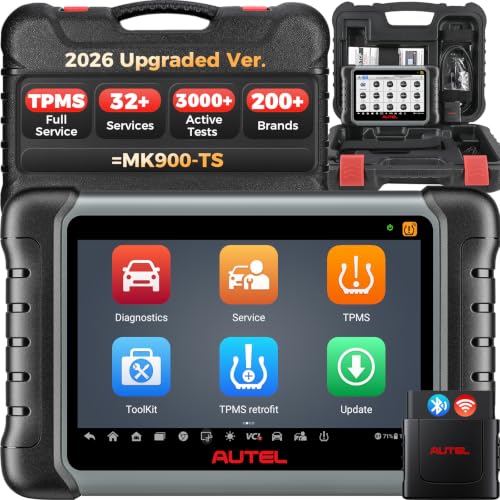
Autel MaxiCOM MK808TS
The Autel MaxiCOM MK808TS is a tablet-based scanner that covers all systems, not just engine. It performs active tests, resets services, and offers guided procedures. Owners report that it works on multiple car brands and handles complex jobs like ABS bleeding and battery registration.
Pros
- Comprehensive system coverage
- Bidirectional controls for active testing
- Large touchscreen with easy navigation
Cons
- Higher price point
- Steeper learning curve for beginners

BlueDriver Pro OBD2 Scan Tool
BlueDriver Pro turns your phone or tablet into a powerful diagnostic tool. It provides detailed code definitions, live data graphs, and repair reports. Owners appreciate its portability and the ability to share reports via email. It covers all OBD2 systems and offers some enhanced diagnostics for certain makes.
Pros
- Compact and portable
- Clear live data and code explanations
- No bulky screen to store
Cons
- Requires smartphone
- Not as deep as full standalone scanners

Foxwell NT710
The Foxwell NT710 offers many features of higher-end scanners at a moderate price. It reads and clears codes on all major systems, performs oil reset, and supports battery registration on select vehicles. Owners report that it covers more functions than typical budget scanners and is easy to use for DIYers.
Pros
- Affordable for the features
- Covers multiple systems
- User-friendly interface
Cons
- No bidirectional control
- Screen is smaller than high-end models

Launch X431 V+
The Launch X431 V+ is a professional-level tablet scanner that offers all-system diagnostics, bi-directional controls, and advanced functions like coding and adaptations. It comes with a powerful processor and a large display. Owners report that it handles complex procedures on many European and Asian cars.
Pros
- Professional-level capabilities
- Fast processor and clear display
- Extensive vehicle coverage
Cons
- High price
- May require internet for some functions

Innova CarScan 5610
The Innova CarScan 5610 provides code reading with detailed repair solutions and live data. It offers ABS and airbag coverage on most vehicles. Owners appreciate the ‘RepairSolutions2’ app that gives likely fixes. It’s a reliable choice for those new to diagnostics.
Pros
- Beginner-friendly with repair tips
- Covers ABS and airbag
- Lifetime updates
Cons
- No bidirectional control
- Limited to certain systems

Ancel AD410
The Ancel AD410 is a compact code reader that reads and clears engine codes, displays live data, and checks readiness monitors. It is simple to use with a small screen. Owners report that it works well for basic diagnostics and is great for older cars that only need engine codes.
Pros
- Very affordable
- Simple operation
- Useful for basic checks
Cons
- No ABS or airbag coverage
- Limited advanced functions

Veepeak OBDCheck BLE+
The Veepeak OBDCheck BLE+ is a small Bluetooth adapter that connects to your phone via apps like Torque or OBD Fusion. It reads and clears engine codes, shows live data, and fits in your glove box. Owners report that it is reliable and works with many apps, but its functionality depends on the app you use.
Pros
- Very compact and cheap
- Wireless convenience
- Works with popular apps
Cons
- No screen of its own
- Limited to engine diagnostics
How to choose
Side by side
| # | Model | Display | Best for | Score | Price |
|---|---|---|---|---|---|
| 1 | Autel MaxiCOM MK808TS | 7-inch touchscreen | All-system diagnostics and bidirectional control | 9.4 | Check price |
| 2 | BlueDriver Pro OBD2 Scan Tool | Uses smartphone app | Smartphone-based diagnostics with live data | 9.0 | Check price |
| 3 | Foxwell NT710 | 2.8-inch color screen | Budget-friendly all-system scanning | 8.7 | Check price |
| 4 | Launch X431 V+ | 8-inch touchscreen | Advanced diagnostics and full system coverage | 9.2 | Check price |
| 5 | Innova CarScan 5610 | 3.5-inch color screen | Easy code reading with repair solutions | 8.6 | Check price |
| 6 | Ancel AD410 | 2.4-inch LCD | Essential OBD2 functions at a low price | 8.2 | Check price |
| 7 | Veepeak OBDCheck BLE+ | Uses smartphone | Bluetooth scanning with smartphone apps | 8.0 | Check price |
Frequently asked questions
What is the difference between a code reader and a professional scanner?
A code reader simply reads and clears engine diagnostic trouble codes. A professional scanner reads codes from all systems, shows live data, and often has bidirectional control. Professional scanners also provide more detailed information and guidance.
Do I need bidirectional control for home use?
Bidirectional control is helpful for testing components like actuators and solenoids. If you plan to do advanced diagnostics or repairs, it is worth having. For basic maintenance, it is not essential.
Can these scanners work on all car brands?
Most scanners cover all OBD2-compliant vehicles, but coverage for manufacturer-specific systems varies. Some scanners have better coverage for certain brands. Check the product details or contact the manufacturer for compatibility with your vehicle.
How often do I need to update the scanner software?
Updates are important to keep up with new vehicle models and features. Many scanners offer free updates for a period, after which you may need to pay. Regular updates ensure you have the latest diagnostic capabilities.
Can I use these scanners to reset service lights?
Many scanners offer service reset functions, such as oil light reset, brake pad replacement, and battery registration. Not all models have these features, so check the specifications if you need them.
Do I need a separate scanner for ABS and airbag codes?
A basic OBD2 scanner only reads engine codes. To access ABS and airbag codes, you need a scanner that supports those systems. Many mid-range and all professional scanners cover these systems.
Are Bluetooth scanners reliable?
Bluetooth scanners are reliable for reading and clearing codes and streaming live data. Their performance depends on the app you use. Some apps offer more features than others, so choose an app that suits your needs.
What is the best way to learn how to use a professional scanner?
Start by reading the manual and watching online tutorials. Practice on your own vehicle by reading and clearing codes, and gradually explore functions like live data and bidirectional tests. Many manufacturers provide online resources.
Can I diagnose a misfire with a scanner?
Yes, a scanner can show misfire counts and identify which cylinder is misfiring. Live data can help you see fuel trim and oxygen sensor readings to diagnose the cause, such as a faulty spark plug or ignition coil.
Are these scanners worth the investment for a home garage?
If you plan to own your car for a long time or enjoy DIY maintenance, a good scanner can save you money on diagnostic fees. Even a basic model can help you avoid unnecessary trips to the mechanic.
Our pick
If you want a professional-grade scanner for your home garage, the Autel MaxiCOM MK808TS is the clear winner. It offers the best combination of all-system coverage, bidirectional control, and user-friendly design. For a more budget-friendly option that still covers multiple systems, the Foxwell NT710 is a solid choice. Avoid getting a basic code reader if you plan to work on modern cars, as you will quickly outgrow it.