Top Optical Drives for Professionals: Reliable Disc Handling
For professionals who need a dependable optical drive, the ASUS BW-16D1X-U stands out as the top pick. It offers fast 16x DVD burning and 8x BD-R writing, along with robust build quality and M-DISC support. Its main limitation is that it is a desktop drive, so it requires an external power source, making it less portable than bus-powered alternatives.
In professional environments, optical drives still play a role for archival, data distribution, and media production. Blu-ray burning, high-quality disc verification, and reliable long-term reading are essential. We compared seven models that meet these needs.
Each drive on this list has been selected for its performance, build quality, and suitability for tasks like video production, data backup, and software installation. We focused on current models with strong user satisfaction and professional-grade features.
What to look for
The shortlist, ranked

ASUS BW-16D1X-U
This external Blu-ray drive from ASUS delivers fast burning speeds and a sturdy metal body. It supports M-DISC for archival quality, and its Sonic Master technology reduces noise. Many professionals rely on it for video production and data backup.
Pros
- Excellent build quality with metal casing
- Fast burning speeds for both DVD and Blu-ray
- Comes with CyberLink software suite
Cons
- Requires external power adapter
- Heavier than bus-powered drives
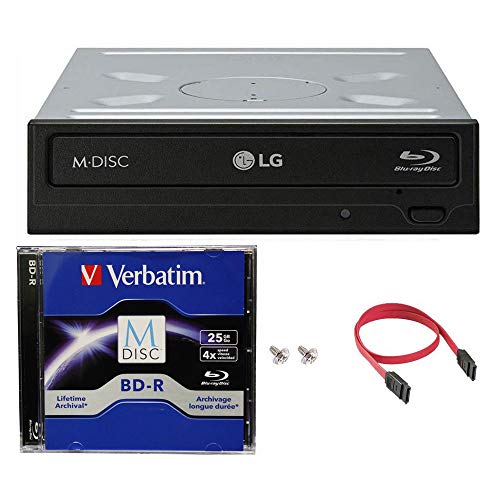
LG Electronics WH14NS40
A reliable internal SATA Blu-ray drive that offers 14x BD-R writing and 16x DVD burning. It is a popular choice for custom PCs and professional builds due to its consistent performance and compatibility. It supports M-DISC for long-term data preservation.
Pros
- Very affordable for the features
- Fast Blu-ray burning speeds
- Quiet operation during playback
Cons
- Requires a desktop computer with a 5.25 inch bay
- No USB port for external use
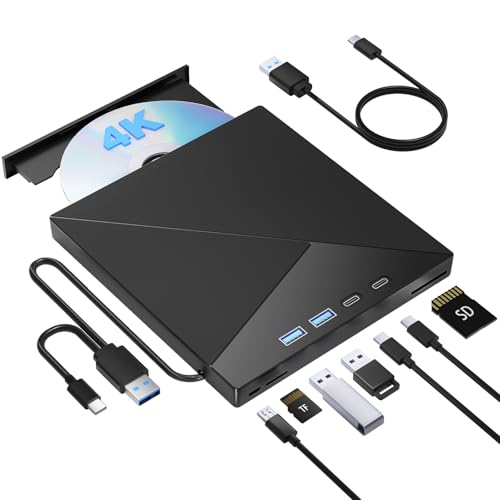
Pioneer BDR-XD07B
This slim external Blu-ray drive from Pioneer is bus-powered via USB, making it highly portable. It offers 6x BD-R writing and includes CyberLink software. Build quality is solid, and it is quiet during operation, which professionals appreciate.
Pros
- No external power needed
- Compact and lightweight design
- Quiet operation
Cons
- Slower burning speeds compared to desktop models
- Lid can feel flimsy to some users

Buffalo BRUHD-PU3-BK
One of the few portable drives that supports Ultra HD Blu-ray playback and burning. It features a slim design and USB 3.0 connectivity. Professionals in video editing benefit from its ability to handle 4K content. It includes CyberLink software for playback and authoring.
Pros
- Can play and burn UHD Blu-ray discs
- Portable bus-powered design
- Includes professional-grade software
Cons
- Premium price for UHD capability
- Requires CyberLink software for UHD playback

LG BP60NB10
An affordable external Blu-ray writer that is bus-powered and easy to carry. It writes at 6x for BD-R and 8x for DVD-R. It is a good option for professionals who need occasional Blu-ray burning without breaking the bank.
Pros
- Low cost for a Blu-ray writer
- Bus-powered for portability
- Supports M-DISC for archival
Cons
- Build quality is mostly plastic
- No bundled software disc, requires download

Pioneer BDR-XD05B
This earlier Pioneer portable drive is known for its very quiet operation and low power consumption. It still offers reliable 6x BD-R writing and includes CyberLink software. While not the fastest, it is a dependable choice for professionals who work in noise-sensitive environments.
Pros
- Extremely quiet during operation
- Compact and portable
- Low power consumption
Cons
- Slower than newer models
- Lid design may be less sturdy

ASUS SDRW-08D2S-U
A slim and stylish external DVD writer from ASUS, ideal for professionals who primarily work with CDs and DVDs. It is bus-powered, supports M-DISC, and has a sleek design. It is not for Blu-ray, but it handles DVD burning efficiently.
Pros
- Very portable and stylish
- Bus-powered via USB
- Affordable for DVD needs
Cons
- No Blu-ray support
- USB 2.0 interface may be slower for large data
Side by side
| # | Model | Interface | Best for | Score | Price |
|---|---|---|---|---|---|
| 1 | ASUS BW-16D1X-U | USB 3.0 | Best overall for professional burning and durability | 9.4 | Check price |
| 2 | LG Electronics WH14NS40 | SATA | Best internal drive for desktop workstations | 9.2 | Check price |
| 3 | Pioneer BDR-XD07B | USB 3.0 (bus-powered) | Best portable drive for on-site work | 9.0 | Check price |
| 4 | Buffalo BRUHD-PU3-BK | USB 3.0 (bus-powered) | Best for UHD Blu-ray playback and burning | 8.8 | Check price |
| 5 | LG BP60NB10 | USB 3.0 (bus-powered) | Best budget-friendly portable Blu-ray burner | 8.6 | Check price |
| 6 | Pioneer BDR-XD05B | USB 3.0 (bus-powered) | Best for quiet operation in shared spaces | 8.4 | Check price |
| 7 | ASUS SDRW-08D2S-U | USB 2.0 (also USB 3.0 compatible) | Best slim DVD writer for everyday professional tasks | 8.0 | Check price |
Good to know
What is the difference between a DVD writer and a Blu-ray writer?
A DVD writer can only read and write CDs and DVDs, while a Blu-ray writer can handle those formats plus Blu-ray discs, which have much higher capacity (25 GB single layer). For professional use, Blu-ray is often preferred for backups and video distribution.
Are external optical drives reliable for professional use?
Yes, external drives from reputable brands like ASUS, LG, and Pioneer are reliable. They offer similar performance to internal drives, and the convenience of portability. However, their durability depends on build quality, so choose a model with a solid casing and good user reviews.
What is M-DISC and why is it important?
M-DISC is a type of optical disc with a special recording layer that is highly resistant to degradation, allowing data to last for hundreds of years. For professionals who need to archive data for long periods, using an M-DISC compatible drive and M-DISC media is a smart choice.
Can I use a bus-powered optical drive with a laptop?
Yes, bus-powered drives draw power from the USB port, so they work with laptops and tablets that have USB ports. However, some older USB ports may not provide enough power, so a Y-cable or powered hub may be needed.
What does the write speed mean (e.g., 16x DVD)?
The write speed indicates how fast the drive can burn data onto a disc. 1x is the original speed, and 16x is 16 times faster. For DVD, 16x is common, while Blu-ray speeds are lower (like 6x or 8x) due to the higher data density. Faster speeds save time but may require high-quality discs.
Do all optical drives support both reading and writing?
Most drives are read/write, meaning they can both read and write discs. However, some are read-only (like DVD-ROM drives) which are less common now. For professional use, you want a writer to create discs.
Can I play 4K UHD Blu-ray movies on any Blu-ray drive?
No, playing 4K UHD Blu-ray requires a drive that supports UHD and compatible playback software like CyberLink PowerDVD. Standard Blu-ray drives cannot read UHD discs. The Buffalo and some LG models are specifically designed for UHD.
What is the best way to clean an optical drive lens?
Use a lens cleaning disc, which has a small brush that cleans the lens when the disc spins. Avoid opening the drive. If problems persist, consult a professional.
Are internal drives better than external ones?
Internal drives are typically faster and more durable because they have a dedicated power supply and SATA connection. They are ideal for desktop workstations. External drives offer portability and ease of use, so the choice depends on your work environment.
How long do Blu-ray discs last?
Standard Blu-ray discs are rated for around 20 to 50 years, but M-DISC Blu-ray can last over 100 years. The lifespan also depends on storage conditions, such as avoiding direct sunlight and high humidity.
Our pick
For most professionals, the ASUS BW-16D1X-U is the best choice because it combines fast burning, durable construction, and M-DISC support. If you need a portable option, the Pioneer BDR-XD07B offers excellent portability without sacrificing too much speed. For those on a budget, the LG BP60NB10 provides reliable Blu-ray burning at a lower cost. Ultimately, your decision should be based on whether you prioritize portability, internal installation, or specific features like UHD playback.



