Top Professional SSDs for Demanding Workloads
For most professionals, the Samsung 990 PRO is the top pick. It delivers class-leading sequential speeds and excellent random performance, making it ideal for heavy workloads like 8K video editing and large dataset processing. Its main limitation is the higher cost per terabyte compared to budget drives.
Professional workloads demand storage that can keep up with intense read and write operations without bottlenecking. Standard consumer drives often falter under sustained load or lack the endurance for constant rewriting.
That’s why we’ve compared the leading professional solid state drives on the market. Our selection focuses on those with high TBW (terabytes written) ratings, robust thermal management, and proven reliability for creators, engineers, and IT professionals.
The top picks, ranked

Samsung 990 PRO
The Samsung 990 PRO is a PCIe 4.0 NVMe SSD that pushes the limits with sequential read speeds up to 7,450 MB/s and write speeds up to 6,900 MB/s. It uses Samsung’s V-NAND TLC and a new controller for improved power efficiency. Owners report consistent performance even during long render sessions, and the drive runs cool thanks to its nickel coating and heat spreader.
Pros
- Exceptional sustained write performance
- High endurance rating
- Efficient power consumption
Cons
- Requires PCIe 4.0 for full speed
- Premium price

WD Black SN850X
The WD Black SN850X is another top-tier PCIe 4.0 drive that offers sequential reads up to 7,300 MB/s. It comes with a gaming mode that can improve performance in supported titles. While aimed at gamers, its high endurance and reliability also make it suitable for content creators who need rapid access to large media files. Owners note that it runs hot under load, so a heatsink is recommended.
Pros
- Excellent gaming performance
- High endurance
- Available in large capacities
Cons
- Runs hot without a heatsink
- Software features limited

SK hynix Platinum P41
The SK hynix Platinum P41 is a PCIe 4.0 SSD that offers speeds up to 7,000 MB/s read and 6,500 MB/s write. It uses SK hynix’s own controller and 128-layer TLC NAND, which contributes to its low power consumption. Based on specifications, it is one of the most power-efficient drives in its class, making it ideal for professionals who work on laptops and need to preserve battery life. Users report stable performance and good thermals.
Pros
- Low power consumption
- Strong sustained performance
- Compact design
Cons
- Limited capacity options
- No heatsink included

Crucial T700
The Crucial T700 is a PCIe 5.0 SSD that delivers staggering speeds of up to 12,400 MB/s read and 11,800 MB/s write. It uses Micron’s 232-layer TLC NAND and comes with a preinstalled heatsink for desktop use (also available without). This drive is for professionals who need the absolute fastest transfer rates for tasks like high-resolution video editing and scientific computing. Keep in mind it requires a PCIe 5.0 motherboard and generates more heat.
Pros
- Blazing fast sequential speeds
- High endurance
- Comes with heatsink option
Cons
- Requires PCIe 5.0 support
- Runs hot, needs proper cooling
Seagate FireCuda 530
The Seagate FireCuda 530 is a PCIe 4.0 drive built to handle heavy workloads with a high endurance rating. It uses Phison’s E18 controller and Micron’s 176-layer TLC NAND. With heatsink options available, it performs well under sustained load. Professionals who value longevity and data integrity will appreciate its 5-year limited warranty and included data recovery services. Owners report reliable performance even in demanding environments.
Pros
- Very high endurance
- Rescue data recovery service
- Multiple capacity options
Cons
- Slightly slower than top PCIe 4.0 drives
- Heatsink version is costly
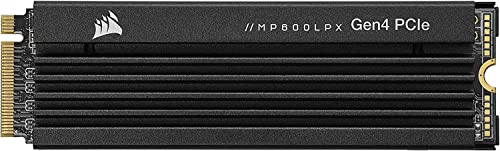
Corsair MP600 Pro LPX
The Corsair MP600 Pro LPX is a PCIe 4.0 SSD with a low-profile heatsink designed for both PS5 and desktop builds. It offers sequential reads up to 7,100 MB/s and writes up to 6,800 MB/s. Its endurance is solid, and the preinstalled heatsink ensures consistent performance. It is a good choice for professionals who also use consoles or need a compact cooling solution. Users find it reliable and easy to install.
Pros
- Preinstalled low-profile heatsink
- Compatible with PS5
- Good endurance
Cons
- Heatsink may be large for some laptops
- Performance not top-tier

Sabrent Rocket 4 Plus
The Sabrent Rocket 4 Plus is a PCIe 4.0 SSD that offers impressive speeds of up to 7,100 MB/s read and 6,600 MB/s write at a more affordable price point. It uses Phison’s E18 controller and high-quality TLC NAND. While its endurance is slightly lower than top-tier drives, it still meets the needs of many professionals. Owners report it performs well in real-world applications and is a great alternative to pricier options.
Pros
- Great price-to-performance
- High speeds
- Available with or without heatsink
Cons
- Lower endurance than some competitors
- Controller runs warm under load
The lineup, side by side
| # | Model | Interface | Best for | Score | Price |
|---|---|---|---|---|---|
| 1 | Samsung 990 PRO | PCIe Gen 4.0 x4, NVMe 2.0 | High-end creative work | 9.4 | Check price |
| 2 | WD Black SN850X | PCIe Gen 4.0 x4, NVMe 1.4 | Gamers and creators who need fast load times | 9.2 | Check price |
| 3 | SK hynix Platinum P41 | PCIe Gen 4.0 x4, NVMe 1.4 | Laptop professionals needing power efficiency | 9.0 | Check price |
| 4 | Crucial T700 | PCIe Gen 5.0 x4, NVMe 2.0 | PCIe 5.0 early adopters | 9.0 | Check price |
| 5 | Seagate FireCuda 530 | PCIe Gen 4.0 x4, NVMe 1.4 | Durability and reliability | 8.8 | Check price |
| 6 | Corsair MP600 Pro LPX | PCIe Gen 4.0 x4, NVMe 1.4 | PlayStation 5 expansion and desktop | 8.6 | Check price |
| 7 | Sabrent Rocket 4 Plus | PCIe Gen 4.0 x4, NVMe 1.3 | Budget-conscious professionals | 8.4 | Check price |
Before you buy
Good to know
What is the main difference between consumer and professional SSDs?
Professional SSDs typically offer higher endurance (TBW), more consistent sustained performance, and often include features like power loss protection. They are built for 24/7 workloads, whereas consumer drives are designed for lighter use.
Do professional SSDs require special cooling?
Many high-performance SSDs generate significant heat, especially under heavy load. Some come with heatsinks, but for drives without them, installing a third-party heatsink or ensuring adequate case airflow is recommended to prevent thermal throttling.
Can I use a professional SSD in my laptop?
Yes, most professional SSDs come in the M.2 2280 form factor that fits laptops with an available slot. However, watch out for thickness constraints and power consumption. Drives like the SK hynix P41 are optimized for energy efficiency.
What is TBW and why does it matter?
TBW stands for terabytes written, which is the total amount of data that can be written to the SSD over its lifetime. It is a key indicator of endurance. For professional workloads, a higher TBW rating ensures the drive lasts longer under heavy write stress.
Is PCIe 5.0 worth it for professional use?
PCIe 5.0 offers dramatically faster sequential speeds, which can be beneficial for tasks involving large file transfers or high-resolution video editing. However, it requires a compatible motherboard and may run hotter. If your workflow benefits from reduced transfer times, it can be worth the investment.
How do I know if my motherboard supports PCIe 4.0 or 5.0?
Check your motherboard’s specifications. Most modern motherboards from 2020 onward support PCIe 4.0, while PCIe 5.0 is available on newer chipsets like Intel Z690/Z790 and AMD X670E. Also, ensure you have a compatible CPU.
What is the typical lifespan of a professional SSD?
With high endurance ratings, professional SSDs can last for many years under heavy use. For example, a 2TB drive with 1,200 TBW can be written to 600 times. The actual lifespan depends on usage patterns, but they often outlast the computer they are installed in.
Are there any software tools to monitor SSD health?
Yes, manufacturers provide tools like Samsung Magician, WD Dashboard, and Crucial Storage Executive. These allow you to check drive health, update firmware, and optimize performance. Third-party tools like CrystalDiskInfo also work with most SSDs.
Can I use a professional SSD for gaming?
Absolutely. Professional SSDs are faster and more durable than typical gaming drives, but they are also more expensive. If you have the budget, they offer excellent performance for gaming as well as professional tasks.
What should I do if my SSD is not recognized?
First, check the physical connection and ensure it is properly seated. Update your motherboard’s BIOS and the SSD’s firmware. If the issue persists, try a different M.2 slot or use a USB enclosure to test the drive. If it still fails, contact the manufacturer for support.
Our take
For the majority of professionals, the Samsung 990 PRO offers the best combination of performance, endurance, and reliability. If you need the absolute fastest speeds and have a PCIe 5.0 system, the Crucial T700 is a worthy upgrade. For those on a budget, the Sabrent Rocket 4 Plus provides excellent value without sacrificing much performance.


