Top RAM Memory Kits for Speed and Stability
For most builders, the Corsair Vengeance LPX 32GB DDR4 kit is the top pick because it offers proven reliability, broad compatibility, and solid performance at a reasonable price. Its main limitation is that it doesn’t have flashy RGB or extreme speeds, but it excels in stability and value.
Choosing the right RAM is crucial for system performance, affecting everything from gaming frame rates to content creation speed. With so many kits on the market, it’s easy to get overwhelmed by specs like frequency, timings, and capacity.
We’ve analyzed specifications and owner reviews to bring you a curated list of the best RAM memory kits available. Whether you’re building a new PC or upgrading an existing one, this guide will help you make an informed decision.
How to pick the right one
The shortlist, ranked

Corsair Vengeance LPX 32GB (2x16GB) DDR4 3200MHz
Corsair’s Vengeance LPX is a classic choice known for its low-profile design and reliable performance. This 32GB kit runs at a sweet spot of 3200MHz with tight timings, making it ideal for Intel and AMD systems. Owners report excellent stability and easy XMP setup. It’s a no-frills kit that gets the job done without breaking the bank.
Pros
- Proven reliability
- Low profile fits most coolers
- Great value
Cons
- No RGB lighting
- Not the fastest DDR4 available

G.Skill Trident Z5 RGB 32GB (2x16GB) DDR5 6000MHz
G.Skill’s Trident Z5 RGB is a top-tier DDR5 kit designed for enthusiasts. With a 6000MHz speed and CL36 latency, it offers exceptional performance for gaming and productivity. The striking RGB lighting and premium heat spreader make it a visual centerpiece. Users praise its overclocking headroom and stability on AM5 and Intel platforms.
Pros
- High frequency with low latency
- Stunning RGB aesthetics
- Excellent build quality
Cons
- Requires DDR5 compatible motherboard and CPU
- Premium price

Crucial Ballistix 32GB (2x16GB) DDR4 3600MHz
Crucial Ballistix is a favorite among AMD users because its 3600MHz speed matches the infinity fabric sweet spot for Ryzen processors. This kit delivers low latency and solid performance. It’s available in various colors and has a sleek, aggressive design. Owners report easy overclocking and good thermal management.
Pros
- Ideal for Ryzen performance
- Good overclocking potential
- Reasonable price
Cons
- Tall heat spreader may block some coolers
- No RGB option on this model
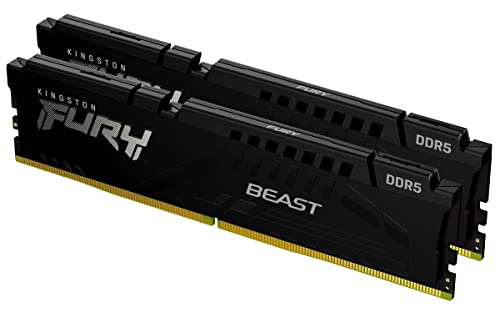
Kingston Fury Beast 32GB (2x16GB) DDR5 5600MHz
Kingston’s Fury Beast DDR5 kit offers an affordable entry into the DDR5 world. Running at 5600MHz, it provides a noticeable jump over DDR4 without the high cost of faster kits. Its plug-and-play design means you can install it and go. Users find it stable and compatible with most modern boards. The heat spreader is stylish and effective.
Pros
- Affordable DDR5 option
- Plug and play with XMP 3.0
- Reliable Kingston brand
Cons
- Higher latency compared to premium kits
- No RGB on base model

Corsair Dominator Platinum RGB 32GB (2x16GB) DDR4 3600MHz
Corsair’s Dominator Platinum RGB is a premium DDR4 kit that combines high performance with luxury aesthetics. It features a distinctive design with dynamic RGB lighting and a robust heat spreader. Running at 3600MHz with low latency, it delivers top-tier performance for gaming and heavy workloads. Owners love the build quality and the iCUE software integration.
Pros
- Superb build quality
- Beautiful RGB lighting
- Excellent performance
Cons
- Expensive
- Tall design may interfere with some coolers

TeamGroup T-Force Delta RGB 32GB (2x16GB) DDR4 3200MHz
TeamGroup’s T-Force Delta RGB offers a great balance of price, performance, and style. This 3200MHz kit provides reliable operation and vivid RGB lighting that can be synchronized with major motherboard software. It’s a popular choice for budget builds that want some flair. Users report easy installation and stable performance at rated speeds.
Pros
- Affordable with RGB
- Good performance for the price
- Wide compatibility
Cons
- Not the fastest timings
- Build quality not as premium as others

G.Skill Ripjaws V 32GB (2x16GB) DDR4 3200MHz
G.Skill Ripjaws V is a no-nonsense RAM kit that focuses on performance and value. This 3200MHz CL16 kit is a dependable upgrade for desktops, offering solid speeds for gaming and multitasking. The heat spreader is low-profile, ensuring compatibility with most CPU coolers. Owners appreciate its straightforward design and reliability.
Pros
- Simple and effective
- Low-profile design
- Budget friendly
Cons
- No RGB
- Average overclocking headroom
Compared at a glance
| # | Model | Capacity | Best for | Score | Price |
|---|---|---|---|---|---|
| 1 | Corsair Vengeance LPX 32GB (2x16GB) DDR4 3200MHz | 32GB (2x16GB) | Best Overall DDR4 | 9.4 | Check price |
| 2 | G.Skill Trident Z5 RGB 32GB (2x16GB) DDR5 6000MHz | 32GB (2x16GB) | Best DDR5 for Gaming | 9.2 | Check price |
| 3 | Crucial Ballistix 32GB (2x16GB) DDR4 3600MHz | 32GB (2x16GB) | Best for Ryzen Builds | 9.0 | Check price |
| 4 | Kingston Fury Beast 32GB (2x16GB) DDR5 5600MHz | 32GB (2x16GB) | Best Budget DDR5 | 8.8 | Check price |
| 5 | Corsair Dominator Platinum RGB 32GB (2x16GB) DDR4 3600MHz | 32GB (2x16GB) | Best Premium DDR4 | 8.7 | Check price |
| 6 | TeamGroup T-Force Delta RGB 32GB (2x16GB) DDR4 3200MHz | 32GB (2x16GB) | Best Value RGB DDR4 | 8.5 | Check price |
| 7 | G.Skill Ripjaws V 32GB (2x16GB) DDR4 3200MHz | 32GB (2x16GB) | Best Basic DDR4 | 8.3 | Check price |
Questions worth asking
How much RAM do I need in 2025?
For everyday computing and light gaming, 16GB is sufficient. For heavy gaming, streaming, or content creation, 32GB is recommended. Power users and professionals may need 64GB or more. It also depends on your budget and future needs.
Is DDR5 worth it over DDR4?
DDR5 offers higher speeds and better efficiency, but it’s only compatible with newer CPUs and motherboards. If you’re building a new system, DDR5 is a good investment. If you’re upgrading an existing system, DDR4 is often more cost-effective.
What does ‘CL’ mean in RAM specs?
CL stands for CAS Latency, which is the delay between the moment the memory controller requests data and the time it’s available. Lower CL values mean faster response times. For example, a CL16 kit is faster than a CL18 kit at the same speed.
Can I mix different RAM brands or speeds?
It’s possible, but not recommended. Mixing RAM can lead to instability or cause the system to run at the lowest common speed. For best performance and stability, use identical modules from the same kit.
How do I enable XMP or DOCP?
Enter your BIOS/UEFI during startup (usually by pressing Delete or F2). Look for an overclocking or memory settings section, and enable XMP (Intel) or DOCP (AMD) profile. Save and exit. This allows the RAM to run at its rated speed.
What is the difference between single-channel and dual-channel RAM?
Dual-channel memory uses two modules to double the data transfer rate, improving system performance. It’s generally better to install RAM in pairs (2x8GB) rather than a single stick (1x16GB) to take advantage of dual-channel architecture.
Why is my RAM not running at its rated speed?
By default, RAM runs at a baseline speed (e.g., 2133MHz for DDR4) until you enable XMP/DOCP in BIOS. If it’s still not running at the rated speed, check compatibility and ensure you’re using the correct slots (usually slots 2 and 4).
Does RAM with higher speed always perform better?
Not always. Performance depends on the combination of speed and latency. Also, the performance gain from higher speeds varies by application and CPU architecture. For example, 3600MHz CL16 is often better than 4000MHz CL19 on Ryzen systems.
Our take
After comparing these top RAM kits, the Corsair Vengeance LPX 32GB DDR4 3200MHz is the best choice for most users due to its outstanding reliability, broad compatibility, and excellent price-to-performance ratio. If you are building a new DDR5 system, go with the G.Skill Trident Z5 RGB for its high speed and overclocking potential. For budget-conscious builders, the Kingston Fury Beast DDR5 offers a cost-effective entry into next-gen memory. Avoid buying the cheapest RAM without checking compatibility and specs; investing a bit more in quality ensures system stability and longevity.