Smart Remote Controls for Every Setup
The Logitech Harmony Elite stands out as the top pick for whole-home control, but its high price and setup complexity may deter some. For a simple streaming remote, the SofaBaton X1 offers a balance of features and value.
Remote controls have evolved far beyond simple channel changers. Modern remotes can command your entire entertainment center, smart lights, and even robotic vacuums. But with so many options, picking the right one can feel overwhelming.
We looked at remotes that cater to different needs: some prioritize simplicity, others offer advanced programming. Owners report that the best remote is one that fits your specific devices and how you use them.
What we recommend
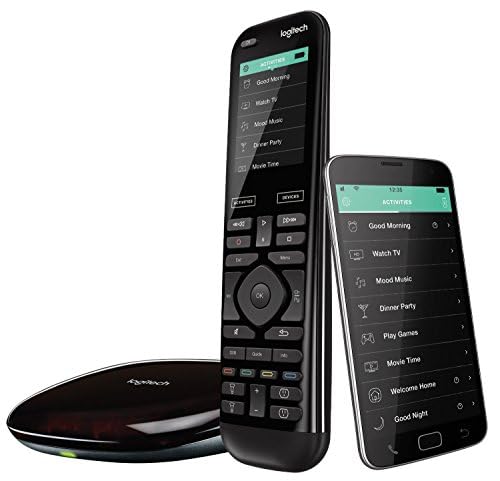
Logitech Harmony Elite
The Harmony Elite is a premium universal remote with a touchscreen and hub. It controls over 270,000 devices and integrates with Alexa, Google Assistant, and smart home platforms. Owners praise its reliability and activity-based control, but note the learning curve and price.
Pros
- Unmatched device compatibility
- Hub allows control from smartphone
- Activity macros control multiple devices with one press
Cons
- Setup is time-consuming
- Premium price point

SofaBaton X1
The SofaBaton X1 is a newer contender that combines IR and Bluetooth with a smart hub. It features a companion app for programming and supports Alexa. Owners like its modern design and lower price, but some report quirks with certain devices.
Pros
- More affordable than Harmony
- Simple app-based setup
- Works with Alexa and Google Assistant
Cons
- Limited macro customization
- Some users note connectivity issues with certain brands

Amazon Fire TV Alexa Voice Remote Pro
This remote is designed for Fire TV devices, offering dedicated buttons for streaming services and a built-in Alexa. It also includes TV controls and can find itself via Alexa. Owners appreciate the responsive voice commands and backlit buttons.
Pros
- Excellent voice search
- Backlit keys for dark rooms
- Lost remote finder using Alexa
Cons
- Only works with Fire TV ecosystem
- No universal IR control for other devices

Roku Voice Remote Pro
The Roku Voice Remote Pro offers hands-free voice control, a headphone jack for private listening, and lost remote finder. It pairs with Roku players and Roku TVs. Owners like the convenience, but it lacks universal device control.
Pros
- Hands-free voice commands
- Private listening via headphone jack
- Rechargeable battery
Cons
- Limited to Roku devices
- No backlight on keys

GE Universal Remote Control for Samsung
This GE remote is preprogrammed for Samsung TVs and also works with many other brands. It comes with a code finder and is easy to set up. Owners report it works well as a basic replacement but lacks advanced features.
Pros
- Very affordable
- Simple setup for Samsung
- Dedicated buttons for streaming services
Cons
- No backlight
- Limited to basic TV control
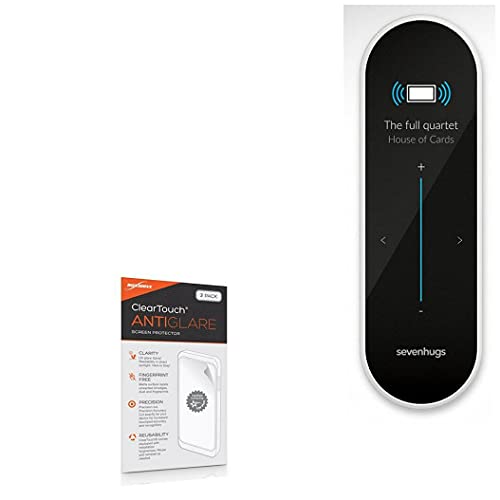
Sevenhugs Smart Remote
The Sevenhugs Smart Remote uses motion to detect which device you are pointing at and displays contextual controls. It integrates with smart home ecosystems. Owners love the intuitive interface, but it requires a hub for full functionality.
Pros
- Contextual controls based on pointing
- Elegant design
- Broad smart home integration
Cons
- Expensive
- Sometimes misdetects devices
Caavo Control Center with Remote
The Caavo Control Center is an HDMI switch that also acts as a universal remote. It connects up to four devices and offers voice search across them. Owners find it useful for integrating cable and streaming, but it adds an extra box to the setup.
Pros
- Simplifies multiple device control
- Voice search across devices
- Reduces remote clutter
Cons
- Requires HDMI connection
- Remote is not backlit
Side by side
| # | Model | Connectivity | Best for | Score | Price |
|---|---|---|---|---|---|
| 1 | Logitech Harmony Elite | Wi-Fi, Bluetooth, IR, RF via hub | Whole-home automation and high-end AV setups | 9.4 | Check price |
| 2 | SofaBaton X1 | IR, Bluetooth, Wi-Fi via hub | Smart home enthusiasts on a budget | 9.0 | Check price |
| 3 | Amazon Fire TV Alexa Voice Remote Pro | Fire TV devices | Fire TV and Alexa users | 8.8 | Check price |
| 4 | Roku Voice Remote Pro | Roku devices and Roku TVs | Roku streaming users | 8.7 | Check price |
| 5 | GE Universal Remote Control for Samsung | Samsung TVs and others | Simple replacement for Samsung TVs | 8.4 | Check price |
| 6 | Sevenhugs Smart Remote | IR, Bluetooth, Wi-Fi via hub | Context-aware control in a minimalist design | 8.2 | Check price |
| 7 | Caavo Control Center with Remote | 4 inputs, 1 output | Cable box and streaming consolidation | 8.1 | Check price |
What to look for
Questions worth asking
Can a universal remote control all my devices?
Most universal remotes can control devices that use IR, Bluetooth, or Wi-Fi, but compatibility varies. Check the remote’s supported device list. High-end remotes like the Harmony Elite support over 270,000 devices, while budget remotes may only cover common TV brands.
What is the difference between IR and RF remotes?
IR remotes require a direct line of sight to the device, while RF remotes can control devices through walls and cabinets. RF remotes often come with a hub that sends IR signals to devices in the room, offering more flexibility in placement.
Do I need a smart hub for a universal remote?
Not all universal remotes need a hub. Some, like the GE Universal Remote, are traditional IR remotes. However, hub-based remotes like the SofaBaton X1 offer more features such as smartphone control and integration with smart home assistants, which can be worth the extra cost.
Can I control my smart lights with a remote?
Yes, if the remote is compatible with your smart lighting system. Many modern remotes support Alexa or Google Assistant, allowing you to control smart lights via voice or through the remote’s interface. The Harmony Elite and Sevenhugs Smart Remote have direct smart home integration.
What is an activity-based remote?
Activity-based remotes let you create macros, such as ‘Watch a Movie,’ which turns on your TV, adjusts the soundbar, and dims the lights with one button press. This is a hallmark of Logitech Harmony remotes and simplifies complex setups.
Are backlit remotes worth it?
Backlit remotes are useful in dark home theaters, as they make buttons visible. Many users report that backlit keys enhance the viewing experience. Some remotes, like the Amazon Fire TV Remote Pro, have motion-activated backlights.
Can I replace my TV’s original remote with a universal one?
Yes, you can replace it with a universal remote. However, some TV-specific functions like picture settings might not be accessible. The GE Universal Remote for Samsung is an affordable option that covers basic functions.
How do I program a universal remote without a code?
Modern remotes often have an auto-search feature that cycles through codes until the device responds. Alternatively, some remotes like the SofaBaton X1 use a companion app that scans your Wi-Fi network for devices, simplifying setup.
What should I do if my remote stops working?
First, check the batteries. If the remote has a charging cable, ensure it’s charged. For hub-based remotes, verify that the hub is powered and connected to Wi-Fi. If issues persist, try reprogramming the remote or contact customer support.
Are there remotes that work with voice assistants?
Yes, many remotes now have built-in microphones for voice commands via Alexa or Google Assistant. The Amazon Fire TV Remote Pro has Alexa built-in, and the Roku Voice Remote Pro offers hands-free voice control. Some universal remotes work with your existing smart speakers.
The verdict
For most people with a complex AV setup, the Logitech Harmony Elite remains the most capable remote, but its price and setup are not for everyone. If you’re on a budget but want smart home integration, the SofaBaton X1 offers remarkable value. For streaming enthusiasts, the official remotes from Amazon or Roku are hard to beat. Choose the Harmony Elite if you need reliable whole-home control; choose the SofaBaton X1 if you want most features at a lower cost.


