Bright Pads for Fast Play: Top RGB Mouse Pads
The Corsair MM700 RGB is our top pick for most gamers because it combines a smooth cloth surface with vivid, customizable lighting and a sturdy build. Its main limitation is the need for a USB port for power, which can be an issue for laptop users.
RGB mouse pads add style to your desk and can improve your aim with the right surface. But with so many options, choosing one can be tricky. We compared popular models to find the best for different play styles and budgets.
Some pads offer full desk coverage, while others are compact for travel. Lighting ranges from simple underglow to per-key effects. Surface speed and texture vary too, affecting glide and control. Our guide helps you pick the right one.
Our top picks
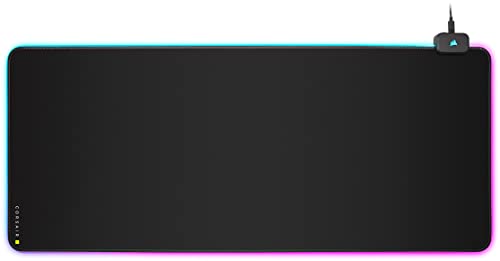
Corsair MM700 RGB Extended
This extended cloth pad offers a smooth, low-friction surface for fast glides. Its three lighting zones are bright and customizable via iCUE. The stitched edges prevent fraying, and the non-slip rubber base keeps it steady during intense matches.
Pros
- Generous size fits full desk
- Bright, even lighting
- Smooth surface for speed
Cons
- Requires USB power
- Software can be complex

Razer Firefly V2
The Firefly V2 features a micro-textured hard surface that offers low friction with high stopping power. Its edge lighting is vivid and customizable through Razer Synapse. The base is rubberized to prevent sliding, and the pad is lightweight for easy portability.
Pros
- Excellent control for low DPI
- Easy to clean
- Compact and portable
Cons
- Smaller surface area
- Hard surface may wear mouse feet

SteelSeries QcK Prism Cloth XL
This XL cloth pad gives you plenty of room for sweeping flicks. The micro-woven fabric offers a balance of speed and control. Two lighting zones are bright and can sync with other SteelSeries gear via PrismSync. The base is non-slip to keep the pad in place.
Pros
- Very wide surface
- Smooth, consistent glide
- Syncs with SteelSeries RGB
Cons
- Not as tall as some extended pads
- Requires USB port

Logitech G840 XL
While not RGB, this pad offers a no-frills approach for those who want a large surface without lighting. The cloth texture provides consistent glide. Its rubber base grips the desk well. It is a durable choice for competitive play.
Pros
- Huge surface area
- Excellent build quality
- No software needed
Cons
- No RGB lighting
- May not fit smaller desks

Corsair MM300 RGB
This medium-sized pad is perfect for smaller desks. It offers a cloth surface with a comfortable glide. The RGB lighting is concentrated on the edges, providing a subtle glow. It is easy to transport for LAN parties.
Pros
- Fits in small spaces
- Lightweight
- Affordable
Cons
- Not enough room for low sensitivity
- Single lighting zone

Redragon P023
This extended pad delivers RGB lighting at a low cost. It has a smooth cloth surface and a non-slip rubber base. The lighting is bright and can be set to different modes via a controller. It is a solid choice for casual gamers.
Pros
- Very affordable
- Large size for the price
- Simple plug-and-play
Cons
- Lighting less customizable
- Stitching may be less durable

Glorious PC Gaming Race XXL Extended
This pad covers your entire desk, offering a huge area for mouse and keyboard. The cloth surface is smooth and comfortable. It has no RGB, but its size and performance make it a favorite among FPS players.
Pros
- Massive coverage
- Smooth glide with control
- Stitched edges for durability
Cons
- No lighting
- May be too large for some
How to choose
Compared at a glance
| # | Model | Surface | Best for | Score | Price |
|---|---|---|---|---|---|
| 1 | Corsair MM700 RGB Extended | Cloth | Best overall for most gamers | 9.4 | Check price |
| 2 | Razer Firefly V2 | Hard plastic | Best for precise control | 9.1 | Check price |
| 3 | SteelSeries QcK Prism Cloth XL | Cloth | Best for large mouse movements | 8.9 | Check price |
| 4 | Logitech G840 XL | Cloth | Best for minimalistic style | 8.6 | Check price |
| 5 | Corsair MM300 RGB | Cloth | Best for mid-sized setups | 8.3 | Check price |
| 6 | Redragon P023 | Cloth | Best budget pick | 8.0 | Check price |
| 7 | Glorious PC Gaming Race XXL Extended | Cloth | Best for desk protection | 8.2 | Check price |
Frequently asked questions
Do RGB mouse pads require special software?
Many do, but some have on-board controls. Software like iCUE or Synapse allows customization of colors and effects. If you prefer simplicity, choose a pad with a physical button.
Can I use an RGB mouse pad with a console?
Yes, but lighting may not sync with console games. The pad’s USB connection provides power, so it works with PS or Xbox for the surface, but lighting is not controlled by the console.
Are hard or cloth RGB pads better for gaming?
It depends on your preference. Hard pads offer speed and are easy to clean, but they can be loud. Cloth pads provide control and comfort, but they can absorb sweat and need more care.
How do I clean an RGB mouse pad?
For cloth pads, use a damp cloth with mild soap. Avoid soaking. For hard pads, wipe with a microfiber cloth. Always unplug the pad before cleaning.
What is the difference between RGB and non-RGB mouse pads?
RGB pads have lighting effects that can enhance your setup’s aesthetics. Non-RGB pads focus solely on surface performance and often cost less. Your choice depends on whether you want visual flair.
Can an RGB mouse pad improve my aim?
The lighting does not affect aim, but the surface texture and glide do. A pad that matches your sensitivity and play style can improve consistency. The RGB is mostly for style.
Do all RGB mouse pads work with Mac or Linux?
Basic lighting may work, but software customization might not be available. Some pads have on-board memory, so you can set colors on Windows and use them on other systems.
How long do RGB mouse pads last?
With proper care, they can last several years. The LEDs typically have a long lifespan. The main risk is wear on the surface. Stitched edges and quality materials extend longevity.
Are extended mouse pads worth it?
Extended pads protect your desk and give room for both mouse and keyboard. They are great for low sensitivity. However, they take up space. If you have a small desk, a smaller pad may be better.
Final word
For most gamers, the Corsair MM700 RGB offers the best mix of size, surface quality, and lighting. If you need precise control, the Razer Firefly V2 is a strong alternative. Budget shoppers will appreciate the Redragon P023, but be aware of its limits.


