Bright Ideas: Our Picks for the Best Smart Bulbs
The Philips Hue White and Color Ambiance Starter Kit is the top pick for most households because it delivers rich colors, reliable connectivity, and a mature app ecosystem. Its main limitation is the higher upfront cost compared to budget options.
Smart bulbs have evolved from a novelty to a practical upgrade for any home. They let you set the mood, schedule lighting, and control everything from your phone or voice assistant. With so many options, it can be tough to decide which one fits your needs.
We’ve sifted through the specs and owner feedback to bring you a lineup of the most reliable and feature-packed smart bulbs. From budget picks to premium color bulbs, this guide covers what you need to know to make a smart choice.
Our top picks

Philips Hue White and Color Ambiance Starter Kit
The Philips Hue system is the gold standard for smart lighting. This starter kit includes two color bulbs and the Hue Bridge, ensuring a stable connection that doesn’t rely on Wi-Fi. Owners report vibrant colors and smooth dimming. The Hue app is intuitive and works with Alexa, Google Home, and Apple HomeKit. It’s pricier than others, but you get what you pay for in terms of performance and ecosystem.
Pros
- Excellent color accuracy and brightness
- Bridge enables reliable communication
- Works with all major smart home platforms
Cons
- Requires separate Hue Bridge for full features
- Higher cost per bulb

Wyze Bulb Color
The Wyze Bulb Color offers an impressive feature set for a budget price. It doesn’t need a hub, connecting directly to your Wi-Fi. You get 16 million colors and scheduling without any monthly fees. Owners find the Wyze app straightforward, and it works with Alexa and Google Assistant. Some have noted occasional connectivity hiccups, but for the price, it’s a steal.
Pros
- Low cost per bulb
- No hub required
- Bright output
Cons
- No Apple HomeKit support
- App can be slow to respond at times

Sengled Smart LED Multicolor A19 Bulb
Sengled’s multicolor bulbs are a popular choice for those deep into the Alexa ecosystem. They connect directly to Wi-Fi, so setup is quick. The bulbs deliver decent color quality and brightness for the price. Users appreciate the responsive app and the ability to set schedules. A downside is that they don’t support Apple HomeKit, and some find the color range slightly less vivid than pricier rivals.
Pros
- Budget-friendly
- Simple setup with Alexa
- No hub needed
Cons
- No HomeKit support
- Colors may appear muted at lower brightness

LIFX Color A19 Wi-Fi Smart Bulb
LIFX bulbs shine with their incredibly bright and saturated colors. They connect directly to Wi-Fi, so no hub is required. They are one of the brightest smart bulbs on the market, reaching 1100 lumens. Owners love the deep colors and the ability to set scenes. The main downside is the higher price and the fact that they require a strong Wi-Fi network for the best performance.
Pros
- Exceptional brightness and color saturation
- No hub required
- Supports Alexa, Google Home, and Siri Shortcuts
Cons
- More expensive
- Needs reliable Wi-Fi to avoid dropouts
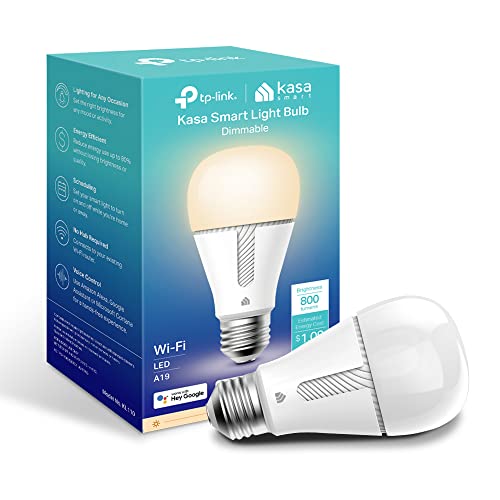
TP-Link Kasa Smart Wi-Fi Light Bulb Dimming
The TP-Link Kasa bulb offers tunable white light from warm to cool, with smooth dimming. It connects directly to Wi-Fi and works with Alexa and Google Assistant. The Kasa app is user-friendly and provides scheduling and away modes. Users appreciate the reliability and the lack of a hub. However, it lacks color options and only supports 2.4GHz Wi-Fi.
Pros
- Smooth dimming without flicker
- No hub required
- Reliable performance
Cons
- No color options
- No HomeKit support

Govee Smart LED Bulb
Govee bulbs are known for their fun features like music sync, where the lights pulse to the beat. They connect via Wi-Fi and offer a wide range of colors. The app is packed with effects and schedules. Owners enjoy the creative control, but note that the music sync is best with the app, not through voice assistants. They work with Alexa and Google, but some users report occasional app bugs.
Pros
- Music sync feature is a blast
- App has many dynamic effects
- Affordable price
Cons
- App can be buggy at times
- No HomeKit support

Sylvania Smart Home Zigbee Soft White A19
Sylvania’s Zigbee bulbs are designed for use with Amazon Echo Plus or Samsung SmartThings hubs. They provide reliable performance and do not clutter your Wi-Fi network. They are dimmable and offer a soft white light. Owners who use them with hubs report seamless integration. A drawback is that they lack color options and require a hub for full smart functionality.
Pros
- Stable Zigbee connection
- Works with Amazon and SmartThings hubs
- Dimmable
Cons
- No color option
- Requires a compatible hub
The lineup, side by side
| # | Model | Bulb Type | Best for | Score | Price |
|---|---|---|---|---|---|
| 1 | Philips Hue White and Color Ambiance Starter Kit | A19 LED | Best overall for rich colors and reliability | 9.4 | Check price |
| 2 | Wyze Bulb Color | A19 LED | Best budget color bulb | 9.0 | Check price |
| 3 | Sengled Smart LED Multicolor A19 Bulb | A19 LED | Best for Alexa users on a budget | 8.8 | Check price |
| 4 | LIFX Color A19 Wi-Fi Smart Bulb | A19 LED | Best for vivid colors without a hub | 9.1 | Check price |
| 5 | TP-Link Kasa Smart Wi-Fi Light Bulb Dimming | A19 LED | Best for dimming without extra hardware | 8.6 | Check price |
| 6 | Govee Smart LED Bulb | A19 LED | Best for music sync and app control | 8.4 | Check price |
| 7 | Sylvania Smart Home Zigbee Soft White A19 | A19 LED | Best for existing smart home hubs | 8.2 | Check price |
Before you buy
Frequently asked questions
Do smart bulbs work with all lamps and fixtures?
Most smart bulbs use a standard E26 base, which fits most lamps and fixtures. However, check if your fixture is enclosed or dimmable; some smart bulbs are not rated for enclosed spaces or may not work with traditional dimmer switches.
Can I control smart bulbs without a hub?
Yes, many smart bulbs connect directly to your Wi-Fi and can be controlled via their companion app or voice assistants without needing a separate hub. Examples include Wyze, LIFX, and TP-Link Kasa.
Do smart bulbs consume more energy?
No, smart bulbs are typically LED, using less energy than incandescent bulbs. Even in standby mode, they draw very little power, often less than a watt.
Can smart bulbs be used in outdoor fixtures?
Some smart bulbs are weather-resistant for outdoor use, but standard indoor bulbs should not be used outside. Check the packaging for an ‘outdoor safe’ rating.
How many smart bulbs can I connect to one hub?
The number varies by hub. For example, the Philips Hue Bridge can support up to 50 bulbs, while many Wi-Fi routers can handle only a limited number of devices before performance suffers.
Will smart bulbs work with my existing dimmer switch?
Most smart bulbs are designed to be controlled via app, not physical dimmer switches. Using a traditional dimmer with a smart bulb can cause flickering or damage. Replace old dimmers with smart switches or use bulbs that are specifically labeled as dimmable.
Can I schedule my smart bulbs?
Yes, scheduling is a common feature. You can set specific times for lights to turn on or off, create wake-up routines, or simulate occupancy while you’re away. Scheduling is done through the app or voice assistant.
What happens if the internet goes down?
If your internet fails, hub-based bulbs may still work through local control if you set up the system properly. Wi-Fi bulbs typically require an internet connection for voice control, but the app may work locally if your phone is on the same network.
Are smart bulbs compatible with Apple HomeKit?
Not all. Some brands like Philips Hue offer HomeKit compatibility, but many budget options do not. Check the product specifications for ‘Apple HomeKit’ support before purchasing.
How do I reset my smart bulb?
Resetting methods vary. For most, you can turn the power off and on several times in a specific sequence, or use the app to remove the device. Consult the manufacturer’s instructions for the exact reset procedure.
The bottom line
For the best overall experience, choose the Philips Hue Starter Kit. It offers unmatched reliability and color quality, making it worth the investment. If you are on a tight budget, the Wyze Bulb Color is an excellent choice that delivers most features at a fraction of the cost.


