Smart Door Locks That Skip the Physical Key
Schlage Encode Smart WiFi Deadbolt is the strongest overall pick, pairing built-in Wi-Fi with a proven ANSI Grade 1 deadbolt. Yale Assure Lock 2 is the value choice, with upgradeable connectivity modules. August Wi-Fi Smart Lock 4th Generation suits renters, since it keeps existing keys and exterior hardware intact.
Schlage Encode Smart WiFi Deadbolt suits most homes, since Wi-Fi is built in and the mechanical lock behind it uses a proven ANSI Grade 1 design. Yale Assure Lock 2 delivers the same job with swappable connectivity modules for less. Renters should look at August Wi-Fi Smart Lock 4th Generation, because it keeps the existing cylinder and keys intact.
Connectivity, form factor and security rating are three separate decisions that marketing often blurs together, and a lock a homeowner can install may be forbidden in a rental. We compared connectivity types, entry methods, whether exterior hardware gets replaced, smart home compatibility and published ANSI grades, then weighed what owners report about battery life and door alignment.
The top picks, ranked

Schlage Encode Smart WiFi Deadbolt
Schlage embeds a Wi-Fi radio directly in the lock, removing the need for a separate bridge or Bluetooth range limits. Up to 100 access codes fit in memory, and the lock carries an ANSI Grade 1 residential security rating. Owners report the built-in Wi-Fi is the biggest convenience gain over bridge-based rivals.
Pros
- No bridge or hub needed for remote access
- Highest residential security grade in this group
- Large code capacity for guests and trades
Cons
- Wi-Fi radio drains batteries faster than Bluetooth
- Interior housing is bulkier than slim rivals

Yale Assure Lock 2 Touchscreen Deadbolt
Yale built the Assure Lock 2 around swappable connectivity modules, so buyers can start with Bluetooth and add Wi-Fi or Z-Wave later. Its touchscreen keypad sits inside a housing noticeably slimmer than earlier Yale models. Key-free and keyed cylinder versions are both available, based on the listing.
Pros
- Connectivity upgrades without buying a new lock
- Slim, modern exterior profile
- Key-free option removes pick risk entirely
Cons
- Wi-Fi module often costs extra
- Touchscreen shows fingerprint smudges in sunlight

August Wi-Fi Smart Lock 4th Generation
August replaces only the interior thumb turn, leaving the exterior cylinder and every existing key working as before. That reversible install is why most landlords approve it. Auto-unlock detects an approaching phone, and the fourth generation ships noticeably smaller than earlier August locks.
Pros
- Existing keys and exterior hardware stay unchanged
- Reversible installation suits rental leases
- Auto-unlock on approach works reliably
Cons
- No keypad unless added separately
- Needs a compatible existing deadbolt cylinder
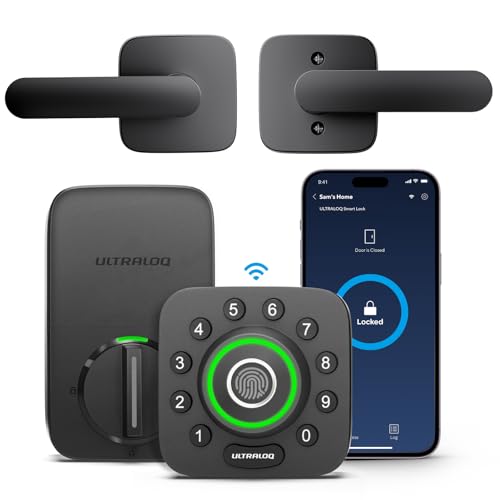
Ultraloq U-Bolt Pro Smart Lock
Ultraloq adds a fingerprint reader alongside the usual keypad, app and key options, useful when hands are full. Recognition responds quickly once prints are enrolled correctly. Six entry methods total, including a physical key backup, based on the listed specifications.
Pros
- Fingerprint entry is fast with full hands
- Wide choice of backup entry methods
- Anti-peep keypad code feature included
Cons
- Wi-Fi needs a separate bridge on most versions
- Wet fingers reduce fingerprint reading accuracy

eufy Security Smart Lock C210
eufy brings fingerprint and keypad entry to the entry-level segment without any subscription fee. Bluetooth handles nearby app control, which suits interior connected homes more than heavy remote access. Owners report battery life beats always-on Wi-Fi locks by a wide margin.
Pros
- Fingerprint entry at an entry-level price point
- No subscription needed for core features
- Long battery life on Bluetooth alone
Cons
- Remote access requires an extra bridge
- Fewer smart home integrations than rivals

Level Lock Plus Connect Smart Lock
Level conceals its entire mechanism inside the deadbolt, so the door keeps looking like it has ordinary hardware on both sides. Apple Home Key support lets a phone or watch unlock it with a tap. A single CR2 battery powers the bolt, according to the listing.
Pros
- Conventional appearance from both sides
- Apple Home Key tap-to-unlock support
- No bulky interior housing
Cons
- No keypad built into the lock
- Small battery needs more frequent changes
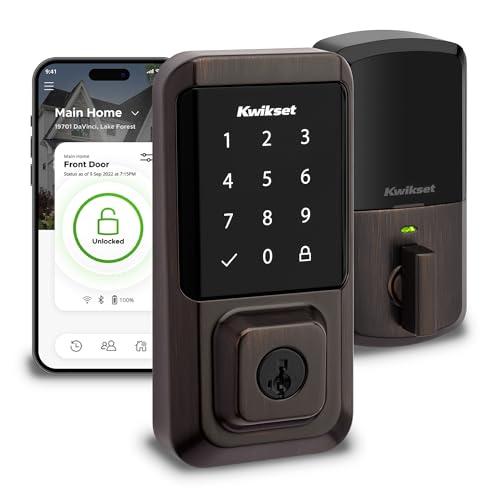
Kwikset Halo Wi-Fi Smart Lock
Kwikset pairs built-in Wi-Fi with its SmartKey cylinder, which owners can rekey themselves in under a minute after a lost key. That flexibility helps landlords and shared households. Installation stays straightforward on standard prepped doors, owners report.
Pros
- Rekey the cylinder without a locksmith
- Wi-Fi built in with no bridge required
- Straightforward install on prepped doors
Cons
- SmartKey cylinders face known bypass criticism
- Exterior housing is chunkier than slim designs
Compared at a glance
| # | Model | Connectivity | Best for | Score | Price |
|---|---|---|---|---|---|
| 1 | Schlage Encode Smart WiFi Deadbolt | Built-in Wi-Fi and Bluetooth | Best overall | 9.4 | Check price |
| 2 | Yale Assure Lock 2 Touchscreen Deadbolt | Modular Wi-Fi, Z-Wave or Bluetooth | Best value | 9.2 | Check price |
| 3 | August Wi-Fi Smart Lock 4th Generation | Built-in Wi-Fi and Bluetooth | Best for renters | 9.0 | Check price |
| 4 | Ultraloq U-Bolt Pro Smart Lock | Bluetooth with optional Wi-Fi bridge | Best for fingerprint entry | 8.8 | Check price |
| 5 | eufy Security Smart Lock C210 | Bluetooth with optional bridge | Best budget | 8.6 | Check price |
| 6 | Level Lock Plus Connect Smart Lock | Wi-Fi and Bluetooth | Best invisible design | 8.3 | Check price |
| 7 | Kwikset Halo Wi-Fi Smart Lock | Built-in Wi-Fi and Bluetooth | Best for rekeying flexibility | 8.0 | Check price |
Before you buy
Wi-Fi, Bluetooth or a hub-based system Bluetooth-only locks talk solely to a nearby phone, which suits homes that never need remote entry and preserves battery life. Built-in Wi-Fi adds full remote access and push notifications from anywhere, at the cost of more frequent battery changes. Z-Wave and Zigbee hub systems sit between the two, running efficiently but requiring a compatible hub already installed in the house.
Retrofit locks versus full deadbolt replacement Retrofit locks such as August replace only the interior thumb turn, leaving the exterior unchanged and existing keys working. Landlords typically approve this option since it is fully reversible. Full replacement deadbolts swap both sides, which keypad entry, fingerprint readers and key-free doors all require.
Entry methods and backup access for different households Consider what happens when a phone battery dies, Wi-Fi drops or an unannounced guest arrives. Keypads cover most of these gaps, and physical key overrides cover the rest. Fingerprint readers add speed but struggle with wet or cold hands, while key-free models remove pick risk but depend fully on codes and batteries.
Fitting, door alignment and ANSI security grades A stiff door, not a weak motor, causes most smart lock jams, since motors apply far less force than a hand. Confirm the deadbolt throws smoothly with the door closed before installing, adjusting the strike plate as needed. ANSI Grade 1 or 2 ratings matter, but long screws anchored into the frame stud do more for real security than any electronics.
Frequently asked questions
Do smart locks work during a power outage?
Yes, since they run on batteries rather than mains power, so the lock itself keeps functioning. Remote access stops working because home Wi-Fi goes down with the outage. Keypad codes and physical keys keep working normally.
Can a landlord refuse a smart lock installation?
They can, especially if it means replacing exterior hardware or swapping the cylinder. Interior-only retrofit models that keep existing keys working get approved far more often. Confirm approval in writing before installing anything.
How long do smart lock batteries last?
Bluetooth-only locks commonly run six to twelve months per set. Built-in Wi-Fi models often need fresh batteries every three to six months depending on use. Owners report cold exterior temperatures shorten battery life noticeably in winter.
Are smart locks safe from hacking?
The realistic risks involve weak codes, reused passwords and physical attacks on the door, not remote hacking. Set a unique account password with two-factor authentication, avoid obvious codes, delete unused guest codes and keep firmware updated.
Can I still use a normal key with a smart lock?
Most models keep a key cylinder as backup, and every retrofit lock does by definition. Key-free versions remove the cylinder entirely, trading pick resistance for full dependence on battery power or a spare key elsewhere.
Will a smart lock fit my door?
Most fit standard doors with a 2 1/8 inch bore hole and a backset of 2 3/8 or 2 3/4 inches, in thicknesses from about 1 3/8 to 1 3/4 inches. Measure the door and check the compatibility list, especially for thick or metal doors.
Do smart locks require a subscription?
Core functions like locking, unlocking and managing codes are normally free. Subscriptions typically add extended activity history, advanced automations or camera integration. Check what sits behind the paywall before buying if history logging matters.
What causes a smart lock to jam?
Door or strike plate misalignment causes jams far more often than lock failure. Check that the deadbolt throws freely by hand with the door shut, then file or reposition the strike plate if it binds. Seasonal wood movement is a common trigger in autumn and spring.
Smart lock vs traditional deadbolt, which is more secure?
Security depends more on the ANSI grade and installation than on whether a lock is smart. A Grade 1 smart deadbolt matches a Grade 1 traditional deadbolt in resistance to forced entry. Smart locks add convenience features like codes and remote access on top of that same mechanical base.
Our pick
Schlage Encode Smart WiFi Deadbolt remains the most complete option, combining built-in Wi-Fi, a large code capacity and the strongest security grade in this group. Yale Assure Lock 2 suits buyers who want to add connectivity later without replacing hardware. Renters should choose August Wi-Fi Smart Lock 4th Generation, since it leaves existing keys and exterior hardware untouched.

