Top Smart Doorbells That Won’t Ruin Your Game Session
For gamers, the Ring Video Doorbell Pro 2 stands out as the top pick. Its advanced motion detection and customizable motion zones ensure you only get alerts for important activity, while its low latency video streaming lets you check who is at the door without leaving your game. The main limitation is its price, which is higher than many other models.
Nothing kills a winning streak like a doorbell chime blaring through your headset. Smart doorbells can be a gamer’s best friend or worst enemy, depending on how they handle notifications.
We looked for models with quiet modes, precise motion zones, and app controls that let you silence the chime during intense sessions. We also prioritized low latency video so you can quickly check who rang without alt-tabbing for ages.
Our top picks

Ring Video Doorbell Pro 2
Ring’s Pro 2 offers head-to-toe HD video and 3D motion detection with customizable zones. Its dual-band Wi-Fi ensures a stable connection, and the quick reply feature lets you send a preset message without opening the app. Gamers appreciate the ability to set motion schedules to avoid distractions during game time.
Pros
- Advanced motion detection with customizable zones
- Low latency video streaming
- Quick replies to avoid full app interaction
Cons
- Requires existing doorbell wiring
- Subscription needed for recording

Arlo Essential Video Doorbell Wired
The Arlo Essential offers 180-degree field of view and a built-in siren. It has a microSD slot for local recording (hub required) and also supports cloud storage with a free plan that includes basic motion alerts. Gamers can set activity zones to monitor only the porch, avoiding unnecessary notifications.
Pros
- No monthly fee for basic features
- Wide field of view
- Local storage option
Cons
- Battery version has slight delay
- Requires Arlo hub for local recording

Google Nest Doorbell (Battery)
The Google Nest Doorbell (Battery) offers up to two and a half months of battery life and can be wired for constant power. It uses on-device AI to distinguish people, animals, and vehicles, reducing false alerts. Gamers can set quiet times and choose to receive alerts only on their phone, not the indoor chime.
Pros
- Smart alerts for people, animals, vehicles
- Flexible power options
- Integration with Google Home for voice announcements
Cons
- Video quality lower than some rivals
- Requires subscription for recorded history

Eufy Security Video Doorbell Dual
Eufy’s Dual doorbell features two cameras: one for packages and one for visitors, providing a complete view. It stores footage locally on a microSD card, eliminating subscription costs. Gamers can set custom activity zones and adjust notification frequency to avoid spam during gameplay.
Pros
- Two cameras cover packages and visitors
- No monthly fees
- High-resolution video
Cons
- Setup slightly more involved
- No 5 GHz Wi-Fi support

RemoBell S
The RemoBell S offers 1080p video and a compact design at a budget price. It has a built-in chime and supports Alexa and Google Assistant. Gamers can use the app to adjust sensitivity and set schedules to silence the chime during specific hours.
Pros
- Affordable price point
- Compact and sleek design
- Works with major voice assistants
Cons
- No battery option
- Limited smart alerts compared to pricier models

Ring Peephole Cam
The Ring Peephole Cam fits over your existing peephole, requiring no drilling. It has a built-in motion sensor and HD camera. Gamers can use the Ring app to get alerts and view live video, and set motion zones to avoid activity in the hallway.
Pros
- Easy installation no wiring
- Ideal for renters
- Has a built-in siren feature
Cons
- Viewing angle limited by peephole size
- Subscription for cloud recording
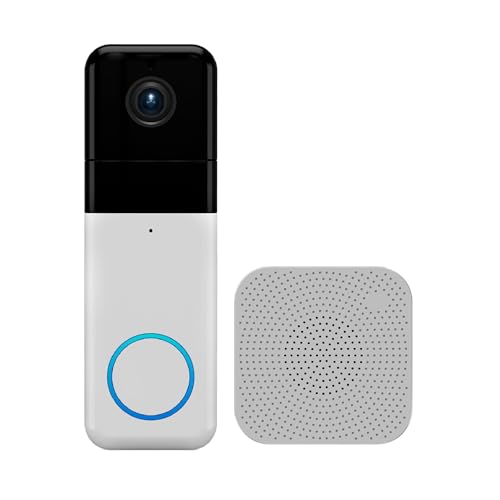
Wyze Video Doorbell Pro
Wyze’s Pro doorbell delivers 2K video and a wide field of view at a very competitive price. It works with Alexa and Google Assistant and offers local storage via microSD. Gamers can set motion detection zones and adjust sensitivity to minimize false alerts.
Pros
- High-resolution video at low price
- Dual-band Wi-Fi
- Supports local microSD storage
Cons
- Requires Wyze subscription for cloud recording
- Some users report occasional app quirks
What matters most
How they stack up
| # | Model | Video Resolution | Best for | Score | Price |
|---|---|---|---|---|---|
| 1 | Ring Video Doorbell Pro 2 | 1536p HD | Best overall for gamers with advanced security needs | 9.4 | Check price |
| 2 | Arlo Essential Video Doorbell Wired | 1536p HD | Best for privacy-focused gamers who want no subscription | 8.9 | Check price |
| 3 | Google Nest Doorbell (Battery) | 960p HD | Best for Google Home users wanting familiar alerts | 8.8 | Check price |
| 4 | Eufy Security Video Doorbell Dual | 2K (front), 1080p (package view) | Best for no monthly fees with local storage | 9.0 | Check price |
| 5 | RemoBell S | 1080p HD | Best budget-friendly option with quick video | 8.2 | Check price |
| 6 | Ring Peephole Cam | 1080p HD | Best for renters or apartments with no wiring | 8.5 | Check price |
| 7 | Wyze Video Doorbell Pro | 2K QHD | Best for budget-conscious gamers who want 2K video | 8.7 | Check price |
Good to know
Can I mute the doorbell chime while gaming?
Yes, most smart doorbells have a physical chime that can be muted through the app. Some also allow you to set quiet hours, which automatically silences the chime during specific times.
Will smart doorbell notifications slow down my internet?
Smart doorbells use a small amount of bandwidth, typically under 2 Mbps for video streaming. If you have a decent internet connection, it should not affect your gaming latency significantly.
What is the best way to get alerts without leaving the game?
Some doorbells can integrate with smart lights or displays. For example, you can set up an Alexa or Google Home announcement that speaks through your speakers, or a light that blinks. This way, you can glance at a second screen without alt-tabbing.
Do I need a subscription for a video doorbell?
Many doorbells offer basic live viewing and motion alerts for free. However, cloud recording of events typically requires a subscription. Some models, like Eufy and Wyze, offer local storage with no monthly fee.
Which doorbell has the lowest video latency?
Wired doorbells generally have lower latency because they maintain a constant power connection, reducing delays. Among the models we compared, Ring Pro 2 and Google Nest Doorbell (wired) are known for quick video access.
Can I use a smart doorbell with my gaming PC or console?
Yes, you can use the mobile app on your phone or tablet, and some doorbells have web browser access. For gaming consoles, you might need to use a separate device like a phone or tablet to view the feed.
How do I prevent false alerts from passing cars?
Set up activity zones in the app to exclude the street. Additionally, adjust the motion sensitivity and turn on person detection if available to filter out non-human motion.
Is it possible to have multiple users get notifications?
Most smart doorbells allow you to share access with family members or friends. They can receive the same notifications and view the live feed, but you should check the app’s permission settings.
What if I have a smart home ecosystem already?
Choose a doorbell that works with your existing ecosystem, such as Amazon Alexa, Google Assistant, or Apple HomeKit. This allows for seamless integration, like announcing on your Echo speakers or showing the feed on a smart display.
Can I talk to the delivery person without opening the app?
Some doorbells offer quick reply messages that you can send with a single tap. For two-way audio, you’ll need to open the app, but it’s still quick if the app loads fast.
Final word
For gamers who want the best balance of performance and customization, the Ring Video Doorbell Pro 2 is the clear winner. Its low latency video and advanced motion zones ensure you only get notifications when it matters. If you prefer to avoid monthly fees, the Eufy Dual offers excellent value with local storage and two cameras, making it a strong alternative.