Top Smart Exercise Bikes for Interactive Indoor Training
The Peloton Bike+ is our top pick for its large rotating screen, auto-follow resistance, and vast content library, ideal for riders who want the most immersive and interactive experience, though it comes with a premium price and a required subscription for full benefits.
Smart exercise bikes have transformed indoor cycling by offering live and on-demand classes, automatic resistance adjustments, and detailed performance tracking. With so many models available, finding the right one can be overwhelming.
We compared seven popular smart bikes to highlight their strengths, limitations, and who they suit best. From budget-friendly options to premium flagship models, this guide covers a range of choices to help you decide.
The top picks, ranked

Peloton Bike+
The Peloton Bike+ features a 23.8 inch rotating HD touchscreen, auto-follow resistance that adjusts to instructor cues, and a powerful sound system. It offers a vast library of live and on-demand classes, plus scenic rides and strength workouts. The bike has a sturdy frame and magnetic resistance for a smooth, quiet ride.
Pros
- Auto-follow resistance syncs with classes
- Rotating screen for off-bike workouts
- High quality build and smooth ride
Cons
- Premium pricing compared to competitors
- Subscription required for full class access

Echelon Smart Connect EX-5s
The Echelon EX-5s offers a 21.5 inch HD touchscreen, adjustable resistance, and a compact design. It includes access to Echelon’s class library, though a membership is needed. The bike provides live metrics and leaderboard challenges, and its handlebars adjust for comfort. It is a solid alternative for those who want a similar experience to Peloton at a lower price.
Pros
- Large touchscreen for the price
- Compact footprint
- Good variety of class types
Cons
- Membership separate (not included)
- Screen not as sharp as Peloton’s
NordicTrack Commercial S22i Studio Cycle
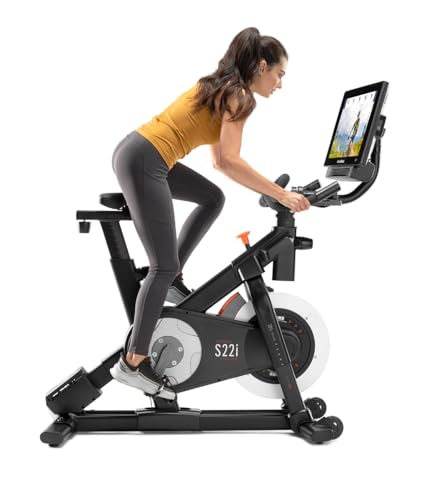
The NordicTrack S22i offers a 22 inch rotating touchscreen, -10% to 20% incline and decline capabilities, and automatic resistance control via iFit. It features a 32 lb flywheel and a sturdy frame. With iFit, you get immersive trainer-led rides that adjust resistance and incline automatically. This bike is ideal for simulating outdoor terrain.
Pros
- Incline and decline adds challenge
- Auto-adjusts with iFit
- Rotating screen for other workouts
Cons
- iFit subscription required for auto features
- Bulky frame takes up space

Schwinn IC4 Indoor Cycling Bike
The Schwinn IC4 is a belt-driven bike with a 40 lb flywheel, providing a smooth and quiet ride. It does not have a screen, but it broadcasts resistance, cadence, and heart rate via Bluetooth and ANT+. This means it works with apps like Peloton, Zwift, and Sufferfest, making it a versatile choice for those who already have subscriptions or prefer to use their own tablet.
Pros
- Works with multiple fitness apps
- Heavy flywheel for smooth ride
- Adjustable to fit most users
Cons
- No built-in screen
- Requires separate equipment for apps
Bowflex C6 Bike
The Bowflex C6 is nearly identical to the Schwinn IC4, offering a 40 lb flywheel, magnetic resistance with 100 micro-adjustable levels, and Bluetooth connectivity. It is compatible with popular apps like Peloton and Zwift. The bike includes a media holder and a water bottle holder, making it convenient for your own device. It is a great value for those who want a quality bike without a built-in screen.
Pros
- Low price point
- Smooth and quiet operation
- App compatible with many platforms
Cons
- No built-in screen
- Pedals may need upgrading
ProForm Studio Bike Pro 22
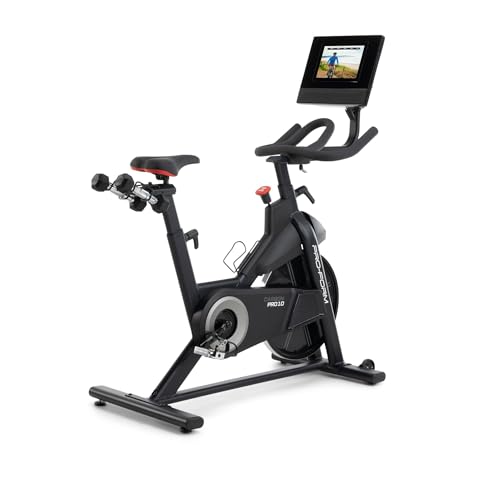
The ProForm Studio Bike Pro 22 features a 22 inch rotating HD touchscreen, 32 digital resistance levels, and auto-adjust capabilities when used with iFit. It has a 32 lb flywheel and a comfortable seat. With iFit, you can access a vast library of studio and scenic rides led by professional trainers. The bike’s price is competitive, though a membership is needed for full functionality.
Pros
- Large screen with rotating capability
- Auto-resistance with iFit
- Smooth magnetic resistance
Cons
- iFit subscription required
- Some users report seat discomfort

SOLE SB900 Smart Exercise Bike
The SOLE SB900 is a heavy-duty indoor bike with a 42 lb flywheel, providing a stable and smooth ride. It includes a built-in tablet holder and Bluetooth connectivity for pairing with apps like Zwift and Peloton. The bike has a commercial-grade frame and a comfortable gel seat. It offers 100 levels of resistance and a compact footprint, making it a reliable choice for intense workouts.
Pros
- Very stable and durable frame
- Smooth, heavy flywheel
- Works with various apps
Cons
- Heavier bike may be harder to move
- Tablet holder not as secure as built-in screen
How they compare
| # | Model | Screen | Best for | Score | Price |
|---|---|---|---|---|---|
| 1 | Peloton Bike+ | 23.8 inch HD multi-touch rotating | Best overall for immersive classes and auto resistance | 9.4 | Check price |
| 2 | Echelon Smart Connect EX-5s | 21.5 inch HD touchscreen | Best for value with a large screen and diverse classes | 8.8 | Check price |
| 3 | NordicTrack Commercial S22i Studio Cycle | 22 inch rotating HD touchscreen | Best for incline and decline training | 9.0 | Check price |
| 4 | Schwinn IC4 Indoor Cycling Bike | 100 levels magnetic | Best for compatibility with popular apps | 8.6 | Check price |
| 5 | Bowflex C6 Bike | 100 levels magnetic | Best for budget-conscious app users | 8.4 | Check price |
| 6 | ProForm Studio Bike Pro 22 | 22 inch rotating HD touchscreen | Best for interactive training with iFit | 8.7 | Check price |
| 7 | SOLE SB900 Smart Exercise Bike | 42 lbs | Best for heavy-duty build and tablet integration | 8.2 | Check price |
How to choose
Good to know
Do I need a subscription for a smart exercise bike?
Many smart bikes require a subscription to access their full library of classes and features. For example, Peloton and Echelon have their own membership fees. However, some bikes like the Schwinn IC4 and Bowflex C6 do not require a subscription; you can use them with free apps or your own training programs.
Can I use my own tablet with a smart bike?
Yes, many smart bikes are designed to work with your own tablet or phone. Bikes without a built-in screen often have a media holder and Bluetooth connectivity, allowing you to use apps like Zwift or Peloton on your device.
What is the difference between magnetic and friction resistance?
Magnetic resistance uses magnets to create resistance, which is quiet and smooth, requiring little maintenance. Friction resistance uses a brake pad that presses against the flywheel, which can wear out over time and may be noisier. Most modern smart bikes use magnetic resistance.
How much space do I need for a smart exercise bike?
Most smart bikes have a footprint of about 2 feet by 4 feet. However, some models with larger screens or incline features may require more clearance. Check the product dimensions and ensure you have adequate space for the bike and for getting on and off safely.
What is the maximum user weight for smart bikes?
Maximum weight capacity varies by model. Most quality smart bikes support riders up to 300 pounds or more. For example, the Peloton Bike+ has a weight capacity of 297 pounds, while the Bowflex C6 supports 330 pounds. Always check the specifications before purchasing.
Can I watch streaming services on a smart bike?
With some smart bikes that have built-in screens, you may be able to access streaming apps if the bike allows it. For instance, Peloton offers some entertainment options. However, most bikes are focused on fitness content. Using your own tablet might give you more flexibility to watch other services while riding.
How do I track my progress on a smart bike?
Smart bikes typically display metrics like cadence, resistance, speed, distance, and estimated calories. They can also sync with fitness apps and wearables via Bluetooth to track your workouts over time. Some bikes have leaderboards and achievements to keep you motivated.
Are smart exercise bikes suitable for beginners?
Yes, smart bikes offer a variety of classes and resistance levels that can accommodate beginners. Many have introductory programs and allow you to adjust the intensity. The interactive features can make it more engaging and help you stay consistent.
What is the warranty on smart exercise bikes?
Warranties vary by brand. Most offer at least a 1-year parts and labor warranty, with some providing longer warranties on the frame. For example, Peloton offers a 12-month warranty, while Schwinn provides a 10-year frame warranty. Check the manufacturer’s warranty details for each bike.
Can I ride a smart bike without an internet connection?
Yes, you can use the bike without internet if it has manual resistance control and a basic metrics display. However, interactive features like streaming classes, auto-adjust resistance, and syncing data require an internet connection. Some bikes store limited data offline, but full functionality needs Wi-Fi.
Our pick
For most riders seeking the ultimate interactive experience, the Peloton Bike+ is the best choice due to its seamless integration, excellent build, and engaging classes, but its high price may be a deterrent. If you want to save money but still enjoy app-based workouts, the Schwinn IC4 is a smart investment, as it offers excellent compatibility and a smooth ride at a lower cost. Choose the NordicTrack S22i if you crave variety with incline training and outdoor simulations. Ultimately, the best bike is one that fits your fitness goals and budget, so focus on features that matter most to you.