Pet Cams Built for Apartment Living: Smart Picks
For apartment dwellers, the Furbo 360 is the top pick, offering a rotating camera and treat tossing to keep pets engaged. Its main limitation is the need for a subscription for some features. The Wyze Cam v3 is a budget-friendly alternative with solid night vision, but it lacks interactive treats.
Living in an apartment with pets brings unique challenges. You want to check in on your furry friend without bulky equipment or complex setup. The right pet camera can ease separation anxiety and keep tabs on mischief.
These cameras offer live streaming, two-way audio, and some even dispense treats. We focused on models that fit small spaces, respect neighbors’ privacy, and are easy to install. Below are the best options for apartment living.
What we recommend

Furbo 360 Dog Camera
The Furbo 360 is a premium pet camera with a 360-degree rotating lens and treat tossing. It has two-way audio with barking alerts and works with Alexa. Owners report crisp video and a responsive app. The main downside is the subscription for advanced features like cloud storage.
Pros
- Pan and tilt covers whole room
- Treat tossing is a hit with pets
- Clear night vision
Cons
- Requires subscription for cloud storage
- Bulky design may not suit tiny shelves

Wyze Cam v3
The Wyze Cam v3 is an affordable indoor camera that excels in low light. It offers color night vision and two-way audio. It’s compact and mounts easily. Owners appreciate the free cloud storage for 14 days. However, it lacks pan and tilt, so you may need multiple units.
Pros
- Excellent value for money
- Color night vision is rare at this price
- No subscription needed for core features
Cons
- No pan or tilt
- Plastic build feels less durable

Petcube Bites 2
The Petcube Bites 2 is a treat camera that also streams live video. It has a wide angle lens and supports two-way audio. The treat dispenser is customizable and can be triggered via app. Owners like the subscription options for 24/7 recording, but it’s pricey.
Pros
- Wide lens covers more area
- Treats can be scheduled
- Great app with easy sharing
Cons
- Expensive compared to others
- Treat dispenser can jam with small treats

TP-Link Tapo C210
The TP-Link Tapo C210 is a pan and tilt camera with auto tracking. It offers 1080p video and two-way audio. It has a microSD slot for local storage. Owners report smooth motion and easy setup. The only downside is that the app is less polished than competitors.
Pros
- Flawless pan and tilt
- Affordable alternative to Furbo
- Local storage means no monthly fee
Cons
- No treat dispenser
- App interface clunky
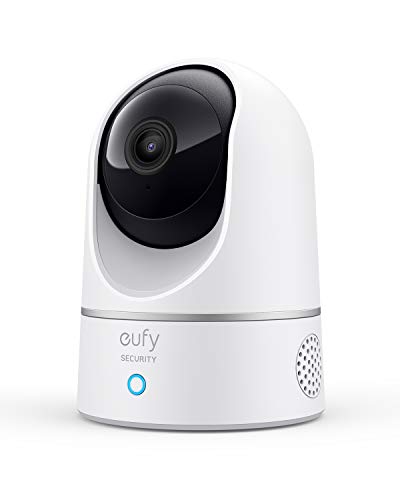
eufy Solo IndoorCam C24
The eufy Solo IndoorCam C24 has a physical privacy shutter and local storage. It records at 2K resolution and includes AI detection for people, pets, and sound. No subscription is needed for basic alerts. Owners value the data privacy as there is no cloud requirement.
Pros
- Physical shutter blocks lens when off
- 2K resolution is sharp
- On-device AI reduces false alerts
Cons
- No pan or tilt
- Requires wiring for continuous power

YI Smart Home Camera 2K
The YI Smart Home Camera 2K delivers high resolution at a low price. It has auto tracking and a built-in siren. Two-way audio works well. Owners note that the app shows ads and some features are behind a subscription, but the core is free.
Pros
- Very affordable with 2K clarity
- Pan and tilt with auto tracking
- Siren can scare off intruders
Cons
- App has ads
- Subscription needed for cloud storage

Blink Mini
The Blink Mini is a tiny camera that plugs into any outlet. It offers HD video and two-way audio. It is easy to set up and works with Alexa. Owners like its size, but it lacks advanced features and requires an optional subscription for cloud storage.
Pros
- Ultra compact fits anywhere
- Easy installation
- Alexa support for voice control
Cons
- No pan or tilt
- No free cloud storage
How to choose
Side by side
| # | Model | Field of view | Best for | Score | Price |
|---|---|---|---|---|---|
| 1 | Furbo 360 Dog Camera | 360 degrees pan, 180 tilt | Best overall for interactive features | 9.4 | Check price |
| 2 | Wyze Cam v3 | Fixed wide angle 130 degrees | Budget friendly without sacrificing quality | 9.1 | Check price |
| 3 | Petcube Bites 2 | 160 degrees wide angle | Best for treat dispensing with wide angle | 9.0 | Check price |
| 4 | TP-Link Tapo C210 | Pan 360 degrees, tilt 114 | Best pan/tilt under current price | 8.8 | Check price |
| 5 | eufy Solo IndoorCam C24 | Fixed wide angle 125 degrees | Best privacy features | 8.7 | Check price |
| 6 | YI Smart Home Camera 2K | Pan 330 degrees, tilt 100 | Best for pet parents on a tight budget | 8.5 | Check price |
| 7 | Blink Mini | Fixed 110 degrees | Best for simple plug and play | 8.0 | Check price |
Questions worth asking
Do pet cameras work over Wi-Fi?
Yes, all the cameras listed use Wi-Fi to stream live video to your smartphone. They need a stable 2.4GHz connection for best performance.
Can I talk to my pet through the camera?
Yes, all have two-way audio, so you can speak to your pet and hear them. Some models like the Furbo even have a speaker that can toss treats.
Will these cameras work in a small apartment?
Absolutely. They are designed for indoor use and are compact. You can place them on a table, shelf, or mount on the wall.
How much storage do I need?
Most cameras offer cloud storage plans or local microSD. For a few hours of footage, free cloud tiers may be enough. For continuous recording, a microSD card is recommended.
Can I use a pet camera as a regular home security camera?
Yes, they have motion detection and live viewing, so they serve dual purposes. However, they may lack advanced features like siren or professional monitoring.
Do these cameras have night vision?
Most do. The Wyze Cam v3 and eufy C24 have color night vision, while others use infrared LEDs for black and white night vision.
Are there any monthly fees?
Some require a subscription for cloud storage or advanced alerts. Wyze offers free cloud for 14 days, while Tapo and eufy allow local storage with no fee.
Which camera has the best treat dispenser?
The Furbo 360 and Petcube Bites 2 both have treat dispensers. Furbo rotates for fun, but Petcube has a wider angle.
Can I access the camera remotely from work?
Yes, all cameras have mobile apps that allow remote viewing from anywhere with internet connection.
What if I move out of my apartment?
Most cameras are easy to uninstall and take with you. They are portable and can be set up in a new home quickly.
The verdict
If you want the best interactive experience, choose the Furbo 360. For a budget-friendly option that still offers great quality, the Wyze Cam v3 is the way to go. For a balance of price and pan/tilt, the TP-Link Tapo C210 offers excellent value. Ultimately, the Furbo 360 stands out for its treat tossing and wide coverage, making it the top recommendation for apartment pet parents.