Smart Glasses for the Office: Picks That Mean Business
For professionals, the Ray-Ban Meta Smart Glasses are the top pick because they combine a discreet design with excellent audio and a capable camera for quick note capture. Their main advantage is seamless integration with social media and hands-free calling. The main limitation is the lack of a visual display, so they are not for those needing on-screen information.
Smart glasses have moved beyond novelty into genuine workplace tools. They can take notes, answer calls, and even show notifications without pulling out your phone. This roundup focuses on models that fit professional environments, from conference calls to field work.
We compared seven top smart glasses on audio, camera, display, battery life, and comfort. Each pick excels in specific scenarios, so you can choose based on your daily needs. Whether you need a subtle camera or a heads-up display, these glasses deliver real utility.
What we recommend

Ray-Ban Meta Smart Glasses
Ray-Ban Meta Smart Glasses offer a classic style with hidden tech. They have a 12MP camera, open-ear speakers, and a five-microphone array for clear calls. The glasses are comfortable for all-day wear, and the touch controls are intuitive. Owners report excellent audio for music and calls, though the camera lacks a viewfinder.
Pros
- Discreet classic design
- Excellent audio quality
- Easy social media sharing
Cons
- No visual display
- Battery life moderate with heavy use

Amazon Echo Frames (3rd Gen)
Amazon Echo Frames are lightweight and comfortable, with Alexa built in. They offer multi-day battery life in mixed use and crisp speakers for calls and podcasts. The glasses have a subtle design that fits into most professional settings. They lack a camera, which may be a privacy plus for some workplaces. Owners appreciate the hands-free control of smart home devices and reminders.
Pros
- Lightweight and comfortable
- Long battery life
- Privacy-friendly no camera
Cons
- Requires Alexa ecosystem
- No display or camera

Xreal Air 2 Pro
Xreal Air 2 Pro are not your typical glasses; they project a virtual screen that appears as a large monitor. They are ideal for professionals who need to view documents, code, or presentations on the go. The glasses are lightweight and comfortable, though they require a wired connection to a compatible device. They are not for outdoor use due to tinted lenses.
Pros
- Large virtual display
- Sharp and clear optics
- Lightweight for a display device
Cons
- Requires wired connection
- Not suitable for outdoor use

Lenovo ThinkReality A3
ThinkReality A3 are designed for business with enterprise-grade security and management. They offer a 1080p display in front of each eye and can project up to five virtual monitors. They are compatible with select Lenovo PCs and industrial applications. The glasses are durable and comfortable, but they have a higher price point and require a tethered connection.
Pros
- Secure and manageable
- Multiple virtual monitors
- Durable build
Cons
- Tethered to PC
- Heavier than consumer models
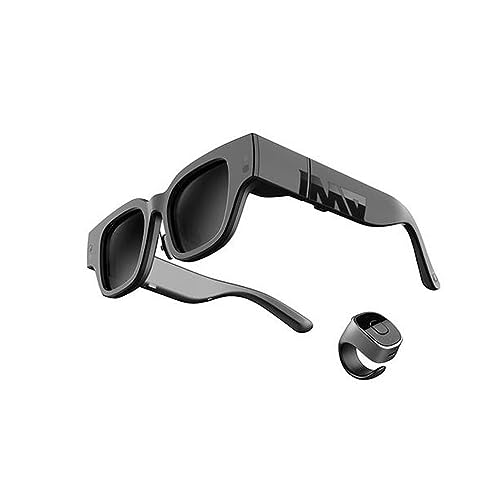
INMO Air 2
INMO Air 2 are lightweight glasses with a small display in the corner that shows notifications, messages, and turn-by-turn directions. They support voice commands and have built-in speakers. They are more affordable than many smart glasses, making them an entry point. However, the display is small and might not be readable in bright light.
Pros
- Budget-friendly
- Hands-free notifications
- Voice control
Cons
- Small display area
- Battery life modest

Rokid Max
Rokid Max offer a large 215-inch virtual screen experience at a distance. They are great for watching presentations or working with multiple windows. The glasses are comfortable and can be worn with prescription lenses. They have built-in speakers and a 120Hz refresh rate for smooth visuals. They require a compatible device with USB-C DP output.
Pros
- Large virtual screen
- High refresh rate
- Clear optics
Cons
- Requires compatible device
- No built-in battery

TCL RayNeo X2
TCL RayNeo X2 are true AR glasses with a binocular waveguide display that overlays information onto the real world. They support real-time translation, navigation arrows, and notifications. They have a built-in camera and are lightweight due to waveguide technology. However, the display is still dim in direct sunlight, and the field of view is narrower than some rivals.
Pros
- True AR overlays
- Real-time translation
- Lightweight design
Cons
- Display dim in sunlight
- Limited app ecosystem
How they compare
| # | Model | Camera | Best for | Score | Price |
|---|---|---|---|---|---|
| 1 | Ray-Ban Meta Smart Glasses | 12MP photo, 1080p video | Best overall for most professionals | 9.4 | Check price |
| 2 | Amazon Echo Frames (3rd Gen) | Open-ear directional speakers | Best for voice-first productivity with Alexa | 9.0 | Check price |
| 3 | Xreal Air 2 Pro | Micro-OLED, 1080p per eye | Best for private display and multi-monitor work | 8.9 | Check price |
| 4 | Lenovo ThinkReality A3 | Dual 1080p micro-OLED | Best for enterprise and secure remote support | 8.7 | Check price |
| 5 | INMO Air 2 | Birdbath micro-OLED, monocular | Best for notifications and quick glances | 8.3 | Check price |
| 6 | Rokid Max | Micro-OLED, 1080p | Best for immersive display with a wide field of view | 8.6 | Check price |
| 7 | TCL RayNeo X2 | Binocular waveguide, green microLED | Best for augmented reality navigation and translation | 8.4 | Check price |
Before you buy
Frequently asked questions
Are smart glasses professional appropriate?
Yes, many smart glasses are designed to look like regular eyewear. Brands like Ray-Ban and Amazon offer classic styles that do not draw attention. However, some models with cameras may be restricted in certain workplaces. Always check your company’s policy on recording devices. For meetings, audio-only glasses are usually safe.
Can I use smart glasses with prescription lenses?
Many smart glasses offer prescription lens options. For example, Ray-Ban Meta and Amazon Echo Frames have a variety of frame styles that can be fitted with prescription lenses. Some AR glasses like Rokid Max and Xreal Air provide prescription lens inserts that you can attach. Check with the manufacturer or retailer for availability.
Do smart glasses have good audio quality for calls?
Smart glasses with open-ear speakers can have excellent audio for calls. They use directional speakers that project sound toward your ears, while microphones capture your voice. Top models like Ray-Ban Meta and Amazon Echo Frames have multiple microphones for noise reduction. However, in loud environments, they may not match dedicated headsets.
How long do smart glasses batteries last?
Battery life varies by model and usage. Audio-focused glasses like Amazon Echo Frames can last up to 14 hours on a single charge. Glasses with displays, such as Xreal Air 2 Pro, often have shorter battery life, sometimes around 2-3 hours, because they draw more power. Some models must be connected to a power source via USB-C to function.
Are there smart glasses with a heads-up display for notifications?
Yes, models like INMO Air 2 and TCL RayNeo X2 offer displays that show notifications. These displays appear in your field of view, allowing you to glance at messages without pulling out your phone. The display area is usually in the corner, so it does not obstruct your vision. However, readability in bright sunlight can be an issue.
Can smart glasses record video for meetings or training?
Some smart glasses have built-in cameras that can record video in 1080p. For example, Ray-Ban Meta can capture video clips. This is useful for recording meetings or creating training content. Keep in mind that recording others without consent may be illegal in some places. Always inform participants and follow privacy laws.
Do I need to connect smart glasses to my phone?
Most smart glasses rely on a Bluetooth connection to your smartphone for calls, notifications, and app integration. Some display glasses require a wired USB-C connection to a compatible phone, tablet, or computer. For example, Xreal Air 2 Pro and Rokid Max need a DP output device. Always check compatibility before buying.
What is the difference between AR and smart glasses?
Smart glasses typically provide audio and maybe a simple notification display. AR glasses, like TCL RayNeo X2, overlay digital information onto the real world, such as navigation arrows or 3D objects. AR glasses often have more advanced optics and sensors. For professional use, AR glasses can assist with hands-free instructions, but they are usually more expensive and have shorter battery life.
The bottom line
For most professionals, the Ray-Ban Meta Smart Glasses are the best choice due to their combination of style, audio, and camera. If you need a visual display for productivity, the Xreal Air 2 Pro offers a high-quality virtual monitor experience. For voice-first assistance with long battery life, the Amazon Echo Frames are a solid pick. Choose based on your primary need: communication, display, or assistant.