Smart Lighting for Gaming: Top Picks for Immersive Play
The Govee Glide Hexagon Light Panels take the top spot for gamers who want dynamic, room-filling effects. They offer modular design and music sync. Their main limitation is the need for careful placement to get the best visual impact.
Smart lighting transforms a gaming setup from ordinary to immersive. The right lights reduce eye strain and set the mood for intense sessions.
With many choices, focus on what matters: color range, brightness, and how well they sync with games or music. This guide breaks down the top performers.
Our top picks

Govee Glide Hexagon Light Panels
These modular panels stick to walls in any pattern. Each panel shows multiple colors at once. They sync with music and react to screen content via the app. Owners love the vibrant glow that fills a room.
Pros
- Highly customizable layout
- Bright and accurate colors
- Excellent music sync
Cons
- Adhesive may weaken over time
- Setup requires planning
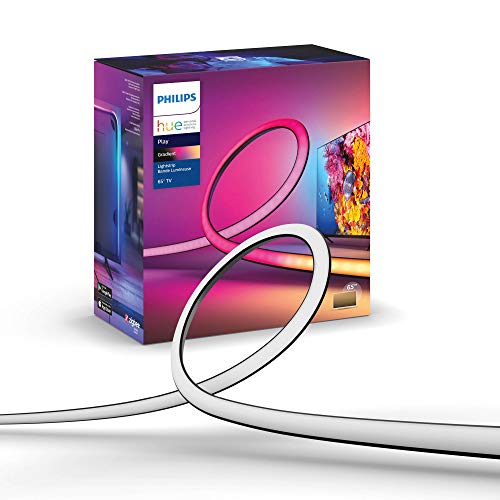
Philips Hue Play Gradient Lightstrip
This lightstrip attaches to the back of your TV. It projects colors that match what is on screen. It works with HDMI sync box for full effect. Users report a dramatic boost in immersion.
Pros
- Seamless TV ambient glow
- High color accuracy
- Reliable ecosystem
Cons
- Expensive with sync box
- Requires Hue Bridge

Nanoleaf Shapes Hexagons
Sleek hexagonal tiles offer touch controls and rhythm sync. They have a minimalist look that fits any room. Owners appreciate the responsive touch gestures. They work with Apple HomeKit and other platforms.
Pros
- Touch controls on each panel
- Sleek design
- Broad smart home support
Cons
- Higher price per panel
- Mounting clips can be tricky

Govee RGBIC LED Strip Lights
This flexible strip can show multiple colors at once. It has a strong adhesive and easy setup. The app offers many scenes and music modes. Owners find it a great entry into ambient lighting.
Pros
- Affordable price
- Multiple colors on one strip
- Easy cut and extend
Cons
- Adhesive may need extra tape
- No screen sync

LIFX Beam
These linear bars connect to form lines or shapes. They provide bright, even light without a hub. Each bar can show different colors. Users like the simplicity of setup and strong app.
Pros
- No hub required
- Bright and vivid output
- Flexible arrangement
Cons
- Connectors are fragile
- App can be slow

Razer Aether Monitor Light Bar
This light bar clips onto your monitor and casts light on the wall behind. It reacts to screen colors using a camera. It also works with Razer Chroma for synchronized effects. Owners report less glare and better focus.
Pros
- Reduces eye strain
- Screen reactive lighting
- Sleek design
Cons
- Requires camera for sync
- Only fits flat monitors

Twinkly Smart LED Curtain
A curtain of LEDs that covers an entire wall. It displays patterns, text, or reacts to music. The app lets you draw custom effects. Users enjoy the dramatic atmosphere it creates.
Pros
- Huge visual impact
- Customizable patterns
- Works with Alexa and Google
Cons
- Installation takes time
- May be overpowering for small rooms
The lineup, side by side
| # | Model | Panel count | Best for | Score | Price |
|---|---|---|---|---|---|
| 1 | Govee Glide Hexagon Light Panels | 10 per pack | Dynamic room effects | 9.4 | Check price |
| 2 | Philips Hue Play Gradient Lightstrip | 75 inch | TV backlighting | 9.2 | Check price |
| 3 | Nanoleaf Shapes Hexagons | 7 per pack | Modern aesthetics | 9.0 | Check price |
| 4 | Govee RGBIC LED Strip Lights | 16.4 feet | Budget flexibility | 8.8 | Check price |
| 5 | LIFX Beam | 6 per pack | Linear accents | 8.6 | Check price |
| 6 | Razer Aether Monitor Light Bar | Monitor top | Monitor backlighting | 8.4 | Check price |
| 7 | Twinkly Smart LED Curtain | 4.9 x 6.6 feet | Wall coverage | 8.2 | Check price |
How to pick the right one
Common questions
Do smart lights reduce eye strain during gaming?
Yes, bias lighting behind a monitor reduces contrast and eye fatigue. It also improves perceived contrast and color accuracy.
What is screen sync and do I need it?
Screen sync makes lights match on-screen colors. It increases immersion but may require extra hardware like a camera or HDMI sync box.
Can I control these lights with my voice?
Most work with Alexa or Google Assistant. Some also support Apple HomeKit. Check compatibility before buying.
Do smart lights require a hub?
Some, like Philips Hue, need a bridge. Others, like Govee and LIFX, connect directly to Wi-Fi and need no hub.
Are smart lights safe to leave on for long gaming sessions?
Yes, they are designed for long use. LED lights generate little heat and are energy efficient.
What is the best placement for gaming lights?
Behind the monitor for bias lighting, along the back edge of the desk for underglow, or on walls for ambient effects. Avoid direct line of sight.
Can I expand my smart light system later?
Some brands allow adding more panels or strips. Check the product’s expandability. Govee and Nanoleaf allow extensions.
How do I sync lights to music?
Most apps have a music mode that uses the microphone. For better sync, some lights use audio input or are aware of the music source.
Do these lights work with gaming peripherals?
Some, like Razer, integrate with Chroma to sync with compatible devices. Others use open APIs or are part of the RGB ecosystem.
Final word
Choose the Govee Glide Hexagon Panels for the best overall gaming atmosphere. If you want TV backlighting, go with Philips Hue Play Gradient. For a budget friendly start, pick the Govee RGBIC Strip.