Smart Locks with USB C Charging for Modern Homes
The Ultraloq U-Bolt Pro WiFi stands out as the best smart lock with USB C charging for most users, offering a fingerprint reader, multiple entry methods, and a USB C port for backup power. Its main advantage is the convenience of using a common cable to jumpstart the lock when the battery dies. The main limitation is that it requires a WiFi bridge for remote access, which is sold separately, though Bluetooth works out of the box.
Smart locks have evolved beyond simple keypads. Many now include USB C ports for emergency charging, which is a game changer for forgetful users. Instead of hunting for a 9V battery, you can plug in a phone charger and unlock your door.
In this roundup, we look at locks that offer USB C backup, ranging from budget-friendly models to premium smart locks with fingerprint sensors. We compared specifications and user reviews to help you find a reliable and secure option.
The best picks, ranked
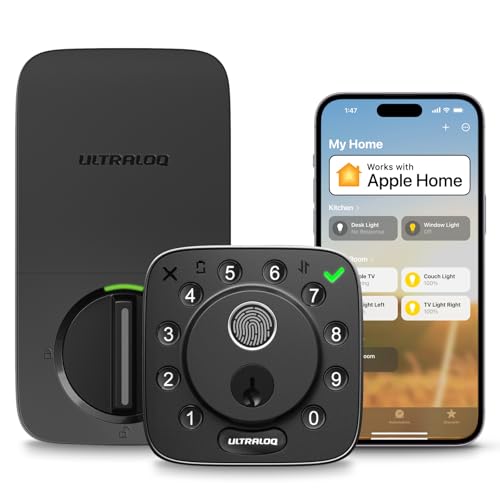
Ultraloq U-Bolt Pro WiFi
The Ultraloq U-Bolt Pro WiFi combines a fingerprint reader, keypad, app control, and a USB C port for backup. It supports multiple entry methods and integrates with Alexa and Google Assistant. Owners appreciate the solid build and the convenience of USB C charging.
Pros
- Fingerprint sensor is fast and accurate
- USB C port allows easy emergency power
- Works with popular smart home platforms
Cons
- WiFi bridge required for remote access
- Larger footprint may not fit all doors

Schlage Encode Plus
The Schlage Encode Plus is a top-tier smart lock with built-in WiFi and support for Apple HomeKit, allowing keyless entry with Home Keys. It has a USB C port for backup, though it requires a physical key for emergency access. Owners value its robust security and reliable performance.
Pros
- Native HomeKit support with Home Key
- High security rating
- Built-in WiFi no extra bridge needed
Cons
- Premium price
- No fingerprint reader

Yale Assure Lock 2 with Wi-Fi
The Yale Assure Lock 2 offers a sleek design and works with the Yale Access app. It features a touchscreen keypad and a USB C port for backup. It integrates with Nest and Alexa via the Yale Connect Bridge, which is included in some packages. Owners like the easy installation and modern look.
Pros
- Sleek and compact design
- Easy to install
- Reliable WiFi connectivity
Cons
- Bridge may be required for some features
- Keypad can be hard to see in low light
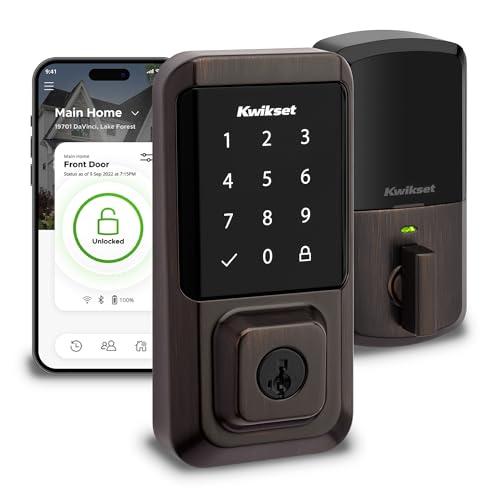
Kwikset Halo WiFi Smart Lock
The Kwikset Halo is a straightforward smart lock with built-in WiFi and a USB C port for backup. It works with Alexa and the Kwikset app, offering keyless entry via keypad or app. Owners appreciate its affordability and the ability to control it remotely without extra hardware.
Pros
- Built-in WiFi no extra hub
- Budget friendly
- Simple installation
Cons
- No HomeKit support
- No fingerprint sensor

Eufy Security Smart Lock Touch & WiFi
The Eufy Smart Lock Touch & WiFi includes a built-in camera and doorbell functionality, plus a fingerprint reader and keypad. It has a USB C port for backup and supports WiFi connectivity. Owners like the video feature and the ability to see visitors from the app.
Pros
- Integrated camera adds security
- Fingerprint and keypad access
- Rechargeable battery with USB C
Cons
- Battery life may be shorter due to camera
- Larger size

August Wi-Fi Smart Lock
The August Wi-Fi Smart Lock attaches to your existing deadbolt, turning it smart without replacing the exterior keyed cylinder. It features a USB C port for backup (though it uses a special connector). It works with Apple HomeKit, Alexa, and Google Assistant. Owners like the ability to keep their existing keys.
Pros
- Keeps existing exterior key
- Easy DIY installation
- Auto-unlock feature works well
Cons
- No built-in keypad or fingerprint
- Some users report connectivity issues

Lockly Secure Pro
The Lockly Secure Pro offers a 3D fingerprint sensor, a backlit keypad with PIN codes, and a USB C port for backup. It supports WiFi and Bluetooth and works with Alexa and Google Assistant. Owners praise its security features and the ability to grant temporary access codes.
Pros
- Advanced 3D fingerprint recognition
- Temporary access codes for guests
- Compatible with major voice assistants
Cons
- Setup can be complex
- Price is on the higher side
How to pick the right one
How they compare
| # | Model | Connectivity | Best for | Score | Price |
|---|---|---|---|---|---|
| 1 | Ultraloq U-Bolt Pro WiFi | WiFi, Bluetooth | Best overall with fingerprint and USB C | 9.4 | Check price |
| 2 | Schlage Encode Plus | WiFi, Bluetooth, Apple HomeKit | Best for Apple HomeKit users | 9.2 | Check price |
| 3 | Yale Assure Lock 2 with Wi-Fi | WiFi (via bridge), Bluetooth | Best for Nest and Alexa integration | 9.0 | Check price |
| 4 | Kwikset Halo WiFi Smart Lock | WiFi (2.4 GHz) | Best for Alexa users on a budget | 8.6 | Check price |
| 5 | Eufy Security Smart Lock Touch & WiFi | WiFi, Bluetooth | Best for built-in camera | 8.8 | Check price |
| 6 | August Wi-Fi Smart Lock | WiFi, Bluetooth, HomeKit | Best retrofit for existing deadbolts | 8.4 | Check price |
| 7 | Lockly Secure Pro | WiFi, Bluetooth | Best for keyless access with 3D fingerprint | 9.1 | Check price |
Frequently asked questions
How does USB C backup charging work on a smart lock?
When the battery is too low to operate, you can connect a USB C power source to the designated port on the lock. This provides temporary power to the lock’s electronics, allowing you to enter your code or use the app to unlock the door, after which you should replace the batteries.
Do all smart locks with USB C have the port on the outside?
No. Some models, like the Ultraloq U-Bolt Pro and Schlage Encode Plus, have a USB C port on the exterior for emergency access. Others, such as the August Wi-Fi Smart Lock, have the port only on the interior, which is less useful if you are locked out.
Can I use any USB C cable to power the lock?
Yes, in most cases you can use a standard USB C cable connected to a power bank, laptop, or wall charger. However, some locks may require a specific voltage or current, so always refer to the manufacturer’s instructions.
What is the battery life of smart locks with USB C?
Battery life varies by model and usage. Most use AA batteries that last 6 to 12 months. Locks with additional features like cameras or WiFi may have shorter battery life. USB C backup is not a primary power source but a temporary solution.
Are smart locks with USB C more expensive?
Not necessarily. The price depends on the features and brand. You can find budget models like the Kwikset Halo with USB C, as well as premium options like the Schlage Encode Plus. USB C is becoming a standard feature, so it does not significantly affect the price.
Can I install a smart lock with USB C myself?
Most smart locks are designed for DIY installation and come with detailed instructions. You only need a screwdriver and about 30 minutes. However, if you are not comfortable with tools, you can hire a professional installer.
Do smart locks with USB C work with Apple HomeKit?
Some do, like the Schlage Encode Plus and August Wi-Fi Smart Lock. Others support Alexa and Google Assistant but not HomeKit. Check the specifications before purchasing if HomeKit is important to you.
What happens if the USB C port is damaged?
If the USB C port is damaged, you can still use the physical key if the lock has one, or you may need to replace the lock. Some locks have an alternative backup, like a 9V battery terminal, but not all.
Are smart locks with USB C secure?
Yes, they offer similar security to other smart locks. However, always choose a reputable brand and enable two-factor authentication in the app. Physical security features like the deadbolt mechanism also play a role.
Which smart lock brand is most reliable?
Brands like Ultraloq, Schlage, Yale, and August are well regarded for their reliability. However, individual experiences vary. Reading user reviews and checking for firmware updates can help ensure a positive experience.
Our pick
After comparing all options, the Ultraloq U-Bolt Pro WiFi is the best overall smart lock with USB C due to its fingerprint sensor, multiple entry methods, and reliable performance. For Apple users, the Schlage Encode Plus is the top choice with HomeKit support. If you want a budget-friendly option, the Kwikset Halo provides solid WiFi features. Choose the Ultraloq for the best balance of features and convenience; it is the smartest addition to your home security.


