Smart Locks That Actually Fit Your Front Door
The Schlage Encode Plus is the strongest all rounder, with built in Wi-Fi, a keypad and Apple home key tap to unlock. Yale’s Assure Lock 2 matches it with swappable modules for different smart platforms. Renters who keep their existing deadbolt should choose the August Wi-Fi Smart Lock.
How a smart lock connects and mounts decides whether it fits your door and your life, more than its feature list. The Schlage Encode Plus leads for most homeowners with built in Wi-Fi, a keypad and phone tap entry, no separate hub needed, though it fully replaces your deadbolt. Yale’s Assure Lock 2 offers swappable radio modules. Renters wanting to keep their key and cylinder should pick the August Wi-Fi Smart Lock.
The biggest hidden cost is a separate hub, which some locks need for remote access while others build Wi-Fi straight in. We compared entry methods against how households actually come and go, checked whether each needs a bridge or works over Wi-Fi alone, and read owner reports on battery life, door alignment tolerance and how each mounts on a standard deadbolt.
Our top picks

Schlage Encode Plus Smart WiFi Deadbolt
Built in Wi-Fi means remote lock and unlock without a hub, and a backlit keypad grants codes to family or guests. Apple home key support lets a phone or watch unlock with a tap. A physical key backup remains for dead battery situations.
Pros
- Built in WiFi needs no separate hub
- Apple home key tap to unlock
- Physical key backup included
Cons
- Fully replaces the existing deadbolt
- Bulkier interior body than slim rivals

Yale Assure Lock 2 Smart Deadbolt
A slim deadbolt with interchangeable modules, so the same lock can add Wi-Fi, Z-Wave or Matter over Thread as your smart home evolves. Keypad and key free touch versions suit different tastes. Its low profile interior sits flatter on the door than most rivals.
Pros
- Swappable radios future proof it
- Slim, low profile interior
- Matter support for broad compatibility
Cons
- Wireless module often sold separately
- Key free version drops the backup cylinder

August Wi-Fi Smart Lock 4th Gen
This retrofit mounts on the inside of an existing deadbolt, so the exterior and your keys stay unchanged, ideal for renters. Auto unlock senses your approach, and built in Wi-Fi handles remote access without a bridge. A DoorSense sensor reports whether the door is actually shut.
Pros
- Keeps your existing key and cylinder
- Retrofit install suits renters
- Auto unlock and door ajar sensor
Cons
- No keypad without an add on
- Bulky interior thumb turn

Level Lock Plus Smart Lock
The entire mechanism hides inside the deadbolt, so the door looks ordinary from either side. Apple home key and included key cards allow tap to unlock without a keypad. Its discreet look appeals to buyers who dislike bulky exterior hardware.
Pros
- Completely hidden smart hardware
- Apple home key and key card entry
- Standard deadbolt appearance
Cons
- Remote access leans on a home hub
- Premium price for the discreet design
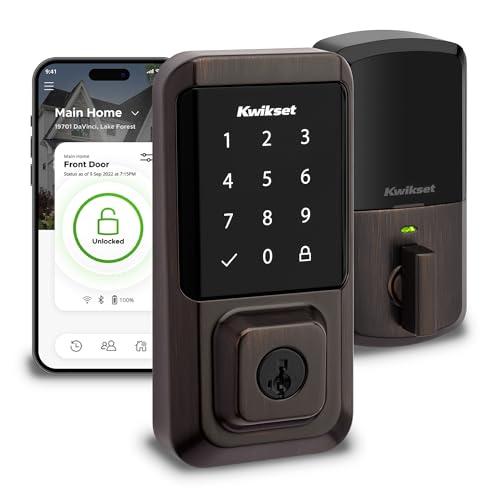
Kwikset Halo WiFi Smart Lock
Built in Wi-Fi and a keypad cover the essentials at a friendlier price than premium rivals. The SmartKey cylinder lets you rekey the lock yourself if a key is lost. Custom user codes suit households granting access to family, cleaners or dog walkers.
Pros
- Built in WiFi with no hub
- Owner rekeyable cylinder
- Good value keypad entry
Cons
- Bulkier keypad than slim rivals
- No Apple home key support
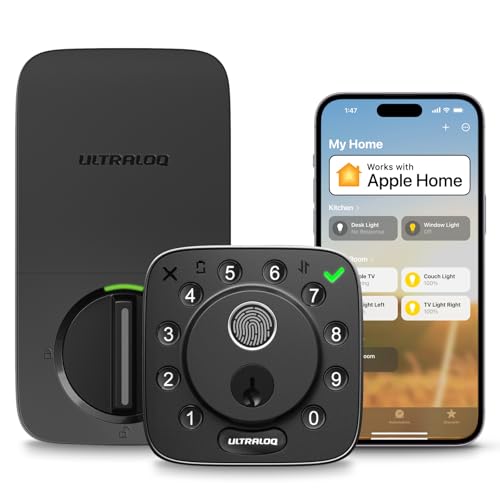
Ultraloq U-Bolt Pro Smart Lock
Six ways to enter include a fingerprint reader, keypad, app, key and more, covering nearly any household preference. A fingerprint unlocks in under a second for hands full arrivals. Remote access needs the add on bridge, which is sold in a bundle version.
Pros
- Fingerprint entry is fast
- Six different entry methods
- Fast local unlock over Bluetooth
Cons
- Remote access needs the bridge add on
- Bulky exterior housing

Wyze Lock Bolt Fingerprint Smart Lock
A fingerprint and keypad deadbolt at the lowest price here, aimed at buyers who mostly unlock at the door rather than remotely. Local Bluetooth entry is quick, though there is no built in Wi-Fi for remote control. It suits a first smart lock on a tight budget.
Pros
- Lowest price with fingerprint entry
- Fast local Bluetooth unlock
- Simple keypad and app codes
Cons
- No Wi-Fi for remote lock or unlock
- No physical key backup
How they compare
| # | Model | Entry methods | Best for | Score | Price |
|---|---|---|---|---|---|
| 1 | Schlage Encode Plus Smart WiFi Deadbolt | Keypad, phone tap, app, key | Best overall | 9.4 | Check price |
| 2 | Yale Assure Lock 2 Smart Deadbolt | Keypad or touch, app, key options | Best for smart home platforms | 9.1 | Check price |
| 3 | August Wi-Fi Smart Lock 4th Gen | App, auto unlock, existing key | Best for renters | 8.9 | Check price |
| 4 | Level Lock Plus Smart Lock | Phone tap, key card, app, key | Best hidden design | 8.7 | Check price |
| 5 | Kwikset Halo WiFi Smart Lock | Keypad, app, key | Best keypad value | 8.5 | Check price |
| 6 | Ultraloq U-Bolt Pro Smart Lock | Fingerprint, keypad, app, key | Best for entry options | 8.3 | Check price |
| 7 | Wyze Lock Bolt Fingerprint Smart Lock | Fingerprint, keypad, app | Best budget | 7.9 | Check price |
Before you buy
What to look for in a smart lock Start with how the lock connects, since built in Wi-Fi allows remote control while Bluetooth only works up close unless you add a bridge. Entry methods should match your household, whether that is a keypad, fingerprint, phone tap or a key backup. Confirm the lock fits a standard deadbolt bore and your door thickness. Battery type and expected life shape how often you maintain it.
Retrofit versus full replacement Retrofit locks like the August mount over your existing deadbolt, keeping the exterior and your keys, which suits renters and anyone avoiding new exterior hardware. Full replacement models such as the Schlage Encode Plus swap the whole deadbolt for a cleaner integrated keypad. Renters usually need landlord permission for the latter, so a retrofit avoids that conversation entirely.
Do you need a separate hub Locks with built in Wi-Fi, including the Schlage Encode Plus, Kwikset Halo and August, handle remote access on their own. Others like the Ultraloq U-Bolt Pro and Level Lock Plus rely on a bridge or a home platform for control away from home. If you want to lock the door from work without extra boxes, choose a lock with Wi-Fi built in.
Battery life and door alignment Most smart locks run on AA batteries lasting several months to about a year, with keypads and Wi-Fi draining faster than Bluetooth. A misaligned door forces the motor to work harder, cutting battery life and causing jams. Check that your deadbolt throws smoothly by hand before installing, since a sticky bolt troubles any smart lock.
Common questions
Do smart locks work without Wi-Fi?
Yes, over Bluetooth at the door for app and keypad entry. Remote locking and unlocking from away needs built in Wi-Fi or a bridge. Budget picks like the Wyze Lock Bolt work locally but cannot be controlled remotely.
Can renters install a smart lock?
Retrofit models like the August Wi-Fi Smart Lock mount on the inside over an existing deadbolt, keeping the exterior and your keys unchanged. That avoids altering the door, though checking your lease is still wise before installing anything.
Do smart locks need a separate hub?
Some do. Locks with built in Wi-Fi such as the Schlage Encode Plus and Kwikset Halo do not. Others like the Ultraloq U-Bolt Pro need a bridge for remote access, so confirm before buying if remote control matters.
How long do smart lock batteries last?
Most run several months to about a year on AA batteries. Frequent keypad use and constant Wi-Fi drain them faster. A misaligned deadbolt that makes the motor strain also shortens battery life noticeably.
Are smart locks secure against hacking?
Reputable brands use encryption for app and wireless communication, and physical break in remains the more common risk. Choosing strong unique codes, keeping firmware updated and picking an established brand reduces the practical risk considerably.
Can I still use a key with a smart lock?
Many keep a key cylinder as backup, including the Schlage Encode Plus and Kwikset Halo. Some slimmer or key free versions drop it, so check the model if a physical key backup matters for dead battery situations.
What happens to a smart lock when the power or internet goes out?
The lock runs on its own batteries, so it keeps working at the door during a power cut. Only remote features that need Wi-Fi pause until the internet returns, while keypad, fingerprint and key entry still function.
Which smart lock works with Apple Home?
The Schlage Encode Plus and Level Lock Plus support Apple home key for tap to unlock with a phone or watch. Check current compatibility for your platform, since supported features vary by model and firmware.
Will a smart lock fit my door?
Most fit a standard deadbolt bore and common door thicknesses, but always check the listed door thickness range and backset. A retrofit lock like the August depends on your existing deadbolt brand being on its compatibility list.
Our take
The Schlage Encode Plus is the pick for most homeowners, combining built in Wi-Fi, a keypad and phone tap entry without any extra hub. Choose the Yale Assure Lock 2 if you want a slim design and swappable radios to match a growing smart home. Renters who cannot alter the exterior should take the August Wi-Fi Smart Lock and keep their existing key.
You might also need

How to Pick a Laptop Privacy Screen That Actually Fits

Smart Paper Trays That Keep Your Desk Tidy and Efficient

Smart Travel Companions: Top Wearable Accessories for Your Next Trip
