Top Smart TVs for Professional Environments
For professionals, the Samsung Q80D QLED stands out with its bright panel, low input lag, and Tizen business-friendly features, making it ideal for presentations and digital signage. Its main limitation is the lack of a dedicated commercial warranty, but its performance and connectivity justify consideration.
Choosing a smart TV for professional use goes beyond consumer needs. You need reliable performance, multiple inputs, and smart features that support presentations, video conferencing, and digital signage.
We evaluated popular models based on specifications, owner feedback, and expert reviews to identify the best options for boardrooms, lobbies, and other business environments.
The shortlist, ranked
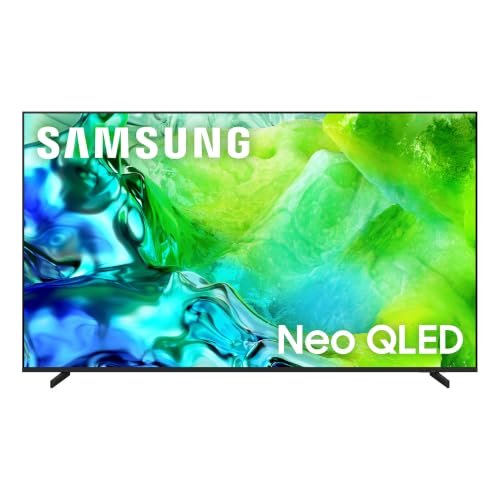
Samsung Q80D 55 Inch QLED 4K Smart TV
The Samsung Q80D offers excellent brightness and wide viewing angles, making it easy for everyone in the room to see. Its Tizen OS supports multiple productivity apps, and the low input lag is a bonus for interactive displays.
Pros
- Superb picture quality with high brightness
- Wide viewing angles for large rooms
- Low input lag for interactive use
Cons
- No commercial warranty
- Tizen app selection not as extensive as webOS

Sony Bravia XR A95L 55 Inch OLED 4K Smart TV
The Sony A95L delivers reference-grade OLED contrast and color accuracy out of the box. It has professional calibration modes and a Cognitive Processor XR that enhances detail, making it ideal for design studios and post-production suites.
Pros
- Industry-leading color accuracy
- Perfect blacks and infinite contrast
- Professional calibration options
Cons
- High price tag
- Risk of burn-in with static content

LG C4 Series 55 Inch OLED evo 4K Smart TV
The LG C4 offers excellent OLED performance with a brighter evo panel and supports Dolby Vision. It has a Filmmaker Mode and ISF expert settings, making it a favorite among video editors and graphic designers.
Pros
- Excellent contrast and color
- Four HDMI 2.1 ports
- User-friendly webOS
Cons
- Potential burn-in risk
- Not as bright as high-end QLEDs

Samsung QN90D 55 Inch Neo QLED 4K Smart TV
The QN90D is a Neo QLED with Mini LED backlighting, providing exceptional brightness and minimal blooming. Its anti-glare screen and wide viewing angles make it perfect for sunlit lobbies and open spaces.
Pros
- Very bright with excellent HDR
- Good anti-glare properties
- Strong build quality
Cons
- More expensive than Q80D
- Some blooming in high contrast scenes

Sony Bravia X90L 55 Inch Full Array LED 4K Smart TV
The X90L offers a full array LED panel with good brightness and color. It runs Google TV, providing a familiar interface for Android users, and has a professional mode for signage and presentations.
Pros
- Great picture for the price
- Google TV with built-in Chromecast
- Professional mode available
Cons
- Not as bright as QN90D
- Viewing angles could be better

LG G4 55 Inch OLED evo AI 4K Smart TV
The LG G4 is designed to be wall-mounted, with a flush fit that looks like a work of art. It uses the α11 AI processor for enhanced picture and includes a webOS that supports multiple user profiles, suitable for shared spaces.
Pros
- Ultra-thin wall-mount design
- Top-tier OLED performance
- AI processor improves upscaling
Cons
- Stand sold separately
- Premium price

LG UR9000 55 Inch 4K Smart TV
The LG UR9000 is an affordable 4K TV with a simple user interface and multiple connectivity options. It handles basic presentations well, but its lower peak brightness limits visibility in bright rooms.
Pros
- Very affordable
- Reliable webOS platform
- Good enough for basic presentations
Cons
- Lower brightness
- No HDMI 2.1
Before you buy
How they stack up
| # | Model | Display | Best for | Score | Price |
|---|---|---|---|---|---|
| 1 | Samsung Q80D 55 Inch QLED 4K Smart TV | 55-inch QLED 4K | Bright conference rooms and presentations | 9.4 | Check price |
| 2 | Sony Bravia XR A95L 55 Inch OLED 4K Smart TV | 55-inch OLED 4K | Color-critical work like video editing | 9.2 | Check price |
| 3 | LG C4 Series 55 Inch OLED evo 4K Smart TV | 55-inch OLED evo 4K | Creative studios needing color accuracy | 9.0 | Check price |
| 4 | Samsung QN90D 55 Inch Neo QLED 4K Smart TV | 55-inch Neo QLED 4K | Lobbies with ambient light | 8.9 | Check price |
| 5 | Sony Bravia X90L 55 Inch Full Array LED 4K Smart TV | 55-inch Full Array LED 4K | Budget-friendly professional use | 8.7 | Check price |
| 6 | LG G4 55 Inch OLED evo AI 4K Smart TV | 55-inch OLED evo 4K | Wall-mounted displays in modern offices | 8.8 | Check price |
| 7 | LG UR9000 55 Inch 4K Smart TV | 55-inch LED 4K | Cost-effective entry-level professional displays | 8.0 | Check price |
Questions worth asking
Are smart TVs suitable for professional use?
Yes, many smart TVs offer features like commercial modes, multiple inputs, and network connectivity that make them suitable for presentations, digital signage, and video conferencing. However, for heavy commercial use, dedicated commercial displays with extended warranties might be better.
What is the ideal screen size for a conference room?
For a small conference room, 55 inches works well. For larger rooms, consider 65 inches or more. The general rule is to add about 4 inches of screen size for every additional 5 feet of viewing distance.
Do professional smart TVs offer burn-in protection?
OLED TVs have some burn-in mitigation features like pixel shifting, but they are not immune. For static content, QLED or LED models are safer. If you must use OLED, ensure you vary content and reduce screen brightness.
Can I use a consumer TV for digital signage?
You can, but consumer TVs are not built for 24/7 operation. They may have a shorter lifespan and lack commercial warranties. For permanent signage, consider commercial displays designed for continuous use.
What smart TV platform is best for business?
It depends on your needs. Android/Google TV offers many apps and Chromecast built-in, which is useful for presentations. Tizen and webOS are also stable and offer screen mirroring. Choose the one that supports the apps you need.
How many HDMI ports do I need?
At least three HDMI ports are recommended for connecting a laptop, a video conferencing camera, and a media player. More ports give flexibility for additional devices.
Is 4K necessary for professional presentations?
4K is becoming standard and ensures crisp text and detailed graphics. If your content is mostly 1080p, a 4K TV will still upscale it, but the benefit is marginal. For future-proofing, choose 4K.
Can I control a smart TV remotely?
Many professional smart TVs support RS-232 control, IP control, or integration with control systems like Crestron. Consumer TVs may not offer these, but they often support mobile apps for control.
What is the difference between a commercial display and a smart TV?
Commercial displays often have brighter panels, anti-glare coatings, and are built for longer operation. They may lack a tuner and smart features but offer more control options and extended warranties. Smart TVs are easier to set up for casual use.
How do I ensure the TV is secure on a network?
Change default passwords, disable external access if not needed, and keep firmware updated. Some professional TVs offer enterprise security features.
The verdict
For most professional settings, choose the Samsung Q80D if you need a bright, reliable TV for presentations. If color accuracy is critical, invest in the Sony A95L or LG C4. For a budget option, the Sony X90L provides solid performance without breaking the bank.