Top Gaming SSDs for Fast Loads and Smooth Play
The Samsung 990 PRO leads our list for gaming due to its top-tier PCIe 4.0 speeds and proven reliability. It offers exceptional performance for loading games and transferring large files. However, it runs warm under heavy loads, so a heatsink is recommended for sustained use.
Upgrading to a solid state drive is the most impactful change for gaming performance. It slashes load times, reduces stutter, and makes open worlds feel seamless. With many options on the market, choosing the right one can be overwhelming.
This guide breaks down the top SSDs for gaming, from budget-friendly SATA drives to blazing-fast PCIe 5.0 models. We highlight each drive’s strengths and weaknesses so you can pick the one that fits your build and budget.
How to choose
Our top picks

Samsung 990 PRO
The Samsung 990 PRO is a powerhouse PCIe 4.0 SSD that delivers near-maximum interface speeds. It excels in random read/write performance, making game loading and level transitions incredibly snappy. Owners report consistent performance even during long gaming sessions, though it benefits from a heatsink to maintain peak speeds.
Pros
- Exceptional sustained performance
- High endurance rating
- Available with or without heatsink
Cons
- Runs hot without proper cooling
- Premium price

WD Black SN850X
The WD Black SN850X is a top-tier PCIe 4.0 drive that shines in gaming workloads. It supports Microsoft’s DirectStorage technology, reducing load times in compatible games. With its optional heatsink version, it fits perfectly in a PS5, offering ample storage and fast performance. Owners praise its reliability and speed.
Pros
- Optimized for gaming with Game Mode 2.0
- Excellent performance in PS5
- Available with heatsink
Cons
- Heatsink version is pricier
- Requires firmware update for best performance

Crucial P3 Plus
The Crucial P3 Plus offers impressive PCIe 4.0 speeds at a budget-friendly price point. It’s an excellent choice for gamers looking to upgrade from SATA SSDs without breaking the bank. While it doesn’t match the top-tier drives in random performance, it still delivers significantly faster load times than SATA. Owners value its reliability and value.
Pros
- Great value for PCIe 4.0 performance
- Low power consumption
- Five-year limited warranty
Cons
- Uses QLC NAND, which can slow under sustained writes
- No DRAM cache

Sabrent Rocket 4 Plus
The Sabrent Rocket 4 Plus is a high-performance PCIe 4.0 SSD that competes closely with the Samsung 990 PRO. It uses TLC NAND and a robust controller to deliver fast speeds and high endurance. Owners report excellent sustained write performance, making it ideal for gamers who also create content. It runs relatively cool but may require a heatsink in tight spaces.
Pros
- High endurance rating
- Consistent performance
- Heatsink version available
Cons
- Slightly slower than 990 PRO in random reads
- Customer support can be slow

Samsung 870 EVO
The Samsung 870 EVO is the go-to SATA SSD for gamers with older motherboards lacking M.2 slots. It delivers the maximum speed possible over SATA III, dramatically improving load times over hard drives. Its reliability is legendary, and it comes with a five-year warranty. Owners appreciate its compatibility and consistent performance.
Pros
- Proven reliability
- Works with virtually any system
- High endurance
Cons
- SATA speeds are far slower than NVMe
- Limited capacity options for gaming

Crucial P5 Plus
The Crucial P5 Plus is a well-rounded PCIe 4.0 SSD that balances speed, price, and reliability. It offers slightly lower sequential speeds than the top contenders but still delivers rapid load times. It includes hardware encryption and good power efficiency. Owners find it a dependable choice for both gaming and general use.
Pros
- Good balance of price and performance
- Supports hardware encryption
- Includes Acronis cloning software
Cons
- Slightly slower write speeds
- No heatsink option
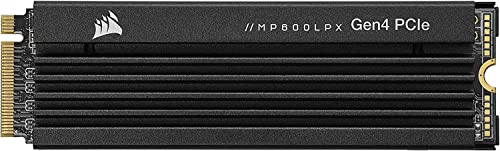
Corsair MP600 Pro LPX
The Corsair MP600 Pro LPX is a low-profile PCIe 4.0 SSD designed specifically for the PlayStation 5. It comes with a pre-installed aluminum heatsink that meets Sony’s requirements. It provides fast load times and ample storage for next-gen games. Owners report it performs flawlessly in their PS5 consoles.
Pros
- Built for PS5 with heatsink included
- High sequential speeds
- Long warranty
Cons
- Heatsink is permanently attached, limiting use in laptops
- Write speeds lower than some competitors
Compared at a glance
| # | Model | Interface | Best for | Score | Price |
|---|---|---|---|---|---|
| 1 | Samsung 990 PRO | PCIe Gen 4.0 x4, NVMe 2.0 | Overall Best for Gamers | 9.6 | Check price |
| 2 | WD Black SN850X | PCIe Gen 4.0 x4, NVMe 1.4 | Best for PS5 and DirectStorage | 9.4 | Check price |
| 3 | Crucial P3 Plus | PCIe Gen 4.0 x4, NVMe 1.4 | Budget NVMe Performer | 8.8 | Check price |
| 4 | Sabrent Rocket 4 Plus | PCIe Gen 4.0 x4, NVMe 1.4 | High Endurance and Speed | 9.0 | Check price |
| 5 | Samsung 870 EVO | SATA III 6Gb/s | SATA Upgrade for Older Systems | 8.6 | Check price |
| 6 | Crucial P5 Plus | PCIe Gen 4.0 x4, NVMe 1.4 | Balanced Performance and Value | 8.9 | Check price |
| 7 | Corsair MP600 Pro LPX | PCIe Gen 4.0 x4, NVMe 1.4 | PS5 Storage Expansion | 9.0 | Check price |
Good to know
What is the difference between SATA and NVMe SSDs for gaming?
NVMe SSDs use the PCIe interface, offering much higher sequential read/write speeds (up to 7,000 MB/s) compared to SATA’s maximum of 560 MB/s. In gaming, NVMe drives load games faster, reduce stutter, and improve texture streaming. If your motherboard supports M.2 NVMe, it is the preferred choice for gaming.
Do I need a PCIe 5.0 SSD for gaming?
Currently, no. PCIe 5.0 SSDs are extremely fast but offer minimal real-world gaming benefit over PCIe 4.0. They also run very hot and are expensive. For most gamers, a high-end PCIe 4.0 drive provides the best combination of performance and value. PCIe 5.0 is more relevant for professional workloads.
Will an SSD improve my FPS?
An SSD will not directly increase your FPS in most cases, as the CPU and GPU are responsible for frame rendering. However, it can reduce stuttering in open-world games that stream assets from storage, and it drastically shortens load times. It also improves overall system responsiveness.
What is the ideal capacity for a gaming SSD?
A 1TB SSD is the minimum recommended for gaming, as modern titles can take up 100-200GB each. 2TB provides more flexibility, allowing you to keep multiple large games installed simultaneously. If you have a large library, consider a 2TB or 4TB drive, but note that higher capacities cost more per GB.
How do I install an M.2 SSD in my PC?
First, locate the M.2 slot on your motherboard, usually near the CPU. Remove the screw, insert the SSD at an angle, then press down and secure it with the screw. If your motherboard has a heatsink, install it over the drive. Then, initialize the drive in your operating system’s disk management tool.
Can I use an NVMe SSD in my PS5?
Yes, if your PS5 has been updated to support M.2 SSDs. You need a PCIe Gen4x4 NVMe SSD with a heatsink, with read speeds of 5,500 MB/s or faster. Many drives like the WD Black SN850X and Samsung 990 PRO meet these requirements. Always check the latest Sony compatibility guide.
What does TBW mean and why is it important?
TBW stands for Terabytes Written, a measure of the SSD’s endurance over its lifetime. It indicates how much data you can write to the drive before the warranty expires or the drive may fail. For gaming, a TBW of 300-600 is sufficient, but higher TBW offers more longevity for heavy users.
Should I buy an SSD with a heatsink or without?
It depends on your system. If your motherboard has a built-in heatsink for M.2 slots, you can buy a drive without one. If not, or if you’re using a PS5, a drive with a heatsink is recommended to prevent thermal throttling. Some drives are available in both versions, such as the Samsung 990 PRO and WD Black SN850X.
The bottom line
For most gamers, the Samsung 990 PRO is the best choice due to its outstanding performance and reliability. If you’re on a budget, the Crucial P3 Plus offers excellent value. For PS5 users, the WD Black SN850X with heatsink is a top pick. Upgrade to any of these drives to experience significantly faster load times and smoother gameplay.


