Top Solid State Drives for Professional Workflows
For professionals, the Samsung 990 PRO stands out for its top-tier PCIe 4.0 performance and superb endurance, suitable for demanding tasks like 8K video editing. Its main limitation is the higher cost per terabyte compared to other drives.
Professionals need storage that keeps up with demanding workloads, from 8K video editing to complex data analysis. A slow drive can bottleneck your entire system, causing lost productivity and frustration.
We compared the top solid state drives available, focusing on performance, reliability, and endurance. Whether you prioritize raw speed, capacity, or value, this guide helps you choose the right drive for your professional setup.
The shortlist, ranked

Samsung 990 PRO 2TB
The Samsung 990 PRO delivers exceptional PCIe 4.0 performance with sequential read speeds up to 7,450 MB/s and write speeds up to 6,900 MB/s. Its nickel-coated controller and dynamic thermal guard ensure sustained performance during heavy workloads. With endurance up to 1,200 TBW, it’s built for years of intensive use.
Pros
- Blazing fast speeds
- Excellent endurance
- Reliable thermal management
Cons
- Premium price
- Requires PCIe 4.0 for full performance

WD Black SN850X 2TB
The WD Black SN850X offers near-identical performance to the 990 PRO with sequential reads up to 7,300 MB/s and writes up to 6,600 MB/s. It features a gamer-oriented mode that boosts performance in gaming workloads. Its endurance is 1,200 TBW, matching the 990 PRO. A great alternative for those who prefer WD’s dashboard software.
Pros
- High performance
- Game Mode for gaming
- Good endurance
Cons
- Slightly slower writes than 990 PRO
- Software not as polished

Crucial T700 2TB
The Crucial T700 is one of the fastest SSDs on the market, leveraging PCIe 5.0 to achieve sequential reads up to 12,400 MB/s and writes up to 11,800 MB/s. It includes a pre-installed heatsink for thermal management. With endurance of 1,200 TBW, it’s ready for the most demanding professional tasks.
Pros
- Cutting-edge speeds
- High endurance
- Included heatsink
Cons
- Requires PCIe 5.0 motherboard
- Runs hot without proper cooling
Seagate FireCuda 530 2TB
The Seagate FireCuda 530 is a PCIe 4.0 drive with sequential reads up to 7,300 MB/s and writes up to 6,900 MB/s. It boasts an endurance rating of 2,550 TBW, the highest among comparable drives, making it ideal for write-heavy workloads. It comes with a 5-year limited warranty and includes three years of Rescue Data Recovery Services.
Pros
- Exceptional endurance
- Fast speeds
- Data recovery services
Cons
- Pricier than competitors
- Heatsink version may be bulky

SK hynix Platinum P41 2TB
The SK hynix Platinum P41 offers excellent performance with sequential reads up to 7,000 MB/s and writes up to 6,500 MB/s. It is known for its low power consumption, which helps extend laptop battery life. With endurance of 1,200 TBW, it’s a solid choice for professionals on the go.
Pros
- Low power draw
- Good performance
- Reliable brand
Cons
- Not as widely available
- Slightly lower write speeds
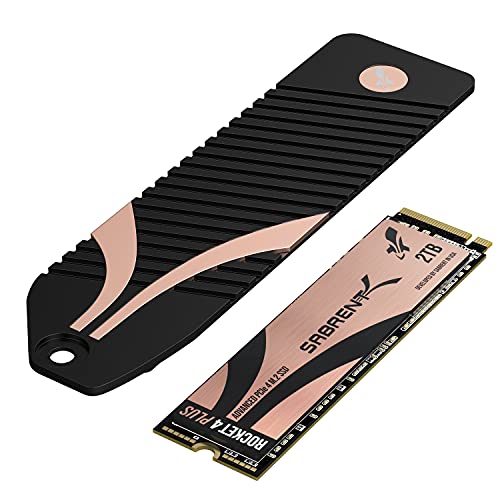
Sabrent Rocket 4 Plus 2TB
The Sabrent Rocket 4 Plus is a budget-friendly PCIe 4.0 drive that delivers impressive speeds: sequential reads up to 7,100 MB/s and writes up to 6,600 MB/s. It has an endurance rating of 1,400 TBW, higher than many competitors. Often available at a lower price point, it offers excellent value for professionals.
Pros
- Great price-to-performance
- High endurance
- Compatible with PS5
Cons
- Controller can run warm
- Software suite is basic

Samsung 870 EVO 2TB
The Samsung 870 EVO is a SATA III 2.5-inch SSD that offers sequential reads up to 560 MB/s and writes up to 530 MB/s. It’s an ideal upgrade for older systems lacking M.2 slots. With a 5-year warranty and proven reliability, it’s a trusted choice for professionals needing a straightforward replacement.
Pros
- Universal compatibility
- Reliable performance
- Good endurance for SATA
Cons
- Much slower than NVMe
- Limited to SATA speeds
Compared at a glance
| # | Model | Interface | Best for | Score | Price |
|---|---|---|---|---|---|
| 1 | Samsung 990 PRO 2TB | PCIe 4.0 NVMe M.2 | Best overall for professionals | 9.6 | Check price |
| 2 | WD Black SN850X 2TB | PCIe 4.0 NVMe M.2 | Best for gaming and creative pros | 9.4 | Check price |
| 3 | Crucial T700 2TB | PCIe 5.0 NVMe M.2 | Best PCIe 5.0 performance | 9.3 | Check price |
| 4 | Seagate FireCuda 530 2TB | PCIe 4.0 NVMe M.2 | Best for durability and reliability | 9.1 | Check price |
| 5 | SK hynix Platinum P41 2TB | PCIe 4.0 NVMe M.2 | Best for power efficiency | 8.8 | Check price |
| 6 | Sabrent Rocket 4 Plus 2TB | PCIe 4.0 NVMe M.2 | Best for value with high performance | 8.6 | Check price |
| 7 | Samsung 870 EVO 2TB | SATA III 2.5 inch | Best SATA option for compatibility | 8.2 | Check price |
Before you buy
Common questions
What is the difference between SATA and NVMe SSDs?
SATA SSDs use the older SATA interface, offering speeds up to about 560 MB/s. NVMe SSDs use the PCIe bus, delivering speeds several times faster, making them ideal for professional tasks that require rapid data transfer.
Is PCIe 5.0 worth it for professionals?
If you work with extremely large files, like 8K video or complex simulations, PCIe 5.0 drives like the Crucial T700 can significantly reduce transfer times. However, they require a compatible motherboard and proper cooling.
How much endurance (TBW) do I need?
For typical professional use, a TBW rating of 600-1200 is sufficient. If you write massive amounts of data daily, such as in data centers or heavy rendering, consider drives with higher TBW, like the Seagate FireCuda 530 with 2550 TBW.
Can I use a PCIe 4.0 SSD in a PCIe 3.0 slot?
Yes, PCIe 4.0 SSDs are backward compatible with PCIe 3.0 slots, but they will run at PCIe 3.0 speeds. You won’t achieve full performance, but it’s a good upgrade path for future systems.
What is the best SSD for a laptop?
For laptops, choose an M.2 NVMe SSD with low power consumption, like the SK hynix Platinum P41. It offers excellent performance and efficiency, helping to preserve battery life.
Do I need a heatsink for my SSD?
High-performance NVMe SSDs can generate significant heat. Some come with pre-installed heatsinks, while others are bare. If your motherboard doesn’t have a heatsink, consider buying one to prevent thermal throttling.
What is the warranty typically on professional SSDs?
Most top-tier SSDs come with a 5-year limited warranty. Seagate also includes three years of Rescue Data Recovery Services, which can be valuable for professionals who cannot afford data loss.
How do I migrate my data to a new SSD?
Many SSD manufacturers offer cloning software, such as Samsung Data Migration or Acronis True Image for WD. You can clone your existing drive to the new SSD, then swap them. Alternatively, you can do a fresh OS installation.
Can I use these SSDs in a PlayStation 5?
Yes, many M.2 NVMe SSDs are compatible with the PS5, including the WD Black SN850X and Sabrent Rocket 4 Plus. They meet the required speed specifications and come in capacities up to 4TB.
What is the difference between TLC and QLC NAND?
TLC (Triple-Level Cell) stores 3 bits per cell, offering better performance and endurance. QLC (Quad-Level Cell) stores 4 bits per cell, allowing higher capacities at lower cost, but with lower endurance. For professional use, TLC is generally preferred.
The verdict
For most professionals, the Samsung 990 PRO is the best choice due to its outstanding performance, high endurance, and proven reliability. If you need extreme endurance for write-heavy tasks, the Seagate FireCuda 530 is worth the extra investment. For those with PCIe 5.0 support, the Crucial T700 delivers future-proof speed. Budget-conscious pros will find the Sabrent Rocket 4 Plus an excellent value.


