Fast and Reliable USB C SSDs for Every Need
The SanDisk Extreme Pro is our top choice for most users, offering the fastest read speeds (up to 2000 MB/s) and robust build quality at a competitive price, though it can run warm during sustained transfers. For budget-conscious buyers, the Crucial X6 provides reliable performance at a lower cost, sacrificing speed for affordability.
USB C external SSDs have become essential for fast data transfer, whether you are backing up a laptop, editing video, or gaming on the go. With speeds that dwarf traditional hard drives, they offer a convenient way to expand storage without sacrificing performance.
Our roundup covers seven leading models that vary in speed, ruggedness, and price, helping you match the drive to your specific workflow. From pocket-sized options to high-capacity workhorses, these drives are ready for USB C connections on modern computers and consoles.
How to choose
What we recommend

SanDisk Extreme Pro
The SanDisk Extreme Pro delivers blistering read speeds up to 2000 MB/s, making it ideal for large file transfers and 4K video editing. Its forged aluminum and silicon body is IP65 water and dust resistant, and it includes a carabiner loop for easy attachment.
Pros
- Extremely fast sequential reads
- Rugged design with IP65 rating
- Five year limited warranty
Cons
- Runs warm during heavy workloads
- Higher price per gigabyte

Samsung T7 Portable SSD
The Samsung T7 offers read speeds up to 1050 MB/s in a compact, pocket-friendly design. It features AES 256 bit hardware encryption, a two meter drop resistance, and is compatible with Android, Windows, and Mac devices.
Pros
- Compact and lightweight
- Hardware encryption keeps data secure
- Included software for password protection
Cons
- Not as fast as Gen 2×2 drives
- Surface may show fingerprints
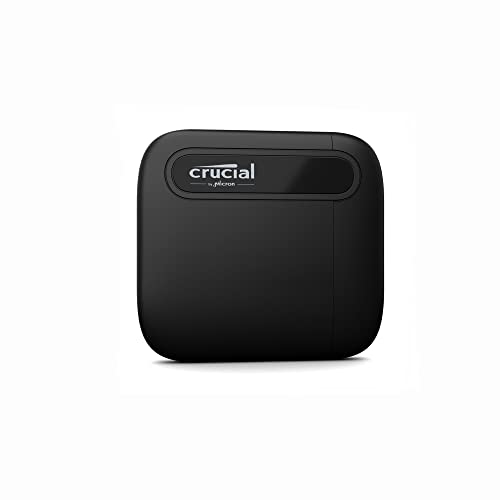
Crucial X6 Portable SSD
The Crucial X6 offers solid performance at an affordable price, with read speeds up to 800 MB/s. It is small enough to fit in a pocket and works with a wide range of devices, including PS4, Xbox One, and USB C laptops.
Pros
- Very affordable per gigabyte
- Slim and lightweight
- Compatible with many devices
Cons
- Slower write speeds than competitors
- No hardware encryption

WD My Passport SSD
The WD My Passport SSD provides read speeds up to 1050 MB/s and comes with WD Backup software for automatic backups. It is password protected with 256 bit AES hardware encryption and has a sleek metal design.
Pros
- Includes WD Backup software
- Hardware encryption with password protection
- Drop resistant up to 2 meters
Cons
- Software can be intrusive during setup
- Slightly higher price than similar drives

SK hynix Beetle Portable SSD
The SK hynix Beetle stands out with its unique beetle shaped design, available in multiple colors. It offers read speeds up to 1050 MB/s and is encased in a sturdy metal body that withstands drops from 2 meters.
Pros
- Distinctive design with color options
- Metal body adds durability
- LED indicator for status
Cons
- Limited availability in some regions
- No software bundle

Kingston XS2000 Portable SSD
The Kingston XS2000 supports USB 3.2 Gen 2×2, achieving read speeds up to 2000 MB/s. It is available in capacities up to 4TB, making it a great choice for professionals who need lots of storage and fast transfer.
Pros
- High speed and high capacity in one
- IP55 water and dust resistance
- Compact size with rubber sleeve
Cons
- Requires USB 3.2 Gen 2×2 port for full speed
- Sleeve may trap heat

ADATA SE800 External SSD
The ADATA SE800 is IP68 rated, meaning it is dustproof and can survive immersion in water up to 1.5 meters for 30 minutes. It delivers read and write speeds up to 1000 MB/s and includes a USB C to C cable.
Pros
- IP68 water and dust resistant
- Military grade shock resistance
- Includes both USB C and USB A cables
Cons
- Limited to 1TB maximum capacity
- Bulkier than other portable SSDs
The lineup, side by side
| # | Model | Capacity | Best for | Score | Price |
|---|---|---|---|---|---|
| 1 | SanDisk Extreme Pro | 1TB, 2TB, 4TB | Best overall for speed and durability | 9.4 | Check price |
| 2 | Samsung T7 Portable SSD | 500GB, 1TB, 2TB, 4TB | Best balance of performance and portability | 9.2 | Check price |
| 3 | Crucial X6 Portable SSD | 500GB, 1TB, 2TB, 4TB | Best budget friendly USB C SSD | 8.6 | Check price |
| 4 | WD My Passport SSD | 500GB, 1TB, 2TB | Best for Mac users with built in backup software | 8.8 | Check price |
| 5 | SK hynix Beetle Portable SSD | 500GB, 1TB, 2TB | Best for style and compact design | 8.7 | Check price |
| 6 | Kingston XS2000 Portable SSD | 500GB, 1TB, 2TB, 4TB | Best for high capacity and speed with USB C | 9.0 | Check price |
| 7 | ADATA SE800 External SSD | 512GB, 1TB | Best rugged option for outdoor use | 8.4 | Check price |
Frequently asked questions
Do all USB C SSDs work with any USB C port?
Yes, all USB C SSDs are physically compatible with any USB C port. However, the data transfer speed may be limited by the port’s USB generation. For example, a USB 3.2 Gen 2×2 drive will run at Gen 2 speeds if plugged into a Gen 2 port.
Can I use a USB C SSD with my iPhone or Android phone?
Yes, many USB C SSDs work with Android phones that support USB On The Go (OTG) and with newer iPhones that have USB C. For iPhones with Lightning, you would need an adapter. Some drives draw power from the host device, so a phone may need a powered hub for larger drives.
How fast are USB C SSDs compared to traditional external hard drives?
USB C SSDs are significantly faster. A typical external HDD offers speeds around 100 to 150 MB/s, while even budget USB C SSDs start at 500 MB/s. High end models can reach 2000 MB/s, making them up to 20 times faster than HDDs.
Are portable SSDs reliable for long term storage?
Yes, SSDs are generally reliable for long term storage, but they are not ideal for archival purposes because they can lose data if left unpowered for extended periods (years). For regular backups and active data, they are excellent. Always keep multiple copies of important data.
Do I need special cables for maximum speed?
To achieve maximum speed, you need a cable that supports the same USB generation as the drive. For USB 3.2 Gen 2×2, you need a cable rated for 20 Gbps. Many drives include a suitable cable, but if you buy a replacement, ensure it meets the spec.
Can I use these SSDs with gaming consoles like PS5 or Xbox Series X?
Yes, many USB C SSDs are compatible with PS5 and Xbox Series X|S for storing and playing PS4 and backward compatible games. However, for PS5 games, you need the internal expansion slot or a certified USB drive for storage, not direct play. Always check console requirements.
What is the difference between USB C and Thunderbolt?
Thunderbolt 3 and 4 use the USB C connector but offer higher bandwidth (up to 40 Gbps) and support daisy chaining. Thunderbolt SSDs are generally more expensive. If you do not need that extra speed, a USB C SSD is more cost effective.
How do I know if my computer has a USB C port that supports fast charging or data?
Check your computer’s specifications or use system information tools. Look for USB 3.2 Gen 2 or Thunderbolt logos near the port. Some ports may only support USB 2.0 speeds, which would greatly limit performance.
Are there any heat issues with USB C SSDs?
All SSDs generate heat during heavy use, which can cause thermal throttling if not dissipated. Metal enclosures help. Some drives have built in thermal management. If you notice slowdowns during large transfers, let the drive cool down or use a drive with better heat dissipation.
Can I use a USB C SSD to run applications or games directly?
Yes, you can run applications and games directly from a portable SSD. Load times will be faster than from an HDD. However, for the best experience, an internal SSD is recommended due to higher sustained speeds and lower latency.
Our take
For most people, the SanDisk Extreme Pro offers the best combination of speed, durability, and capacity, making it our clear recommendation. If you are on a tight budget, the Crucial X6 gives you reliable performance without breaking the bank. For those needing extra ruggedness, the ADATA SE800 is the way to go, though it lacks high capacity options.


