Top Sticker Makers for Crafting and Small Business
The Silhouette Cameo 4 is our top pick for a sticker maker, ideal for crafters and small business owners who need precise cuts and versatility. Its main advantage is the ability to cut stickers from a wide range of materials, including vinyl and printable sticker paper, with high accuracy. Its main limitation is the learning curve for beginners.
Creating custom stickers has never been easier with today’s sticker makers, which range from simple portable printers to sophisticated cutting machines. Whether you’re a hobbyist, a teacher, or a small business owner, there’s a sticker maker to fit your needs.
We’ve analyzed the most popular models on Amazon, considering factors like print quality, cutting accuracy, software compatibility, and user feedback. Our goal is to help you find the right sticker maker for your specific projects.
What we recommend

Silhouette Cameo 4
The Silhouette Cameo 4 is a powerful cutting machine that excels at sticker making. It can cut a wide range of materials, including vinyl, cardstock, and printable sticker paper, with exceptional accuracy. Its dual-carriage system allows for two tools to be used simultaneously, increasing efficiency.
Pros
- Precise cuts with adjustable settings
- Large cutting area for bulk stickers
- Bluetooth connectivity for wireless use
Cons
- Steep learning curve for beginners
- Software can be complex

Cricut Joy
The Cricut Joy is a compact smart cutting machine that is perfect for beginners. It cuts stickers and labels easily with its simple setup and app-guided projects. It is small enough to fit on a desk and works with a variety of materials.
Pros
- Compact and portable
- Easy setup and use
- No mat required for many materials
Cons
- Small cutting area limits large stickers
- Limited material compatibility

Phomemo M120 Label Maker
The Phomemo M120 is a pocket-sized thermal printer that prints stickers and labels directly from your phone via Bluetooth. It is perfect for making quick labels, stickers for journaling, or small business products. It uses thermal printing technology, so no ink is required.
Pros
- Portable and lightweight
- No ink or toner needed
- Works with a smartphone app
Cons
- Prints only in monochrome
- Sticker size limited to paper width
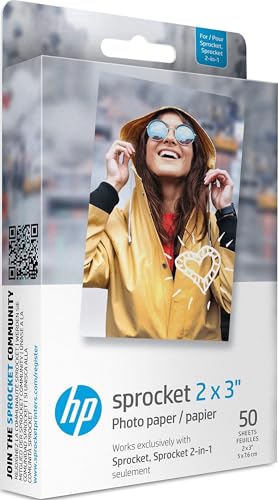
HP Sprocket 2-in-1
The HP Sprocket 2-in-1 is a portable printer that creates 2×3 inch photo stickers. It prints vibrant, full-color stickers using ZINK (zero ink) technology. It is great for personalizing planners, scrapbooks, and making fun photo stickers.
Pros
- Full-color photo stickers
- Compact and travel-friendly
- No ink cartridges to replace
Cons
- Small sticker size
- Ongoing cost of ZINK paper

Brother P-Touch Cube
The Brother P-Touch Cube is a wireless label maker that prints durable, adhesive labels ideal for organization. It connects to your smartphone or computer to create custom labels for home, office, or craft projects. It supports multiple tape widths and colors.
Pros
- Durable, water-resistant labels
- High-quality print resolution
- Wide range of tape colors
Cons
- Not suitable for large custom stickers
- Requires proprietary tape cartridges

Silhouette Portrait 3
The Silhouette Portrait 3 is a compact cutting machine that offers many features of the Cameo at a lower price. It cuts stickers, vinyl, and paper with precision. It is ideal for users who have limited space or smaller sticker needs.
Pros
- More affordable than larger models
- Compact footprint
- Precise cutting for small to medium stickers
Cons
- No Bluetooth connectivity
- Smaller cutting width than Cameo

Niimbot D110
The Niimbot D110 is a budget-friendly thermal label printer that is easy for kids and teens to use. It prints small labels and stickers from a smartphone app. It is great for organizing, labeling school supplies, or making fun stickers for crafts.
Pros
- Very affordable
- Simple app with many designs
- Portable and lightweight
Cons
- Limited to small sticker size
- Prints in monochrome only
Before you buy
Side by side
| # | Model | Cutting Area | Best for | Score | Price |
|---|---|---|---|---|---|
| 1 | Silhouette Cameo 4 | 12 inches wide, up to 10 feet long | Precision cutting and versatility | 9.4 | Check price |
| 2 | Cricut Joy | 4.5 inches wide, up to 20 inches long | Compact and beginner-friendly | 9.0 | Check price |
| 3 | Phomemo M120 Label Maker | Thermal | Portable printing on the go | 8.8 | Check price |
| 4 | HP Sprocket 2-in-1 | ZINK (zero ink) | Photo stickers and instant printing | 8.6 | Check price |
| 5 | Brother P-Touch Cube | Thermal transfer | Durable label stickers for organization | 8.4 | Check price |
| 6 | Silhouette Portrait 3 | 8 inches wide, up to 10 feet long | Budget-friendly cutting for smaller projects | 8.3 | Check price |
| 7 | Niimbot D110 | Thermal | Simple and affordable for small stickers | 8.0 | Check price |
Questions worth asking
What is the best sticker maker for beginners?
The Cricut Joy is often recommended for beginners due to its compact size, simple setup, and user-friendly app. It requires minimal learning and is great for basic sticker cutting and labeling.
Can I print full-color stickers with these machines?
Yes, some machines like the HP Sprocket print full-color photo stickers. However, many thermal printers like the Phomemo and Niimbot only print in black and white. If you need color, choose a printer that supports color printing or use a cutting machine with pre-printed sticker paper.
Do I need a computer to use a sticker maker?
Many modern sticker makers connect to smartphones via Bluetooth and have dedicated apps, so a computer is not necessary. However, for more advanced cutting machines like the Silhouette Cameo, you may need a computer for full software functionality, though some have mobile apps as well.
Are sticker makers cost-effective for small business use?
Yes, they can be cost-effective for producing small batches of stickers. Cutting machines like the Cameo 4 offer precision and versatility, allowing you to create professional-quality stickers. However, factor in the initial investment and consumable costs.
What materials can I use with a sticker maker?
Cutting machines can cut various materials including vinyl, printable sticker paper, cardstock, and even heat transfer vinyl. Printers are limited to specific sticker paper, such as thermal paper for thermal printers or ZINK paper for HP Sprocket.
How do I make stickers with a cutting machine?
First, design your stickers in the software. Then print them onto sticker paper using a regular inkjet printer. Load the printed sheet into the cutting machine, and it will cut around your designs. Some machines also allow you to cut vinyl directly for durable stickers.
Can these machines cut intricate designs?
Yes, cutting machines can handle intricate designs with high precision. The Silhouette Cameo 4 and Cricut Joy are capable of cutting fine details. The key is to use appropriate settings and a sharp blade.
What is the difference between a sticker maker and a label maker?
A sticker maker is generally designed for creating custom stickers for crafts, scrapbooking, or business, often with full-color options. A label maker focuses on producing simple labels for organization, typically in black and white, and uses thermal transfer technology. Some devices like the Brother P-Touch Cube are label makers but can be used for decorative labels.
Our pick
For most crafters and small business owners, the Silhouette Cameo 4 is the best investment due to its large cutting area, precision, and versatility. If you are a beginner on a budget, the Cricut Joy offers an excellent starting point. For portability, the Phomemo M120 is a winner, while the HP Sprocket is ideal for photo stickers.