Professional Storage Enclosures That Keep Your Data Safe
For professionals who need reliable, high-performance storage, the OWC Mercury Elite Pro Dual is our top pick. It offers dual-bay flexibility with RAID support, making it ideal for creative pros who need speed and redundancy. Its main advantage is the combination of hardware RAID and USB 3.2 Gen 2 (10Gbps) connectivity, but its limitation is that it requires two drives to be configured, which may be overkill for simple backups.
Professional data storage demands more than just capacity. You need enclosures that offer speed, durability, and flexible RAID configurations to protect your work. Whether you’re a photographer, video editor, or system administrator, the right enclosure can make the difference between seamless workflows and costly downtime.
We focused on enclosures that support multiple drive form factors, offer hardware RAID, and feature modern interfaces like USB 3.2 and Thunderbolt. We also considered cooling and build quality, as these factors affect long-term reliability. After comparing specifications and owner reports, we selected seven enclosures that stand out in the professional market.
Our top picks

OWC Mercury Elite Pro Dual
A dual-bay enclosure that supports both 2.5 and 3.5 inch drives, with hardware RAID 0, 1, and JBOD. Constructed with a rugged aluminum case for heat dissipation. Features USB 3.2 Gen 2 (10Gbps) and comes with SoftRAID XT software for advanced disk management.
Pros
- Hardware RAID provides reliable data protection
- Supports both 2.5 and 3.5 inch drives
- Sturdy aluminum construction for professional environments
Cons
- No Thunderbolt option
- Requires two drives for RAID 1

Sabrent USB 3.2 Type-C Tool-Free Enclosure for 2.5 inch SSD/HDD
A single-bay enclosure supporting 2.5 inch SATA drives up to 9.5mm. Tool-free design with a sliding latch for easy installation. USB 3.2 Gen 2 (10Gbps) provides fast transfer speeds. Its compact aluminum body is durable and portable.
Pros
- Tool-free operation saves time
- Blazing fast UASP support
- Compact and lightweight for travel
Cons
- Only supports 2.5 inch drives
- No hardware encryption

TerraMaster D2-310
A dual-bay RAID enclosure with hardware RAID 0, 1, and JBOD. Features USB 3.1 Type-C (10Gbps) for high-speed transfers. The included drive trays allow for easy installation and it is compatible with both 2.5 and 3.5 inch drives.
Pros
- Hardware RAID independent of OS
- Fast USB 3.1 Type-C
- Supports large capacity drives (up to 16TB)
Cons
- Fan can be audible under load
- No Thunderbolt

OWC Mercury Elite Pro
A single-bay enclosure that accepts 3.5 inch SATA drives, offering capacities up to 20TB. Features USB 3.2 Gen 2 (10Gbps) and a fanless aluminum design for silent operation. Comes with SoftRAID XT for monitoring and formatting.
Pros
- Supports massive drives up to 20TB
- Silent operation due to fanless design
- Ships with SoftRAID XT software
Cons
- Single drive means no redundancy
- Heavier due to aluminum construction

Plugable USB 3.0 2 Bay SATA Hard Drive Docking Station
A dual-bay docking station that supports both 2.5 and 3.5 inch SATA drives. Features an offline clone function for duplicating drives without a computer. USB 3.0 provides up to 5Gbps, and the unit is powered by an external adapter.
Pros
- Offline cloning saves time
- Accepts both 2.5 and 3.5 inch drives
- LED indicators for drive activity
Cons
- Slower USB 3.0 interface
- Dock style not as durable as enclosed

StarTech.com Dual Bay 2.5 inch SATA SSD/HDD Enclosure with USB 3.2 Gen 2
A dual-bay enclosure designed specifically for 2.5 inch drives, supporting hardware RAID 0, 1, and JBOD. With USB 3.2 Gen 2 (10Gbps), it achieves high transfer rates. The enclosure is bus-powered via USB-C, but includes a power adapter for reliable operation.
Pros
- Compact and lightweight
- Fast 10Gbps throughput
- Hardware RAID for flexibility
Cons
- Limited to 2.5 inch drives
- May need external power for some computers
Synology DiskStation DS220+ (Diskless)
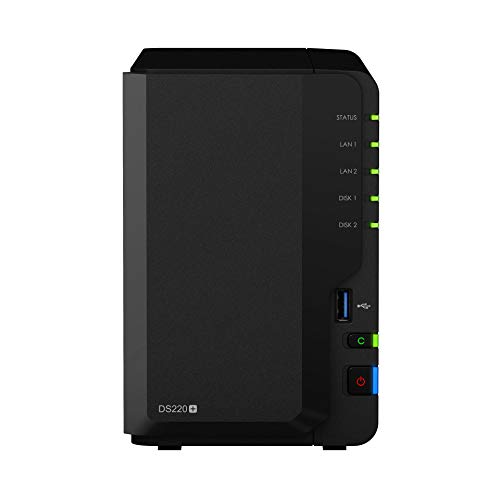
A two-bay NAS enclosure that provides network-attached storage with a powerful dual-core CPU. Supports RAID 0, 1, and JBOD. Features two Gigabit LAN ports with failover and link aggregation. Runs Synology DiskStation Manager for data management and backup.
Pros
- Access files from anywhere via network
- Rich app ecosystem for backup and sync
- Hardware encryption engine
Cons
- Requires network setup
- Higher cost than direct-attach enclosures
How to pick the right one
The lineup, side by side
| # | Model | Drive Bays | Best for | Score | Price |
|---|---|---|---|---|---|
| 1 | OWC Mercury Elite Pro Dual | 2x 2.5/3.5 inch SATA | Creative professionals needing hardware RAID | 9.4 | Check price |
| 2 | Sabrent USB 3.2 Type-C Tool-Free Enclosure for 2.5 inch SSD/HDD | 1x 2.5 inch SATA | On-the-go professionals needing quick drive swaps | 8.7 | Check price |
| 3 | TerraMaster D2-310 | 2x 2.5/3.5 inch SATA | Small teams needing dual-bay RAID without software | 8.5 | Check price |
| 4 | OWC Mercury Elite Pro | 1x 3.5 inch SATA | Professionals requiring high-capacity single-drive storage | 8.9 | Check price |
| 5 | Plugable USB 3.0 2 Bay SATA Hard Drive Docking Station | 2x 2.5/3.5 inch SATA | IT professionals needing dual drive cloning | 8.2 | Check price |
| 6 | StarTech.com Dual Bay 2.5 inch SATA SSD/HDD Enclosure with USB 3.2 Gen 2 | 2x 2.5 inch SATA | Editors needing portable fast RAID 0 | 8.8 | Check price |
| 7 | Synology DiskStation DS220+ (Diskless) | 2x 3.5/2.5 inch SATA | Professionals needing network storage with apps | 9.1 | Check price |
Questions worth asking
What is the difference between a storage enclosure and a docking station?
An enclosure is a protective case that fully encloses the drive, while a docking station exposes the drive and allows for easy swapping. Enclosures are more durable and suitable for permanent installations, whereas docking stations are convenient for temporary access.
Can I use an enclosure with both SSD and HDD?
Yes, many enclosures support both 2.5 inch SSDs and 3.5 inch HDDs. However, some are designed specifically for one form factor. Always check the specifications.
How do I set up RAID on a professional enclosure?
Most enclosures with hardware RAID have physical switches or jumpers to select the RAID mode. Refer to the manual to set the mode before installing drives. Software RAID is configured through the operating system.
Is it better to use hardware RAID or software RAID?
Hardware RAID is generally more reliable because it does not depend on the OS and works even if you move the enclosure to another computer. Software RAID is more flexible but can be affected by OS issues.
What does UASP mean and why is it important?
UASP (USB Attached SCSI Protocol) improves performance by reducing latency and increasing throughput. It is supported by many enclosures and can significantly speed up data transfers.
Can I hot-swap drives in an enclosure?
Some enclosures support hot-swapping, allowing you to remove and insert drives without powering down. This is common in multi-bay enclosures with removable trays. Check the product feature list.
Are these enclosures compatible with Mac and Windows?
Most enclosures are cross-platform compatible, but RAID may require reformatting. Some come with software for both systems. Always verify compatibility with your OS.
How do I connect a storage enclosure to my network?
A NAS enclosure connects directly to your router or switch via Ethernet. Direct-attached enclosures use USB or Thunderbolt. If you need network access, choose a NAS.
What is the maximum drive capacity supported?
This varies by enclosure. Many support drives up to 20TB or more. Always check the manufacturer’s specifications to ensure compatibility with large drives.
Do I need a power adapter for the enclosure?
Larger enclosures and those with 3.5 inch drives require an external power adapter. Some 2.5 inch enclosures are bus-powered via USB-C, but they may not deliver enough power for two drives.
Final word
For most professionals, we recommend the OWC Mercury Elite Pro Dual. It offers the best balance of performance, build quality, and RAID flexibility. If you need a portable single-drive solution, the Sabrent USB 3.2 Type-C Enclosure is an excellent choice. For network access and advanced features, the Synology DS220+ is the way to go.