Streaming Cameras for Every Setup, From Solo to 4K
Logitech StreamCam handles most setups with dependable 1080p60 output and simple USB-C plug-in. Elgato Facecam Pro suits creators chasing uncompressed 4K and interchangeable lenses. OBSBOT Tiny 2 fits solo streamers who need automatic framing without a second person adjusting the shot mid-broadcast.
Logitech StreamCam leads this comparison for most streamers, since dependable 1080p60 output pairs with a simple USB-C setup; its fixed 1080p ceiling will frustrate anyone chasing 4K. Elgato Facecam Pro suits creators who want interchangeable lenses and uncompressed footage instead. OBSBOT Tiny 2 fits streamers who move during a show, since its built-in gimbal tracks a face without a second operator.
Webcam spec sheets rarely show how a sensor behaves once room lighting turns unreliable. USB bandwidth limits also mean a quoted resolution and frame rate do not always run together in practice. We compared published sensor sizes, frame rate ceilings and lens options, then weighed owner reports on autofocus hunting, dropped frames and streaming software compatibility.
Our top picks

Logitech StreamCam
Smart autofocus and exposure track a face through on-air movement, while 1080p60 output keeps motion smooth for Twitch and YouTube encoders. USB-C connects straight to laptops and most capture cards without an adapter. Owners report the clip mounts securely to monitors or tripods, and vertical framing suits mobile-style content.
Pros
- Autofocus and exposure hold steady during movement
- Works in horizontal and vertical orientation
- USB-C setup needs no external power
Cons
- Tops out at 1080p with no 4K option
- Low light footage grows noisy after dusk

Elgato Facecam Pro
A Sony STARVIS sensor paired with uncompressed USB output gives a cleaner image than compressed rivals at the same resolution. The C-mount lens system lets creators swap in wider or faster glass instead of living with one fixed lens. Elgato’s Camera Hub software adds a software-controlled pan-tilt-zoom crop, so framing changes without moving the body.
Pros
- Interchangeable lenses adapt the field of view
- Uncompressed output avoids USB video artifacts
- Software crop reframes without a physical mount
Cons
- Costs considerably more than fixed-lens webcams
- Extra lenses add cost on top of the body

OBSBOT Tiny 2
A built-in two-axis gimbal physically turns the camera to follow a presenter, something a fixed-lens webcam cannot do. Gesture controls start and stop tracking without touching a mouse. Anyone who stands, cooks or demonstrates a product benefits most, since no second person has to adjust the shot.
Pros
- Physical gimbal keeps a moving presenter centered
- Gesture control starts tracking hands free
- Wide field of view suits standing demos
Cons
- Moving parts add bulk versus a fixed webcam
- AI tracking software needs a one-time setup
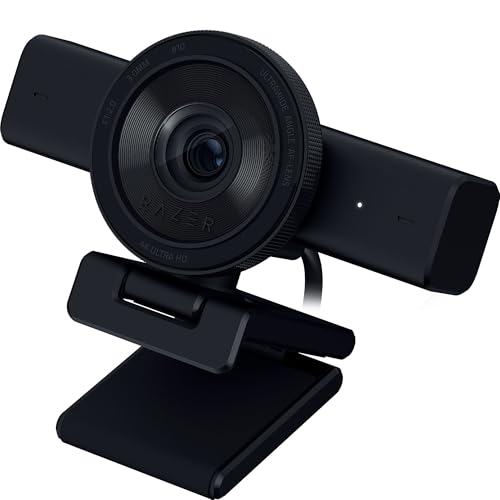
Razer Kiyo Pro
An adaptive light sensor reads the room 60 times a second and adjusts exposure before highlights blow out or shadows crush. A Sony STARVIS sensor behind it keeps detail visible in rooms lit only by a monitor glow. Field of view switches between a wide group shot and a tighter solo frame.
Pros
- Adaptive exposure handles dim and mixed lighting
- Adjustable field of view suits solo or group shots
- HDR keeps window backlighting from blowing out
Cons
- Requires a USB 3.0 port for full frame rate
- No physical privacy shutter included

Sony ZV-1 II
A 1-inch stacked sensor paired with a fast 18 to 50mm equivalent zoom produces background blur no compact webcam can replicate. Sony’s Imaging Edge Webcam software turns the USB-C port into a clean feed for streaming software. Continuous USB power skips battery swaps during long broadcasts, as long as power stays connected.
Pros
- Background blur outperforms any fixed-lens webcam
- Zoom lens reframes without moving the camera
- Larger sensor performs far better after dark
Cons
- Needs constant USB power for long sessions
- Menus and setup take longer than a plug-in webcam

Logitech Brio 4K
RightLight 3 processing balances exposure automatically when a window sits behind the presenter, a common streaming problem. 4K capture gives platforms that support higher resolution more detail to work with, though most streaming software still downsamples to 1080p. Windows Hello infrared login doubles as a bonus outside of streaming.
Pros
- 4K capture future-proofs against higher-bitrate platforms
- RightLight exposure handles strong backlight well
- Windows Hello infrared sensor doubles as a login camera
Cons
- 4K and 60fps are not available at the same time
- Costs more than 1080p-only alternatives

NexiGo N960E
A three-level ring light wraps the lens, fixing the flat lighting that budget webcams usually struggle with. Autofocus and dual stereo microphones cover the basics most casual streamers need. Owners report the tripod mount feels sturdy enough for a desk arm despite the low cost.
Pros
- Built-in ring light fixes typical desk lighting
- Dual microphones outperform most webcams at this price
- Tripod mount feels sturdy for the cost
Cons
- No USB-C connector included
- Autofocus runs slower than pricier competitors
How to pick the right one
What actually separates one streaming camera from another Resolution numbers look similar across price points, so frame rate and sensor size decide more. Larger sensors gather more light, which shows up after dark rather than in a bright room. Autofocus speed matters most when a presenter leans toward the lens. USB bandwidth also caps what a laptop port can deliver, regardless of the spec sheet.
1080p60 versus 4K30 for live streaming Twitch and most game-streaming layouts still run well under 4K, so a 1080p60 feed often looks smoother than a 4K30 one. Higher frame rate reduces motion blur during fast gestures or head turns. 4K becomes useful for recorded content that gets cropped or reframed later in editing. A weak upload connection also strains faster under 4K footage than under 1080p.
When a mirrorless camera beats a dedicated webcam A camera built around a 1-inch or larger sensor produces shallower depth of field and cleaner low light footage than any compact webcam matches. Software like Sony’s Imaging Edge Webcam turns that camera into a UVC device over USB-C. Battery life becomes the tradeoff, since continuous streaming needs external power rather than an internal cell. Anyone chasing a cinematic look should weigh that extra setup step against the image gain.
Lighting, framing and mount details worth checking A ring light built into the lens housing fixes flat desk lighting cheaply, without buying a separate light. Auto-framing gimbals help presenters who move, cook or demonstrate rather than sit still. Field of view adjusts on several models between a tight solo frame and a wider group shot. Mount type matters too, since a monitor clip and a tripod thread solve different desk setups.
The lineup, side by side
| # | Model | Max video | Best for | Score | Price |
|---|---|---|---|---|---|
| 1 | Logitech StreamCam | 1080p at 60fps | Best overall | 9.4 | Check price |
| 2 | Elgato Facecam Pro | 4K at 30fps, 1080p at 60fps | Best for content creators | 9.2 | Check price |
| 3 | OBSBOT Tiny 2 | 4K at 30fps | Best for solo streamers | 9.0 | Check price |
| 4 | Razer Kiyo Pro | 1080p at 60fps | Best for low light | 8.8 | Check price |
| 5 | Sony ZV-1 II | 1-inch stacked CMOS, 20.1MP | Best for mirrorless-quality streaming | 8.6 | Check price |
| 6 | Logitech Brio 4K | 4K at 30fps, 1080p at 60fps | Best for 4K streaming | 8.3 | Check price |
| 7 | NexiGo N960E | 1080p at 60fps | Best budget | 8.0 | Check price |
Common questions
What is the best webcam for streaming on Twitch and YouTube?
Logitech StreamCam and Razer Kiyo Pro both handle 1080p60, matching what most streaming layouts actually use. Elgato Facecam Pro adds uncompressed output for creators who edit footage afterward.
Is 1080p60 or 4K30 better for live streaming?
1080p60 usually looks smoother for live viewers, since motion matters more than resolution at typical stream bitrates. 4K30 helps more for recorded video that gets cropped or reframed later.
Can I use a mirrorless camera like the Sony ZV-1 II as a webcam?
Yes, through Sony’s Imaging Edge Webcam software over USB-C. It needs continuous external power for long sessions, since the internal battery was not built for that.
Do streaming webcams perform well in low light rooms?
Performance varies a lot by sensor size. Razer Kiyo Pro’s adaptive light sensor and Sony STARVIS sensor handle dim rooms better than the smaller sensors in budget webcams.
What field of view should a streaming camera have?
A narrower field of view around 65 to 80 degrees suits a single presenter close to the lens. Wider settings near 90 to 103 degrees fit group shots or a desk with visible props.
Are auto-framing webcams worth it for solo streamers?
They help anyone who stands, walks or demonstrates a product on camera. OBSBOT Tiny 2 physically repositions its gimbal to keep a moving presenter centered, something a fixed-lens webcam cannot do.
Does a streaming webcam need a ring light?
Not if a separate light already covers the desk. Built-in ring lights like the one on NexiGo N960E help when there is no room or budget for standalone lighting.
Streaming webcam vs mirrorless camera: which is worth the upgrade?
A mirrorless camera like the Sony ZV-1 II wins on background blur and low light detail. A dedicated webcam wins on simplicity, since it skips the external power and menu setup a camera needs.
Is it worth upgrading from a budget webcam to a premium streaming camera?
It depends on what limits the current setup. Low light noise, laggy autofocus and no USB-C port are the usual reasons to upgrade, more than resolution alone.
The bottom line
Logitech StreamCam remains the sensible default streaming camera, since reliable autofocus and 1080p60 output cover most setups without extra software. Choose Elgato Facecam Pro when interchangeable lenses and uncompressed 4K justify the added cost. Streamers who move around on camera should pick OBSBOT Tiny 2 instead, since its gimbal tracks motion no fixed-lens webcam can follow.


