Streaming Sticks Ranked by Speed, Apps and Value
The Roku Streaming Stick 4K is our top pick because its interface stays simple and every major app is present. The Amazon Fire TV Stick 4K Max is the fastest of the group, and the Fire TV Stick HD is the cheapest sensible way to make an older television smart.
The Roku Streaming Stick 4K is the one we would hand to most people, with the Amazon Fire TV Stick 4K Max for anyone who wants the quickest menus and the Fire TV Stick HD for older sets that do not need 4K. All three hide behind the screen and draw power from a nearby USB port or adapter.
Sticks are harder to judge than boxes because the differences hide in memory, heat and wireless performance rather than on the spec sheet. Two devices with the same resolution support can feel worlds apart after a year, once app updates get heavier. We compared processor and memory allowances, wireless standards, supported HDR and audio formats, remote features and what owners report about slowdown and Wi-Fi dropouts over time.
The best picks, ranked

Roku Streaming Stick 4K
Roku’s grid of apps is the least confusing interface anyone has shipped, which is why it remains the easiest recommendation for a shared or family television. The long range wireless receiver is built into the HDMI extender, so it holds a signal in rooms where other sticks stutter. Dolby Vision and HDR10 support cover almost every current TV, and the voice remote can control TV power and volume.
Pros
- Clearest interface for casual viewers
- Strong wireless reception in far rooms
- Broadest app and live TV catalogue
Cons
- Sponsored tiles sit on the home screen
- Menus are plainer than rivals

Amazon Fire TV Stick 4K Max (2nd Gen)
This is the quickest stick you can buy, with enough memory that heavy apps open without the pause that makes cheaper devices feel old. Wi-Fi 6E is the standout addition, useful in apartment buildings where the normal bands are congested. The trade off is a home screen built around Amazon’s catalogue, so expect promoted content above your own apps.
Pros
- Noticeably faster than every other stick here
- Wi-Fi 6E helps in congested buildings
- Ambient art mode when idle
Cons
- Home screen heavily promotes Amazon content
- Needs the supplied adapter rather than TV USB power

Amazon Fire TV Stick 4K (2nd Gen)
The standard 4K version gives you the same app catalogue and the same Dolby Vision output as the Max for a fair bit less, with a slightly slower processor and Wi-Fi 6 instead of 6E. In practice most viewers never notice the gap unless they switch apps constantly. It is the model to buy when you want current picture formats without paying for the top tier.
Pros
- Same picture formats as the Max
- Good value for the app catalogue
- Wi-Fi 6 is plenty in most homes
Cons
- Less storage for installed apps
- Slightly slower app launching

Google Chromecast with Google TV (4K)
Google TV pulls titles from every service you subscribe to into one continue watching row, which genuinely reduces the hunting that comes with four or five subscriptions. Casting from a phone still works exactly as it always did, which suits households where guests want to share video. Storage is tight, so heavy app users will eventually be uninstalling things to make room.
Pros
- Cross service watchlist saves searching
- Casting from phones works well
- Good voice search results
Cons
- Limited storage fills quickly
- Interface can feel cluttered at first

Roku Express 4K Plus
Not strictly a stick, this palm sized box does the same job for TVs where the HDMI port is awkwardly placed or an adjacent port would be blocked. It runs the same Roku software as the Streaming Stick 4K with the same app catalogue. Wireless performance is a step behind the stick’s long range receiver, so keep it within reasonable distance of the router.
Pros
- Fits where a stick physically cannot
- Same Roku software and app list
- Sticks to the TV back with the supplied strip
Cons
- No Dolby Vision support
- Weaker wireless than the stick version

Amazon Fire TV Stick HD
If the television is 1080p, paying for 4K output achieves nothing, and this is the sensible stick for a bedroom set, a camper or a garage screen. The interface is the same as the pricier Fire sticks with a slower processor behind it. Owners report it handles single app viewing perfectly well but shows its limits when switching between heavy apps quickly.
Pros
- Cheapest way to modernise an older TV
- Full Fire TV app catalogue
- Small enough to travel with
Cons
- No 4K output at all
- Slower when switching between apps
Google Chromecast with Google TV (HD)
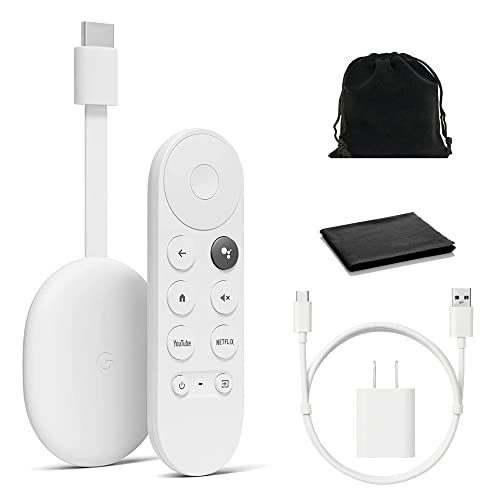
The HD version keeps Google TV’s unified watchlist and phone casting while dropping to 1080p output, which suits a second television that was never going to show 4K anyway. It is the cheapest way into the Google ecosystem with a proper remote rather than casting alone. Storage is the same tight allowance as the 4K model, so app management is part of ownership.
Pros
- Keeps the unified watchlist at lower cost
- Reliable casting from phones and laptops
- Compact and easy to hide
Cons
- 1080p ceiling limits future use
- Storage fills up with a few large apps
How to pick the right one
Match the output to the television you own A 4K stick on a 1080p television gives you exactly a 1080p picture, so the extra outlay buys nothing today. The counter argument is future proofing, since sticks outlive the sets they start on and moving one to a newer television is trivial. If the TV is old and staying that way, an HD stick is the honest choice, and it also uses less bandwidth on a slow connection.
HDR formats are not interchangeable Dolby Vision and HDR10+ are competing standards and most televisions properly support one, not both. Check which one your set handles before choosing a stick, because a device outputting a format the panel ignores simply falls back to standard HDR. Roku’s 4K stick covers Dolby Vision, Amazon’s covers both, and the Roku Express 4K Plus covers neither, which is a real distinction rather than marketing.
Memory and heat determine how a stick ages Sticks sit behind a warm panel with no ventilation and very little storage, and both of those things bite eventually. Apps grow with every update, so a device with 8 GB of storage will eventually ask you to uninstall something. More memory means fewer stutters when returning to a paused show. This, rather than resolution, is what separates a stick that feels fine after three years from one that does not.
Check remote features you will actually use TV power and volume control on the streaming remote is the single feature that stops a household juggling two controllers, and every current stick here offers it. Voice search quality varies more, with Google and Amazon returning better cross app results than Roku. If you regularly lose remotes, note that no stick includes a finder, which is a feature reserved for larger boxes.
How they compare
| # | Model | Max output | Best for | Score | Price |
|---|---|---|---|---|---|
| 1 | Roku Streaming Stick 4K | 4K with Dolby Vision and HDR10 | Best overall | 9.4 | Check price |
| 2 | Amazon Fire TV Stick 4K Max (2nd Gen) | 4K with Dolby Vision and HDR10+ | Best for speed | 9.2 | Check price |
| 3 | Amazon Fire TV Stick 4K (2nd Gen) | 4K with Dolby Vision and HDR10+ | Best value | 9.0 | Check price |
| 4 | Google Chromecast with Google TV (4K) | 4K with Dolby Vision and HDR10+ | Best for cross app recommendations | 8.8 | Check price |
| 5 | Roku Express 4K Plus | 4K with HDR10 and HDR10+ | Best small box alternative | 8.6 | Check price |
| 6 | Amazon Fire TV Stick HD | 1080p HDR | Best budget | 8.3 | Check price |
| 7 | Google Chromecast with Google TV (HD) | 1080p HDR | Best for casting on a budget | 8.0 | Check price |
Good to know
Can a streaming stick power from the TV USB port?
Sometimes, though many manufacturers advise against it. TV USB ports often supply less current than the stick needs, which causes random restarts. Using the supplied mains adapter is the reliable route, especially for 4K models.
How much internet speed does a streaming stick need?
Around 25 Mbps handles a single 4K stream comfortably, and 5 to 10 Mbps is enough for HD. Connection stability matters as much as raw speed, particularly for live content.
Why does my stick get hot?
They run warm by design, sitting in an unventilated space behind the panel. Use the supplied HDMI extender to move the stick away from the TV chassis, which improves both heat and wireless reception.
Do streaming sticks work on any television?
Any TV with a free HDMI port will work. Very old sets with only composite or component inputs need an adapter, and picture quality through those converters is poor enough that it is rarely worth doing.
Which stick has the most apps?
Roku and Fire TV both carry very broad catalogues, including nearly all live TV services. Google TV is close behind. Differences now tend to be about interface preference rather than missing major apps.
Will a stick slow down over time?
Owners report that limited storage and memory cause slowdown well before software support ends, since apps grow with each update. Choosing a model with more storage is the practical defence.
Can I take one travelling?
Yes, and they are popular for hotels, though captive portal Wi-Fi that requires a browser login can be awkward. Using a phone hotspot or a travel router is the usual workaround.
Is a stick or a set top box the better buy?
A stick is fine for normal app viewing and hides completely. Choose a box when you want Ethernet for live sport, more storage, an HDMI input or a remote finder.
The bottom line
The Roku Streaming Stick 4K is the stick we would buy for most televisions, thanks to its plain interface, strong wireless reception and complete app catalogue. Pick the Amazon Fire TV Stick 4K Max if raw speed and Wi-Fi 6E matter more than a clean home screen, and the Fire TV Stick HD when the television is 1080p and always will be.