Top Tablets for Professionals: Power, Portability, and Precision
The Apple iPad Pro 12.9-inch (M2) is the top pick for most professionals because it combines desktop-class performance with a stunning Liquid Retina XDR display and a mature app ecosystem. Its main limitation is the high price, especially when adding the Magic Keyboard and Apple Pencil. For Windows users needing full desktop software, the Microsoft Surface Pro 9 is a strong alternative.
Professionals need tablets that can handle demanding tasks like content creation, data analysis, and client presentations. These devices must offer powerful processors, high-resolution displays, and reliable accessory support to replace a laptop in many scenarios.
Our selection focuses on tablets that excel in productivity and creativity, based on specifications and owner reports. We have considered both Apple’s iPadOS and Windows and Android alternatives to cover a wide range of professional needs.
How to choose
The best picks, ranked
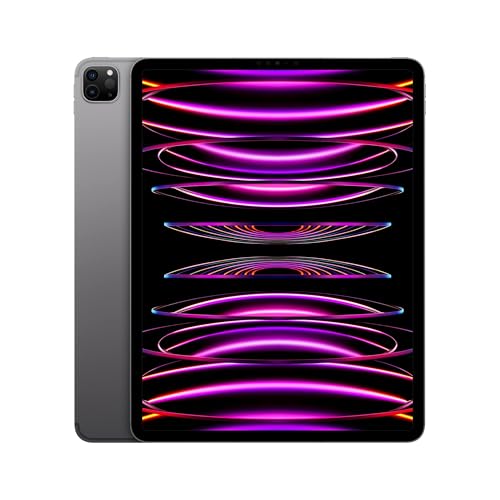
Apple iPad Pro 12.9-inch (M2)
The iPad Pro 12.9 with M2 chip is a powerhouse, offering laptop-level performance with the flexibility of a tablet. Its Liquid Retina XDR display with mini-LED technology delivers exceptional brightness and contrast, ideal for HDR video editing and graphic design. The Apple Pencil hover feature adds precision, and the Magic Keyboard makes it a versatile laptop replacement.
Pros
- Outstanding performance for heavy apps
- Best-in-class display for color work
- Extensive professional app library
Cons
- Very expensive with accessories
- iPadOS can limit multitasking compared to full desktop OS

Microsoft Surface Pro 9
The Surface Pro 9 runs full Windows 11, allowing you to use traditional desktop applications like the entire Microsoft Office suite and Adobe Creative Cloud. It features a 13-inch PixelSense display with a smooth 120Hz refresh rate, and the built-in Kickstand and Surface Pro Signature Keyboard transform it into a laptop. With Intel 12th-gen processors, it can handle demanding business workloads.
Pros
- Full Windows OS for complete software compatibility
- Replaceable SSD for storage upgrades
- Excellent kickstand and keyboard integration
Cons
- Keyboard and Slim Pen sold separately
- Battery life varies with usage

Samsung Galaxy Tab S9 Ultra
The Galaxy Tab S9 Ultra is a massive 14.6-inch tablet with a Super AMOLED display that offers vivid colors and deep blacks. It includes the S Pen in the box, which is great for note-taking and drawing. With the Snapdragon 8 Gen 2 processor and up to 16GB RAM, it handles multiple apps simultaneously, and DeX mode provides a desktop-like interface for productivity.
Pros
- Immense, beautiful display
- S Pen included with low latency
- Multitasking features like split-screen and DeX
Cons
- Very large and heavy for handheld use
- Android tablet app optimization can be inconsistent
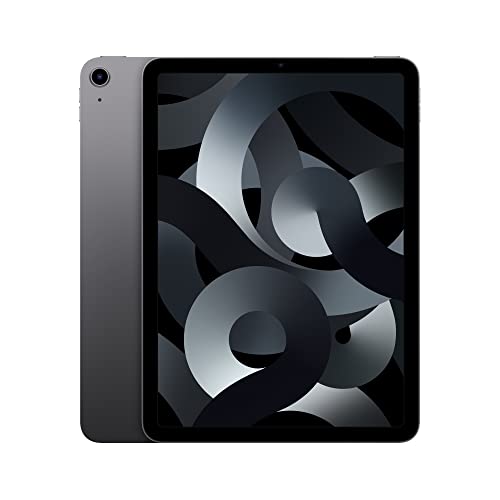
Apple iPad Air (5th Generation)
The iPad Air (5th gen) packs the M1 chip, offering performance that rivals many laptops. It has a 10.9-inch Liquid Retina display with True Tone and wide color, and supports the 2nd generation Apple Pencil and Magic Keyboard. It is lighter and more affordable than the iPad Pro, making it a great choice for note-taking, presentations, and light content creation.
Pros
- M1 chip delivers excellent performance
- Compatible with Magic Keyboard and Apple Pencil 2
- Lighter and more portable than iPad Pro
Cons
- No ProMotion 120Hz display
- Limited to 256GB storage option

Lenovo Tab P12 Pro
The Lenovo Tab P12 Pro features a 12.6-inch AMOLED display with a 120Hz refresh rate, delivering stunning visuals for presentations and media. It comes with the Lenovo Precision Pen 3 and an optional keyboard, making it a capable productivity tool. The Snapdragon 870 processor handles everyday tasks smoothly, and the quad JBL speakers provide excellent audio.
Pros
- Vibrant AMOLED display
- Pen and keyboard included in some bundles
- Great speaker system for media
Cons
- Performance not as high as Snapdragon 8 Gen 2
- Software update support may be shorter than competitors

Microsoft Surface Go 3
The Surface Go 3 is a compact 10.5-inch tablet that runs full Windows 11, making it perfect for quick email, note-taking, and light productivity on the go. It weighs just over a pound, and with the Surface Type Cover, it becomes a mini laptop. It is ideal for professionals who need a secondary device for travel.
Pros
- Extremely portable and lightweight
- Runs full Windows software
- Affordable price point
Cons
- Performance is limited for heavy tasks
- Keyboard and pen are extra

Samsung Galaxy Tab S8
The Galaxy Tab S8 offers a 11-inch LTPS TFT display with 120Hz refresh rate, ensuring smooth scrolling and precise pen input. It includes the S Pen, which is excellent for note-taking and sketching. With the Snapdragon 8 Gen 1 processor and up to 8GB RAM, it handles multitasking well. Samsung DeX provides a desktop experience when connected to an external display.
Pros
- S Pen included with low latency
- High refresh rate display
- Slim and portable design
Cons
- Display is not AMOLED (on the base model)
- Battery life could be better
How they stack up
| # | Model | Processor | Best for | Score | Price |
|---|---|---|---|---|---|
| 1 | Apple iPad Pro 12.9-inch (M2) | Apple M2 chip with 8-core CPU and 10-core GPU | Creative professionals who need top-tier performance and a large, color-accurate display. | 9.4 | Check price |
| 2 | Microsoft Surface Pro 9 | Intel Core i5-1235U or i7-1255U | Professionals who require full Windows desktop software in a portable form factor. | 9.1 | Check price |
| 3 | Samsung Galaxy Tab S9 Ultra | Qualcomm Snapdragon 8 Gen 2 for Galaxy | Professionals who want a huge display and Android flexibility for multitasking. | 9.0 | Check price |
| 4 | Apple iPad Air (5th Generation) | Apple M1 chip with 8-core CPU and 8-core GPU | Professionals on a budget who still want Apple’s performance and ecosystem. | 8.8 | Check price |
| 5 | Lenovo Tab P12 Pro | Qualcomm Snapdragon 870 | Professionals who want a premium Android tablet for media consumption and light productivity. | 8.4 | Check price |
| 6 | Microsoft Surface Go 3 | Intel Pentium Gold 6500Y or Core i3-10100Y | Professionals who need a highly portable, budget-friendly Windows tablet for light office work. | 8.2 | Check price |
| 7 | Samsung Galaxy Tab S8 | Qualcomm Snapdragon 8 Gen 1 | Professionals who want a powerful Android tablet with a S Pen and great display for notes and drawing. | 8.6 | Check price |
Good to know
Can a tablet fully replace a laptop for professional work?
Yes, for many professionals, if you choose the right model. The iPad Pro and Surface Pro 9 can handle most tasks, but you may encounter limitations with specialized software that is only available on desktop OS. For heavy coding or advanced CAD, a traditional laptop is still preferable.
What is the best tablet for graphic designers?
The Apple iPad Pro 12.9 with the Apple Pencil is widely preferred for graphic design due to its seamless integration, powerful apps like Procreate, and accurate display. The Samsung Galaxy Tab S9 Ultra is also a strong contender with its S Pen and AMOLED screen.
Are Windows tablets better than iPads for business?
It depends on your software needs. If you rely on Windows-only enterprise applications, the Surface Pro 9 is better. If you work within the Apple ecosystem and use cloud-based tools, the iPad Pro can be more efficient and offers a longer battery life.
How much storage do I need for professional use?
It depends on your files. For document-heavy work, 256GB is usually enough. For video editing or large design files, consider 512GB or more. Cloud storage can supplement, but having local storage is important for offline work.
Do I need a separate keyboard and stylus?
Not always. The Galaxy Tab S8 and S9 include the S Pen, but keyboards are usually sold separately. The iPad Pro and Surface Pro typically require separate purchases for both. Some bundles offer discounts when bought together.
Can I connect my tablet to an external monitor?
Yes, most professional tablets support external display output via USB-C or HDMI. The iPad Pro supports up to 6K displays, and the Surface Pro 9 can output to multiple monitors. Samsung tablets support DeX mode for a desktop experience on an external screen.
What is the battery life like on professional tablets?
Battery life varies. The iPad Pro and iPad Air last around 10 hours of video playback. Surface Pro 9 claims up to 15.5 hours but real-world usage is often lower. Samsung tablets have large batteries and can last 12-14 hours. Intensive tasks like 3D rendering will drain the battery faster.
Is it worth investing in a stylus?
If you take handwritten notes, annotate documents, or create digital art, a stylus is a worthwhile investment. The Apple Pencil and S Pen offer excellent pressure sensitivity and low latency. Many professionals find them indispensable for presentations and brainstorming.
Final word
For most professionals, the Apple iPad Pro 12.9-inch (M2) is the best choice due to its unmatched performance, display quality, and accessory ecosystem. If you must run full Windows software, choose the Microsoft Surface Pro 9. For Android users who prioritize a large screen and value, the Samsung Galaxy Tab S9 Ultra is the top pick. Ultimately, identify your primary software needs and budget to make the final decision.


