Light and Ready: Top Travel Laptops for Every Journey
The Apple MacBook Air M3 is our top pick for most travelers because it combines featherlight design with all-day battery life and a brilliant display, but its limited port selection may require adapters.
Traveling with a laptop means balancing weight, battery life, durability, and performance. You need a device that can survive airport security bins and cramped airplane trays while still handling your work or entertainment.
We analyzed specifications and owner feedback to identify the strongest contenders. Our list spans different operating systems and price points, so you can find a match for your travel style.
How to choose
The shortlist, ranked

Apple MacBook Air M3
The MacBook Air M3 is exceptionally thin and light at 2.7 pounds, making it a joy to carry. Its M3 chip delivers fast performance for daily tasks and creative work, while the battery comfortably lasts a full workday. The Liquid Retina display is sharp and vibrant, and the build feels premium. However, it only has two Thunderbolt ports, so you may need a dongle for more connectivity.
Pros
- Outstanding battery life
- Light and thin design
- Silent, fanless operation
Cons
- Limited to two ports
- More expensive than Windows counterparts

Dell XPS 13
The Dell XPS 13 is a favorite among Windows users for its near-borderless InfinityEdge display and compact footprint. It feels sturdy despite its small size, and the battery life is solid for a full day of work. The performance is snappy with Intel’s latest processors, and the keyboard is comfortable for long typing sessions. The webcam is positioned below the screen, which can be unflattering during video calls.
Pros
- Beautiful edge-to-edge display
- Premium aluminum build
- Excellent keyboard
Cons
- Webcam placement is awkward
- No USB-A ports without adapter

Lenovo ThinkPad X1 Carbon Gen 11
The ThinkPad X1 Carbon is renowned for its legendary keyboard and durable, carbon-fiber reinforced chassis. It has passed military-grade durability tests, so it can handle rough travel. It offers strong performance and a battery that lasts through a cross-country flight. The display is excellent, and it includes a healthy selection of ports, including USB-A and HDMI, which is rare in ultraportables. It comes with a premium price tag.
Pros
- Superb keyboard
- Rugged build for travel
- Good port selection
Cons
- Expensive
- Design is conservative
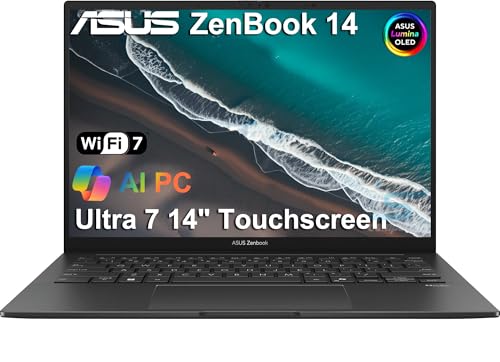
ASUS Zenbook 14 OLED
The ASUS Zenbook 14 OLED stands out with its stunning OLED display that makes movies and photos pop with deep blacks and vivid colors. It is light and compact, making it easy to slip into a backpack. The battery life is good, but the OLED screen may consume more power if you use it at high brightness. The keyboard is comfortable, and the laptop includes a number pad on the touchpad, which is a clever feature for data entry.
Pros
- Vibrant OLED display
- Good port variety
- Lightweight for a 14-inch
Cons
- Battery drains faster with OLED
- No Thunderbolt support

Microsoft Surface Laptop 5
The Surface Laptop 5 offers a sleek design with a 3:2 aspect ratio touchscreen that provides extra vertical space for reading and browsing. It is comfortable to use on a lap, and the keyboard is responsive. The audio quality is surprisingly good for a laptop, enhancing movie watching. It lacks a USB-A port and has a proprietary Surface Connect charging port, which might require a dongle for some peripherals.
Pros
- Bright, crisp touchscreen
- Excellent build quality
- Great audio
Cons
- Limited ports
- Repair difficulty is high

LG gram 14
The LG gram 14 is incredibly light, weighing just under 2.2 pounds, making it one of the lightest 14-inch laptops available. It has a large battery that lasts all day, and the screen is bright and clear. The build feels solid despite the light weight, thanks to a magnesium alloy body. It comes with a generous array of ports, including USB-A and HDMI. The downside is that the keyboard is shallow and the performance is not geared for heavy gaming.
Pros
- Remarkably light
- Long battery life
- Good port selection
Cons
- Shallow keyboard
- No dedicated graphics

Acer Swift 3
The Acer Swift 3 offers solid performance and a lightweight design at an affordable price. It has a metal chassis that feels more expensive than it is, and the battery life is respectable for a budget laptop. The screen is decent but not as vibrant as OLED options. It includes a good selection of ports, including USB-C and HDMI. The main drawbacks are the dim display and average speakers.
Pros
- Great value
- Lightweight for the price
- Solid build
Cons
- Display could be brighter
- Speakers are weak
The lineup, side by side
| # | Model | Weight | Best for | Score | Price |
|---|---|---|---|---|---|
| 1 | Apple MacBook Air M3 | 2.7 pounds | Best overall for most travelers | 9.4 | Check price |
| 2 | Dell XPS 13 | 2.6 pounds | Best Windows ultraportable | 9.1 | Check price |
| 3 | Lenovo ThinkPad X1 Carbon Gen 11 | 2.48 pounds | Best for business trips | 9.0 | Check price |
| 4 | ASUS Zenbook 14 OLED | 2.82 pounds | Best for media consumption | 8.8 | Check price |
| 5 | Microsoft Surface Laptop 5 | 2.8 pounds | Best for students on the go | 8.6 | Check price |
| 6 | LG gram 14 | 2.18 pounds | Best for ultralight packing | 8.4 | Check price |
| 7 | Acer Swift 3 | 2.65 pounds | Best budget travel laptop | 8.0 | Check price |
Frequently asked questions
What is the best travel laptop?
The Apple MacBook Air M3 is often considered the best for most travelers due to its light weight, long battery life, and robust performance. However, if you prefer Windows, the Dell XPS 13 or Lenovo ThinkPad X1 Carbon are excellent choices.
How light should a travel laptop be?
Aim for under 3 pounds to minimize strain. The LG gram 14 weighs only 2.18 pounds, while the MacBook Air M3 is 2.7 pounds. Even lighter options exist, but they often sacrifice performance or battery life.
How many hours of battery life do I need?
For a full day of travel, look for at least 10 to 12 hours of battery life. The MacBook Air M3 and Surface Laptop 5 can last up to 18 hours under light use, but real-world usage may reduce that.
Are travel laptops good for gaming?
Most travel laptops are not designed for gaming. They prioritize portability and battery life over graphics performance. If gaming is essential, consider a laptop with a dedicated GPU, but it will be heavier and have shorter battery life.
What is the most durable travel laptop?
The Lenovo ThinkPad X1 Carbon is known for its durability, passing military-grade tests. It uses a carbon fiber reinforced chassis that can withstand rough handling. Other options like the Dell XPS 13 also have sturdy builds.
Should I get a 13-inch or 14-inch laptop for travel?
Both sizes are portable. A 13-inch laptop is slightly more compact, while a 14-inch offers a larger screen for productivity. The Dell XPS 13 and MacBook Air M3 are 13 to 13.6 inches, while the ASUS Zenbook 14 is 14 inches. Choose based on your preference for screen size versus minimal weight.
Are there travel laptops with touchscreens?
Yes, the Microsoft Surface Laptop 5 has a touchscreen, and the Dell XPS 13 offers touch options. Touchscreens can be useful for presentations or when using tablet mode, but they may slightly increase weight and battery drain.
Do travel laptops have good keyboards?
Keyboard quality varies. The ThinkPad X1 Carbon is famous for its comfortable keyboard, while the MacBook Air M3 has a responsive keyboard. Some ultraportables, like the LG gram, have shallower keys that may not suit everyone. If you type a lot, try before you buy.
Can I expand storage on a travel laptop?
Many travel laptops have solid-state drives (SSDs) that are soldered in, making upgrades difficult. Some models, like the Acer Swift 3, may have accessible SSD slots. If you need more storage, consider cloud storage or external drives.
What operating system is best for travel laptops?
It depends on your ecosystem. macOS offers seamless integration with iPhones and iPads, while Windows is more versatile with software compatibility. Chrome OS is lightweight but may lack certain applications. Choose the one that fits your workflow.
Final word
For frequent travelers who prioritize portability and battery life without compromising performance, the Apple MacBook Air M3 is the clear winner. Its combination of low weight, long endurance, and powerful chip makes it ideal for work, streaming, and everything in between. If you require a Windows laptop for business, the Lenovo ThinkPad X1 Carbon is the best investment for its durability and keyboard comfort. For budget-conscious travelers, the Acer Swift 3 delivers essential features at an affordable price.


