Top USB C Cables for Fast Charging and Data Transfer
The Anker PowerLine III Flow is our top pick for most people because it is flexible yet durable, supports 60W charging, and handles USB 2.0 data speeds for everyday use. Its main limitation is the absence of USB 3.0 data transfer, but for charging and syncing, it excels.
USB C cables have become essential for powering and syncing modern devices. But not all cables are created equal. Some charge slowly, others break easily, and a few struggle with data transfer.
This roundup highlights the most reliable USB C cables available on Amazon. We focused on real-world performance, build quality, and value to help you choose the right one for your setup.
Our top picks

Anker PowerLine III Flow USB C to USB C Cable (3ft)
The Anker PowerLine III Flow offers a tangle-free braided design with a soft, flexible feel. It supports up to 60W charging for phones and tablets, and its reinforced stress points prevent fraying. Owners report it withstands daily use without breaking.
Pros
- Exceptionally flexible and durable
- Supports fast charging for phones and tablets
- Trusted brand with reliable quality
Cons
- Only USB 2.0 data speed
- Not ideal for heavy laptop charging
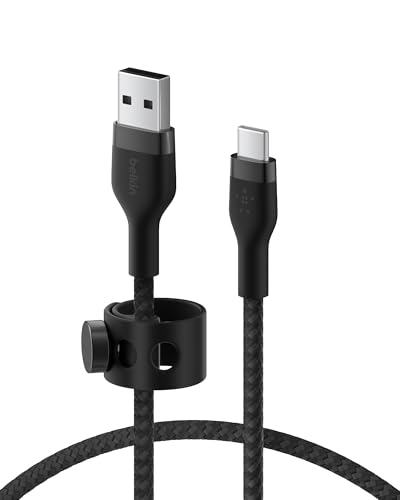
Belkin BoostCharge USB C Cable (USB IF Certified)
Belkin’s BoostCharge cable is USB IF certified, ensuring compliance with USB standards. It delivers up to 60W charging and robust data transfer. The braided nylon exterior adds extra protection, making it a dependable choice for home or office.
Pros
- USB IF certified for safety and performance
- Sturdy braided nylon build
- Backed by reputable brand
Cons
- Pricier than some similar cables
- Limited to USB 2.0 data

UGREEN USB C Cable 100W (2 Pack)
UGREEN’s 100W cable is built for power hungry devices like MacBook Pro and Dell XPS. It supports up to 100W charging via USB PD and features an E marker for safe power delivery. The braided design is both flexible and durable.
Pros
- Handles high wattage for laptops
- Comes in a 2 pack for extra value
- Long 2 meter length
Cons
- USB 2.0 data transfer only
- Slightly thicker cable

Anker New Nylon USB C Cable (3ft, 2 Pack)
Anker’s New Nylon cable is a cost effective solution that doesn’t skimp on quality. It offers 60W charging and reliable data sync, all wrapped in a tough nylon exterior. Two cables for the price of one makes it a great value.
Pros
- Excellent value with 2 pack
- Nylon braiding adds durability
- Compact length for travel
Cons
- No high speed data transfer
- Shorter length may not suit all

Cable Matters USB C to USB C Cable (10Gbps)
Cable Matters offers a USB 3.1 Gen 2 cable with 10Gbps data transfer, perfect for external SSDs and 4K displays. It also supports 100W charging. The braided cable is thick yet pliable.
Pros
- Blazing fast data transfer
- Supports high power charging
- Suitable for video output
Cons
- More expensive than USB 2.0 cables
- Stiff cable may be less flexible

Nomad Universal USB C Cable
Nomad’s cable stands out with a rugged metal and leather construction. It’s designed for longevity and aesthetic appeal. It supports 60W charging and USB 2.0 data, making it a stylish accessory for professionals.
Pros
- Premium materials and craftsmanship
- Very durable for daily use
- Attractive design
Cons
- Premium price point
- Lower data speed compared to others

Syntech USB C Cable 240W (3 Pack)
Syntech offers a 240W capable cable that meets the latest USB PD 3.1 standard. It’s ready for next gen laptops and high power devices. The cable is braided and comes in multiple lengths.
Pros
- Highest charging capability
- Future proof for upcoming devices
- Good value with 3 pack
Cons
- Overkill for current phones
- Data speed limited to USB 2.0
The lineup, side by side
| # | Model | Connector | Best for | Score | Price |
|---|---|---|---|---|---|
| 1 | Anker PowerLine III Flow USB C to USB C Cable (3ft) | USB C to USB C | Everyday charging and durability | 9.4 | Check price |
| 2 | Belkin BoostCharge USB C Cable (USB IF Certified) | USB C to USB C | Official certification and safety | 9.1 | Check price |
| 3 | UGREEN USB C Cable 100W (2 Pack) | USB C to USB C | High wattage charging for laptops | 9.0 | Check price |
| 4 | Anker New Nylon USB C Cable (3ft, 2 Pack) | USB C to USB C | Budget friendly durability | 8.8 | Check price |
| 5 | Cable Matters USB C to USB C Cable (10Gbps) | USB C to USB C | High speed data transfer | 8.7 | Check price |
| 6 | Nomad Universal USB C Cable | USB C to USB C | Premium design and build | 8.5 | Check price |
| 7 | Syntech USB C Cable 240W (3 Pack) | USB C to USB C | Future proofing with 240W support | 8.0 | Check price |
How to pick the right one
Questions worth asking
Are all USB C cables the same?
No. They vary in charging speed, data transfer rate, and build quality. Some support only USB 2.0, while others handle USB 3.1 or higher. Always check specifications for your needs.
Can I use any USB C cable to charge my laptop?
Only if the cable supports the required wattage. Laptops often need 60W or more, so look for cables rated for at least that. Some laptops require 100W or more.
What does USB PD mean?
USB PD stands for Power Delivery, a charging standard that allows higher power over USB C. It’s essential for fast charging laptops and some phones.
Why is data transfer speed important?
If you transfer large files like videos or backups, faster data speeds save time. USB 3.0 is 10 times faster than USB 2.0.
How do I know if a cable is certified?
Look for USB IF certification, which ensures the cable meets industry standards. This is important for safety and performance.
Can a USB C cable damage my device?
Poor quality cables may not have proper resistors, potentially causing damage. Stick to reputable brands or certified cables.
What is the difference between USB C and USB A?
USB C is a newer connector that is reversible and supports higher power and data speeds. USB A is the traditional rectangular connector found on older devices.
How long should my USB C cable be?
It depends on your usage. For desk setups, a 3 to 6 foot cable is common. For travel, shorter cables are more portable.
The bottom line
For most users, the Anker PowerLine III Flow offers the best balance of durability and performance. If you need to charge a laptop, the UGREEN 100W cable is your best bet. For high speed data transfers, choose the Cable Matters 10Gbps cable. Ultimately, consider your primary use case and pick accordingly.



