Top Video Adapters for Every Connection Type
For most people, the UGREEN USB C to HDMI Adapter is the best choice because it offers reliable 4K output and broad compatibility with laptops, phones, and tablets. Its main advantage is plug-and-play simplicity, but it lacks support for high refresh rates above 30Hz at 4K.
Video adapters are essential for connecting modern devices to older displays or vice versa. Whether you need to mirror your laptop screen to a TV or extend your desktop with an external monitor, the right adapter makes it seamless.
This roundup covers a variety of connection types, including USB-C to HDMI, DisplayPort to HDMI, and HDMI to VGA. We’ve selected adapters that perform well based on specifications and owner reports.
The top picks, ranked

UGREEN USB C to HDMI Adapter
This compact adapter converts USB-C to HDMI, supporting 4K at 30Hz. It works with laptops, smartphones, and tablets that support DisplayPort Alt Mode. The aluminum housing resists heat, and the braided cable adds durability.
Pros
- Plug-and-play, no drivers needed
- Compact and sturdy design
- Wide device compatibility
Cons
- No 4K@60Hz support
- Short cable may limit placement

Anker USB C to HDMI Adapter (with 4K@60Hz)
Anker’s adapter supports 4K@60Hz for crisp, fluid visuals. It is ideal for connecting a USB-C laptop to a 4K monitor or TV. The compact design is travel-friendly, and the chipset ensures stable signal transmission.
Pros
- High refresh rate for 4K
- Reliable performance
- Compact and portable
Cons
- Requires USB-C port with DP Alt Mode
- May not work with phones that don’t support 4K60

Cable Matters DisplayPort to HDMI Adapter
This adapter converts DisplayPort output to HDMI, supporting resolutions up to 4K@30Hz. It is a passive adapter, so it requires a DisplayPort source that outputs HDMI signals. Works well with graphics cards and laptops with DisplayPort.
Pros
- Supports audio pass-through
- Simple plug-and-play
- Affordable
Cons
- No 4K@60Hz support
- Not bidirectional

Rankie HDMI to VGA Adapter
This adapter lets you connect an HDMI source to a VGA display. It supports resolutions up to 1920×1200 and includes an audio jack for separate audio output. It is powered by the HDMI port, so no external power is needed.
Pros
- Works with older VGA displays
- No external power required
- Audio output included
Cons
- Not for 4K
- VGA quality is analog, not as sharp

Belkin USB-C to DisplayPort Adapter
Belkin’s adapter supports 4K@60Hz and even 1440p at 144Hz, making it great for gaming or productivity. It features a braided cable and a robust build. It works with MacBooks, iPads, and Windows laptops that support DisplayPort Alt Mode.
Pros
- Supports high refresh rates
- Durable build
- Good for gaming
Cons
- Requires DP Alt Mode support
- More expensive than HDMI adapters
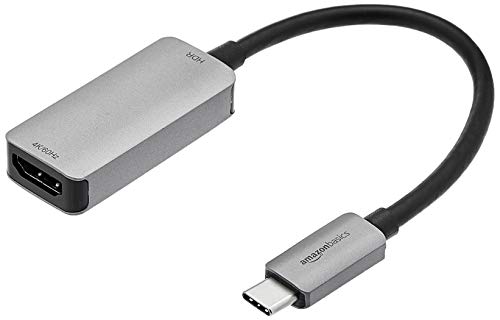
Amazon Basics USB-C to HDMI Adapter
This adapter provides a simple way to connect USB-C devices to HDMI displays. It supports up to 4K@30Hz and is compatible with many laptops and tablets. The compact design is easy to carry, and the price is attractive.
Pros
- Very affordable
- Simple to use
- Small footprint
Cons
- Build quality feels less premium
- No 4K@60Hz
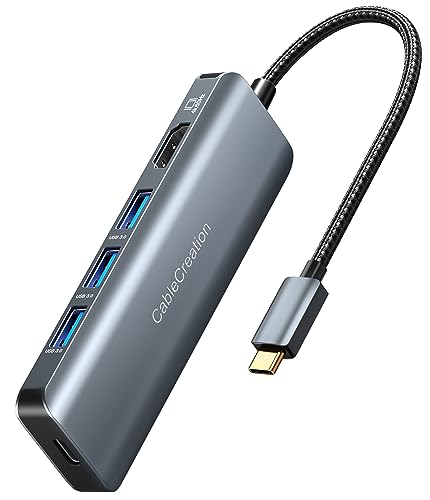
CableCreation USB C to HDMI Adapter with 8K Support
This adapter supports up to 8K@30Hz and 4K@120Hz, making it one of the most advanced options. It uses the latest HDMI 2.1 standard and is backward compatible with older displays. It is ideal for users with high-end monitors or future upgrades.
Pros
- Future-proof with 8K support
- High refresh rates for gaming
- Backward compatible
Cons
- Overkill for most users
- May not work with all USB-C ports
How to pick the right one
How they compare
| # | Model | Connector | Best for | Score | Price |
|---|---|---|---|---|---|
| 1 | UGREEN USB C to HDMI Adapter | USB-C to HDMI | Most users needing a reliable USB-C to HDMI connection | 9.4 | Check price |
| 2 | Anker USB C to HDMI Adapter (with 4K@60Hz) | USB-C to HDMI | Users who need smooth 4K video at 60Hz | 9.2 | Check price |
| 3 | Cable Matters DisplayPort to HDMI Adapter | DisplayPort to HDMI | Connecting a DisplayPort computer to an HDMI monitor or TV | 9.0 | Check price |
| 4 | Rankie HDMI to VGA Adapter | HDMI to VGA | Connecting modern HDMI devices to older VGA monitors or projectors | 8.8 | Check price |
| 5 | Belkin USB-C to DisplayPort Adapter | USB-C to DisplayPort | Connecting USB-C devices to DisplayPort monitors at high refresh rates | 8.6 | Check price |
| 6 | Amazon Basics USB-C to HDMI Adapter | USB-C to HDMI | Budget-friendly option for basic HDMI connectivity | 8.4 | Check price |
| 7 | CableCreation USB C to HDMI Adapter with 8K Support | USB-C to HDMI | Future-proofing for 8K displays and high-end setups | 8.2 | Check price |
Questions worth asking
Do video adapters require external power?
Most simple adapters like HDMI to VGA or USB-C to HDMI are powered by the source device. However, some adapters that convert digital to analog or support high resolutions may need external power. Check the product specifications.
Can I use a USB-C to HDMI adapter with my phone?
Yes, if your phone supports DisplayPort Alt Mode over USB-C. Many flagship phones from Samsung, Huawei, and others support this. For iPhones, you need a Lightning to HDMI adapter instead.
What is the difference between active and passive adapters?
Active adapters convert the signal format, allowing connections between incompatible interfaces like DisplayPort to HDMI. Passive adapters simply reroute signals and usually only work when the source outputs the same signal type. For DisplayPort to HDMI, passive adapters work if the source supports dual-mode DisplayPort.
Will a video adapter support audio?
HDMI and DisplayPort carry audio, so adapters that convert between these formats typically support audio. For HDMI to VGA, audio is not carried over VGA, so many adapters include a 3.5mm audio jack. Check the product description.
Can I connect multiple monitors using video adapters?
Yes, if your computer has multiple video outputs or if you use a docking station that supports multiple displays. Some USB-C hubs include multiple video ports. Ensure your graphics card supports the number of monitors you want.
Why is my adapter not working?
First, ensure the adapter is fully inserted and the source device is set to the correct output. Check if your device supports the required Alt Mode. Also, try a different cable or port. Some adapters are directional, so verify you are using the correct ends.
Are all USB-C to HDMI adapters the same?
No, they differ in supported resolution, refresh rate, and build quality. Some are designed for 4K at 30Hz, while others support 4K at 60Hz or even 8K. Compatibility also varies based on your device’s USB-C implementation.
Do I need a special adapter for 4K@60Hz?
Yes, not all adapters support 4K at 60Hz. Look for adapters that explicitly state 4K@60Hz or higher. They often use advanced chipsets and support HDMI 2.0 or DisplayPort 1.2 and above.
Can I use an HDMI to VGA adapter with a DVD player?
Yes, if the DVD player has an HDMI output and you have a VGA monitor, the adapter will convert the signal. However, note that HDCP-protected content may not work on VGA due to copy protection.
What is the maximum cable length for video adapters?
The built-in cable length on adapters is usually short, around 15 cm (6 inches). For longer runs, you can use extension cables, but signal quality may degrade over long distances. For best results, keep the adapter close to the source.
Our pick
For the majority of users, the UGREEN USB C to HDMI Adapter offers the best balance of performance and reliability. If you need 4K at 60Hz, choose the Anker adapter. For connecting DisplayPort sources to HDMI, the Cable Matters adapter is a solid pick. Budget-conscious buyers can rely on the Amazon Basics adapter for basic needs.