Pro Video Cables That Survive the Gig
For most professional video work, the Cable Matters 8K HDMI 2.1 cable is the top pick. It handles 48Gbps bandwidth, supports 8K/60Hz, and has a braided, durable build. Its main limitation is its length, which maxes out at 6 feet for full 8K performance; longer runs need optical or active cables.
In professional video production, the cable is the weakest link. A cheap cable can cause flicker, signal dropouts, or even damage equipment. Professionals need cables that deliver consistent signal, survive travel, and handle high bandwidth.
We compared the most popular professional video cables on Amazon, focusing on HDMI 2.1, SDI, and DisplayPort. We looked at build quality, shielding, and real-world ratings. Here are the best options for different professional needs.
Our top picks

Cable Matters 8K HDMI 2.1 Cable
This HDMI 2.1 cable supports 48Gbps, 8K/60Hz, and 4K/120Hz. It features a braided nylon jacket and gold-plated connectors. Owners report solid build quality and reliable performance for gaming and professional video editing.
Pros
- Ultra-high bandwidth for demanding applications
- Sturdy braided jacket
- Supports HDR and eARC
Cons
- Length limited for full 8K
- Stiff cable

Belkin UltraHD 8K HDMI 2.1 Cable
Belkin’s cable is certified for 8K and 48Gbps. It has a durable, flexible design with metal connectors. Users appreciate its consistent performance and length options up to 10 feet.
Pros
- Certified HDMI 2.1
- Flexible and durable
- Good for high refresh gaming
Cons
- Pricey
- No 90-degree option
Monoprice Onyx Series 8K HDMI 2.1 Cable
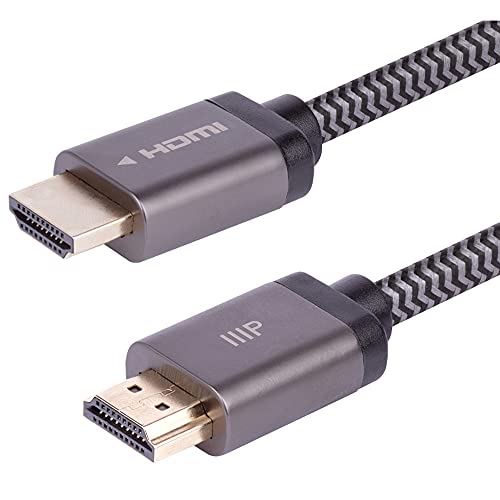
Monoprice Onyx offers 8K support at a lower price. It has a braided jacket and supports 48Gbps. Owners find it reliable for home theaters and professional setups.
Pros
- Affordable
- High bandwidth
- Braided jacket
Cons
- Thicker cable
- Connectors may be large

Cable Matters 12G SDI Cable
This SDI cable supports 12G-SDI for up to 4K/60. It features a rugged design with BNC connectors. Broadcasters and event videographers rely on its signal integrity over long runs.
Pros
- Long run capability
- Professional BNC connectors
- Excellent shielding
Cons
- No HDMI output
- Not for consumer devices

Blue Jeans Cable BJC-HDMI-8K
Blue Jeans Cable offers custom lengths up to 100 feet. Their HDMI 2.1 cable is built with premium materials. Installers praise its reliability and support.
Pros
- Custom lengths
- High quality construction
- Excellent customer service
Cons
- Expensive
- Longer lead time

Silicon Power DisplayPort 1.4 Cable
This DisplayPort cable supports up to 8K@60Hz and HDR. It has a latch-free design and gold-plated connectors. Gamers and designers find it reliable for high refresh rates.
Pros
- High refresh support
- Secure connection
- Affordable
Cons
- Not as durable as some
- No locking mechanism

Ugreen 8K HDMI 2.1 Cable
Ugreen’s HDMI cable is lightweight and flexible. It supports 8K and has a nylon braid. Users like its portability and value.
Pros
- Flexible and lightweight
- Good price
- Supports 8K
Cons
- Shorter lengths for 8K
- Not as rugged
How they stack up
| # | Model | Cable Length | Best for | Score | Price |
|---|---|---|---|---|---|
| 1 | Cable Matters 8K HDMI 2.1 Cable | 3, 6, 10 ft | Highest bandwidth and future-proofing | 9.6 | Check price |
| 2 | Belkin UltraHD 8K HDMI 2.1 Cable | 3.3, 6.6, 10 ft | Reliable premium build | 9.3 | Check price |
| 3 | Monoprice Onyx Series 8K HDMI 2.1 Cable | 3, 6, 10 ft | Budget-friendly professional use | 9.1 | Check price |
| 4 | Cable Matters 12G SDI Cable | 25, 50, 100 ft | Broadcast and live production | 9.2 | Check price |
| 5 | Blue Jeans Cable BJC-HDMI-8K | Custom up to 100 ft | Custom lengths and studio installs | 9.0 | Check price |
| 6 | Silicon Power DisplayPort 1.4 Cable | 3, 6, 10 ft | PC workstations and high refresh displays | 8.8 | Check price |
| 7 | Ugreen 8K HDMI 2.1 Cable | 3, 6, 10 ft | Everyday professional portability | 8.5 | Check price |
How to pick the right one
Good to know
What is the difference between HDMI 2.0 and HDMI 2.1?
HDMI 2.1 supports 48Gbps, enabling 8K@60 and 4K@120. HDMI 2.0 supports 18Gbps, up to 4K@60. For future-proofing, choose 2.1.
Can I use an 8K HDMI cable with a 4K TV?
Yes. 8K cables are backward compatible. They will work with 4K devices, providing headroom for future upgrades.
What is SDI and when should I use it?
SDI is a broadcast standard for reliable video over long distances. Use it in live production or when runs exceed 50 feet. It uses BNC connectors.
Are expensive HDMI cables worth it?
For professional use, yes. Higher quality cables have better shielding and connectors, reducing signal issues. For short runs, cheaper cables may suffice.
How long can an HDMI cable be without signal loss?
Standard HDMI cables work up to about 15 feet for 4K. Beyond that, use active or optical cables. For 8K, keep it under 6 feet unless active.
Do I need a DisplayPort cable for gaming?
If your monitor has DisplayPort and supports high refresh rates, use DisplayPort. It supports higher bandwidth than HDMI 2.0.
What does the braided jacket do?
Braided jackets add durability and flexibility. They protect against bending and crushing, ideal for portable use.
Can I use a 12G SDI cable for 1080p?
Yes. 12G SDI is backward compatible with lower SDI rates. It will carry 1080p without issues.
How do I choose the right cable length?
Measure the distance between devices. Add a little slack. Keep HDMI under 15 feet. For longer runs, consider SDI or optical.
The bottom line
For most professionals, the Cable Matters 8K HDMI 2.1 cable is the best investment. It offers top bandwidth and quality at a reasonable price. If you need long runs, choose the 12G SDI cable. For PC setups, the Silicon Power DisplayPort cable is excellent.