Voice Remotes for Fire TV, Roku, Apple TV and Google TV
Amazon Alexa Voice Remote Pro leads this lineup for Fire TV owners, with backlit keys and a locator that Alexa triggers on command. Roku Voice Remote Pro suits Roku households that want USB-C charging. Apple Siri Remote fits Apple TV 4K best, pairing a touch clickpad with a dedicated Siri button.
Typing a show title with a directional pad wastes time that a microphone skips entirely. Amazon Alexa Voice Remote Pro tops this list, and Roku Voice Remote Pro follows close behind for Roku households.
Most voice remotes lock to a single ecosystem, so a Fire TV remote will not pair with a Roku box. We compared platform compatibility, microphone behavior, charging method and owner feedback on finder reliability to rank these seven picks.
The shortlist, ranked

Amazon Alexa Voice Remote Pro
Motion sensors light the buttons the instant you pick this remote up. Two customizable shortcut keys launch apps or Alexa routines instantly. A built-in finder chimes on command, and it pairs with most Fire TV sticks, cubes and Fire TV Edition televisions.
Pros
- Ask Alexa to trigger the built-in remote finder
- Buttons illuminate automatically when lifted
- Two custom keys map to apps or routines
Cons
- Works only with Fire TV hardware
- Runs on disposable AAA batteries, not rechargeable

Roku Voice Remote Pro (2nd Edition)
USB-C charging replaces the AAA batteries found on cheaper Roku remotes. A hands-free wake phrase locates it under couch cushions without pressing a button. Private listening runs through a built-in headphone jack, and it pairs with most current Roku players and Roku TV models.
Pros
- A single charge lasts for months of typical use
- Hands-free wake phrase finds it even when buried
- Headphone jack enables private listening
Cons
- Hands-free listening mode shortens battery life slightly
- Limited to the Roku ecosystem only
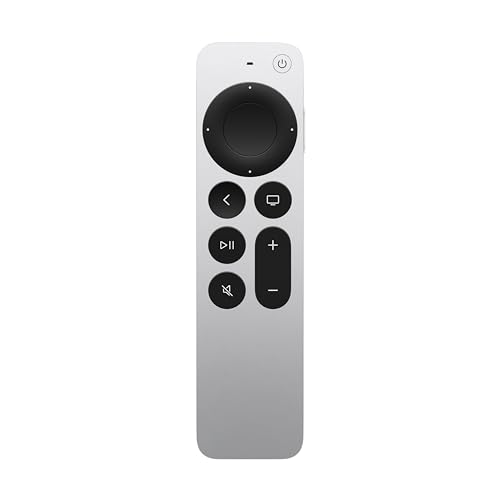
Apple Siri Remote (USB-C, 3rd Generation)
Aluminum housing gives this remote a denser, more premium feel than plastic rivals. A circular touch clickpad scrubs through video with more precision than button-only designs. Siri sits on a dedicated side button, and USB-C charging plus HDMI-CEC volume control round out the feature set.
Pros
- Aluminum build resists everyday wear
- Touch clickpad scrubs playback with fine control
- Charges on the same USB-C cable as an iPhone
Cons
- No backlight for locating buttons in the dark
- Slim shape slips between couch cushions easily
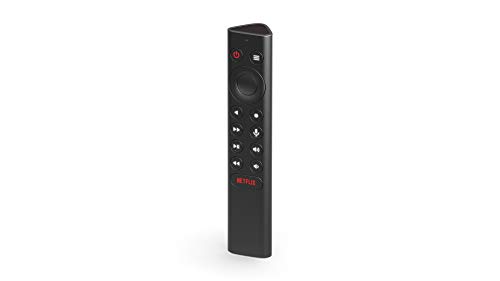
NVIDIA SHIELD Remote
Triangular shape keeps this remote from rolling off an armrest. Backlit buttons wake automatically when lifted, and an IR blaster handles television power and volume. A locator chime plays from the SHIELD app, while Google Assistant searches across installed Android TV apps.
Pros
- IR blaster adjusts TV volume and power directly
- Phone app triggers a locator chime on demand
- Triangular body resists rolling off furniture
Cons
- Pairs only with SHIELD TV streaming devices
- Netflix shortcut button cannot be reprogrammed

Chromecast Voice Remote
Google sells this pebble-shaped remote as a standalone replacement for Chromecast with Google TV. A dedicated Assistant button searches across every connected subscription. Programmable controls manage TV power, volume and input over IR or HDMI-CEC, and setup runs through the Google TV interface.
Pros
- Restores a lost Chromecast setup at low cost
- Handles TV volume and input switching directly
- Compact size suits kids’ hands
Cons
- No finder feature if the remote goes missing
- Minimal buttons slow down text entry

Amazon Alexa Voice Remote (3rd Gen)
Four app shortcut buttons sit alongside Alexa search, TV power and volume keys on this standard Fire TV remote. Skipping the Pro’s backlight and finder keeps the design simple. Compatibility spans most Fire TV sticks, cubes and televisions sold since 2016.
Pros
- Affordable replacement for a lost original remote
- Alexa search performs the same as the Pro model
- Volume and power keys eliminate a second remote
Cons
- No backlight for dim room viewing
- App shortcut buttons stay fixed, not customizable

SofaBaton X1S Universal Remote
One hub-based handset consolidates streamers, soundbars, TVs and Blu-ray players. An OLED scroll wheel navigates menus, while activity macros fire a chain of commands like powering on the TV, receiver and Apple TV together. Alexa and Google Assistant integration route voice control through an existing smart speaker.
Pros
- Replaces a pile of separate remotes at once
- One-press macros switch the entire home theater setup
- App-based setup maps new devices in minutes
Cons
- Voice control needs a separate smart speaker, not a built-in mic
- Initial device mapping can take an evening
How they compare
| # | Model | Platform | Best for | Score | Price |
|---|---|---|---|---|---|
| 1 | Amazon Alexa Voice Remote Pro | Amazon Fire TV devices | Best overall | 9.4 | Check price |
| 2 | Roku Voice Remote Pro (2nd Edition) | Roku players and Roku TV | Best rechargeable | 9.2 | Check price |
| 3 | Apple Siri Remote (USB-C, 3rd Generation) | Apple TV 4K and Apple TV HD | Best for Apple TV | 9.0 | Check price |
| 4 | NVIDIA SHIELD Remote | NVIDIA SHIELD TV models | Best for Android TV | 8.7 | Check price |
| 5 | Chromecast Voice Remote | Chromecast with Google TV | Best for Google TV | 8.5 | Check price |
| 6 | Amazon Alexa Voice Remote (3rd Gen) | Amazon Fire TV devices | Best value | 8.2 | Check price |
| 7 | SofaBaton X1S Universal Remote | IR and Bluetooth devices, 60+ brands | Best universal | 8.0 | Check price |
Before you buy
What should you look for in a voice remote? Platform compatibility narrows the field first, since almost every voice remote locks to one streamer. Match the remote to Fire TV, Roku, Apple TV, Google TV or SHIELD before comparing anything else. Power source matters next: rechargeable models like the Roku Voice Remote Pro and Siri Remote skip battery swaps. Backlighting, finder tools and CEC volume control separate premium remotes from basic replacements.
Push to talk or hands free, which voice mode fits your home? Push-to-talk remotes keep the microphone off until a button is held, a behavior many owners prefer for privacy. Hands-free models such as the Roku Voice Remote Pro listen for a wake phrase, so you can locate them or pause playback without touching anything. Battery drain runs slightly higher in hands-free mode. Roku lets owners toggle the feature off to compare both styles.
Which voice remote works best as a lost-remote replacement? Buying the exact ecosystem match solves most replacement needs. The Alexa Voice Remote (3rd Gen) restores a Fire TV Stick cheaply, and the Chromecast Voice Remote does the same for Google TV. Pairing takes a home-button hold near the powered-on device in both cases. Stepping up to a Pro-tier remote during a replacement adds backlighting and a finder for a modest premium.
Is a universal voice remote worth it for a mixed home theater? Multi-device rooms with a TV, soundbar, console and streamer benefit most from consolidation. A hub remote like the SofaBaton X1S triggers whole-room macros and accepts voice commands routed through Alexa or Google speakers. Limited dexterity is another strong reason to switch, since voice search skips on-screen keyboard hunting. Single-streamer households rarely need this level of complexity.
Frequently asked questions
Do voice remotes work with any TV brand?
No. Most voice remotes pair with only one streaming platform. TV power and volume pass through HDMI-CEC or IR, but voice search works solely with the matching Fire TV, Roku, Apple TV, Google TV or SHIELD device.
How do you pair a replacement voice remote?
Power on the streaming device first, then hold the home button on the new remote for about 10 seconds nearby. Fire TV, Roku and Google TV all follow this pattern, confirming the pairing on screen.
Can a voice remote control soundbar volume?
Yes, when the soundbar connects over HDMI-ARC, the remote’s volume keys usually pass through via CEC. Some models, including the Alexa Voice Remote Pro, also carry IR profiles for popular soundbar brands.
Which voice remotes are rechargeable?
The Roku Voice Remote Pro, Apple Siri Remote and SofaBaton X1S all charge over USB-C or an included cable. Amazon’s Fire TV remotes and the Chromecast Voice Remote still run on AAA batteries.
Is the Alexa Voice Remote Pro worth it over the standard remote?
For most Fire TV owners, yes. The backlight, finder and two programmable buttons fix common complaints about the basic remote, and owners report using the finder weekly.
Why is a voice remote not responding to commands?
Dead batteries cause most failures, so recharge or swap them first. Re-pair by holding the home button near the device if that does not help, and check for obstructions on IR-based TV controls.
Can a phone app replace a physical voice remote?
Fire TV, Roku, Apple TV and Google TV all offer companion apps with voice search and keyboards built in. Apps work as a solid backup, but a physical remote stays faster for daily pause and volume presses.
Do voice remotes need line of sight to work?
Voice and navigation commands travel over Bluetooth or Wi-Fi, so no line of sight is required for the streamer itself. Only IR functions, like powering an older TV, need the remote pointed at the device.
What is the difference between the Alexa Voice Remote Pro and the standard version?
The Pro adds motion-activated backlighting, a remote finder and two customizable shortcut buttons. The standard 3rd Gen remote covers Alexa search, TV power and volume without those extras. Both use 2 AAA batteries and pair with the same Fire TV devices.
The verdict
Match the remote to your streaming platform before comparing features, since none of these cross ecosystems. Amazon Alexa Voice Remote Pro earns the top overall spot through its finder and backlight, while Roku Voice Remote Pro wins on rechargeable convenience. Mixed-device living rooms should look at the SofaBaton X1S to fold everything into one handset.

