Top WiFi Range Extenders to Boost Your Signal Now
The TP-Link RE505X is our top pick for most homes. It delivers strong AC1200 speeds and Wi-Fi 6 support at a price that suits most budgets. Its main limitation is that it lacks a dedicated wireless backhaul band, which can reduce speeds if the signal source is weak.
Dead zones in your home are frustrating. A WiFi range extender can fix that by rebroadcasting your existing signal to hard-to-reach areas. But not all extenders work equally well in every home.
We compared the most popular models on the market. We looked at specifications, owner feedback, and real-world performance to help you choose. Our top pick offers the best balance of speed, features, and value for most people.
The shortlist, ranked

TP-Link RE505X WiFi Range Extender
This AC1200 Wi-Fi 6 extender covers up to 1,500 square feet and connects up to 25 devices. It has a gigabit Ethernet port and works with most routers. Owners report stable connections for streaming and gaming.
Pros
- Supports Wi-Fi 6 for better efficiency
- Easy setup with the TP-Link app
- Compact design that plugs directly into outlet
Cons
- No dedicated backhaul band
- Can run warm during heavy use

NETGEAR WiFi 6 Range Extender EAX20
The EAX20 is an AX1800 dual-band extender that adds Wi-Fi 6 to your network. It covers up to 1,500 square feet and supports multiple devices without slowdowns. It has a gigabit Ethernet port and works with any router.
Pros
- True Wi-Fi 6 speeds
- Works with any standard router
- Four external antennas for better signal
Cons
- Slightly bulkier than some
- No wall plug design, uses separate power adapter

TP-Link AC1750 WiFi Extender (RE450)
The RE450 is a proven performer with AC1750 speeds and three external antennas. It covers up to 2,000 square feet and has a gigabit Ethernet port. It is easy to set up and works with any router.
Pros
- Excellent coverage for the price
- Three adjustable antennas
- Simple one-touch setup
Cons
- No Wi-Fi 6 support
- Larger size may block adjacent outlet
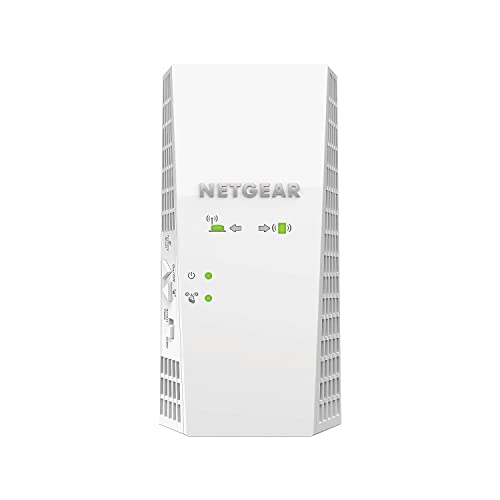
NETGEAR Nighthawk X4 EX7300
The EX7300 is an AC2200 extender with four antennas and MU-MIMO technology. It covers up to 2,000 square feet and is designed to handle high-bandwidth activities like gaming and 4K streaming. It includes a dedicated high-speed port.
Pros
- Strong performance for gaming
- MU-MIMO supports multiple devices
- High-speed mode for better throughput
Cons
- No Wi-Fi 6
- Price is higher than similar models

Asus RP-AX56
The RP-AX56 is an AX1800 dual-band extender that works as a standalone extender or as part of an AiMesh system with compatible Asus routers. It covers up to 1,500 square feet and includes a gigabit Ethernet port.
Pros
- Can integrate with AiMesh for seamless roaming
- Supports Wi-Fi 6
- Compact and wall-plug design
Cons
- AiMesh requires compatible Asus router
- No external antennas

Linksys RE7000 Max-Stream AC1900+
The RE7000 is an AC1900+ extender with MU-MIMO and a spot finder technology. It covers up to 2,000 square feet and works with any router. It has one gigabit Ethernet port and can be managed via the Linksys app.
Pros
- Spot finder technology helps optimal placement
- Supports cross-band technology for faster speeds
- Easy app-based setup
Cons
- No Wi-Fi 6
- Reported occasional disconnects with some routers

D-Link DAP-1620
The DAP-1620 is an AC1200 dual-band extender that is simple and affordable. It covers up to 1,200 square feet and has a compact plug-in design. It includes a fast Ethernet port and works with any router.
Pros
- Very affordable
- Compact and neat
- Easy setup with WPS
Cons
- Only Fast Ethernet port (100 Mbps)
- Lower coverage than others
How to choose
Compared at a glance
| # | Model | Speed | Best for | Score | Price |
|---|---|---|---|---|---|
| 1 | TP-Link RE505X WiFi Range Extender | AC1200 | Best Overall | 9.4 | Check price |
| 2 | NETGEAR WiFi 6 Range Extender EAX20 | AX1800 | Best for Wi-Fi 6 Routers | 9.2 | Check price |
| 3 | TP-Link AC1750 WiFi Extender (RE450) | AC1750 | Best Value | 9.0 | Check price |
| 4 | NETGEAR Nighthawk X4 EX7300 | AC2200 | Best for Gaming | 8.8 | Check price |
| 5 | Asus RP-AX56 | AX1800 | Best for AiMesh | 8.6 | Check price |
| 6 | Linksys RE7000 Max-Stream AC1900+ | AC1900+ | Best for Whole Home Coverage | 8.4 | Check price |
| 7 | D-Link DAP-1620 | AC1200 | Best Budget | 8.0 | Check price |
Common questions
Do WiFi range extenders actually work?
Yes, they work by receiving your existing WiFi signal and rebroadcasting it to extend coverage. However, they can reduce speed by about half because they use the same channel for receiving and sending. Place them where the signal is still strong to minimize speed loss.
What is the difference between a WiFi extender and a WiFi repeater?
They are often used interchangeably. A repeater simply rebroadcasts the signal, while an extender may use a wired connection to the router (like a powerline extender). Most consumer devices are repeaters, but they are marketed as extenders.
How many devices can a WiFi extender handle?
It depends on the model. Basic extenders can handle around 10-15 devices, while higher-end ones like the TP-Link RE505X claim up to 25 devices. Heavy usage like streaming and gaming will use more bandwidth, so consider the capacity.
Will a WiFi extender work with any router?
Yes, most extenders are designed to work with any router brand. They connect wirelessly to your existing network. Some extenders have features that work best with the same brand, like Asus AiMesh, but they still function as standard extenders otherwise.
Do I need a WiFi 6 extender if I have a WiFi 5 router?
No, a WiFi 6 extender will work with a WiFi 5 router, but it will only offer WiFi 5 speeds. If you plan to upgrade your router soon, a WiFi 6 extender is future-proof. Otherwise, a good WiFi 5 extender is sufficient.
How do I set up a WiFi range extender?
Most have a WPS button for quick setup: press the WPS button on your router, then on the extender. Alternatively, use the mobile app or web interface to connect to the extender’s network and follow the prompts. It usually takes less than 5 minutes.
Can I connect devices to the extender via Ethernet?
Yes, if the extender has an Ethernet port. You can connect a smart TV, game console, or computer directly to the extender for a more stable wired connection. This also reduces wireless congestion.
Why is my extender slow?
The extender’s placement is likely too far from the router, resulting in a weak backhaul. Move it closer to the router. Also, interference from other devices or walls can affect signal. Try using the 5GHz band for less congestion, but remember it has shorter range.
What is the difference between dual-band and tri-band extenders?
Dual-band extenders have one 2.4GHz and one 5GHz radio. Tri-band extenders add a second 5GHz radio, which can be used as a dedicated backhaul to communicate with the router, freeing the other band for devices. This can improve speeds but costs more.
Are WiFi extenders safe?
Yes, they emit low-level RF radiation similar to your router. They are safe for home use. Ensure you buy from reputable brands that comply with FCC regulations.
The bottom line
For most people, the TP-Link RE505X is the clear winner. It offers Wi-Fi 6 compatibility, solid coverage, and a reasonable price. If you have a larger home or more demanding needs, consider the Netgear Nighthawk X4 EX7300 for its higher throughput. If you’re on a tight budget, the D-Link DAP-1620 provides basic coverage at a low cost. Avoid buying an extender without checking your router’s capabilities and your home’s layout.


