Which Wireless CarPlay Adapter Reconnects the Fastest?
CarlinKit’s Mini Ultra 3 leads this roundup with dual-band Wi-Fi and fast reconnects for most factory-wired iPhones. AAWireless’s TWO+ suits households sharing one car, and Ottocast’s U2-Air keeps steering wheel and voice controls intact for drivers who rely on them daily.
CarlinKit’s Mini Ultra 3 stands out as the strongest overall pick, pairing dual-band 2.4GHz and 5GHz Wi-Fi with a compact housing that fits behind most dash panels. It mirrors whichever phone connects, so an iPhone gets CarPlay and an Android phone gets Android Auto, though it cannot bridge CarPlay onto an Android head unit.
Wired CarPlay ports vary by brand, which is why a chipset that reconnects fast in a Honda can lag in a Ford. We compared listed chipsets, Wi-Fi standards, and compatibility notes from each product page, then checked that against common owner feedback on reconnect reliability and control retention.
The top picks, ranked

CarlinKit Mini Ultra 3
An Arm Cortex-A7 dual-core chip runs dual-band 2.4GHz and 5GHz Wi-Fi, switching bands automatically to dodge interference. Both USB-A and USB-C connectors ship in the box for different factory ports. Whichever phone pairs with it gets mirrored, so an iPhone receives CarPlay and an Android phone receives Android Auto.
Pros
- Compact housing tucks behind most dash trim panels
- Dual-band Wi-Fi cuts down on 2.4GHz congestion
- Ships with both USB-A and USB-C connectors
Cons
- Cannot bridge CarPlay onto an Android-based head unit
- Some 2016-2018 infotainment systems need a firmware check first

AAWireless TWO+
A physical multifunction button lets two drivers swap between paired phones without opening a settings menu. Bluetooth handles the initial pairing to exchange Wi-Fi credentials, then hands the session to Wi-Fi for the drive. Support covers iPhone X and newer alongside Android 11 and newer.
Pros
- Multifunction button switches driver profiles instantly
- Backed by a 2-year warranty through Amazon or the manufacturer
- Works for both CarPlay and Android Auto vehicles
Cons
- Initial Bluetooth pairing adds a step versus Wi-Fi-only dongles
- Costs more than single-purpose CarPlay-only adapters

Ottocast U2-Air
Steering wheel buttons, voice command, touchscreen input, and rotary knob functions keep working exactly as they did over a cable. A built-in 5GHz Wi-Fi module and quick-response chip reconnect automatically about 13 seconds after the first pairing, according to the listing.
Pros
- Preserves steering wheel, knob, and voice controls
- Ships with two cable types for different USB ports
- Backed by a one-year warranty with lifetime technical support
Cons
- CarPlay only, with no Android Auto path
- Listed compatibility focuses on cars from roughly 2016 onward

CarlinKit CPC200-U2W Plus
A 5.8GHz Wi-Fi chip avoids the crowded 2.4GHz band that many home routers and neighboring cars use. CarPlay is the only protocol on board, since it skips Android Auto entirely. That single focus keeps the design and setup simpler than dual-protocol dongles.
Pros
- Costs less than the flagship Carlinkit and Ottocast models
- 5.8GHz band sidesteps common 2.4GHz interference
- Installs with a single cable
Cons
- No Android Auto support for shared or Android-driver cars
- Firmware updates arrive less often than on newer Carlinkit models
CarlinKit CPC200-CP2A
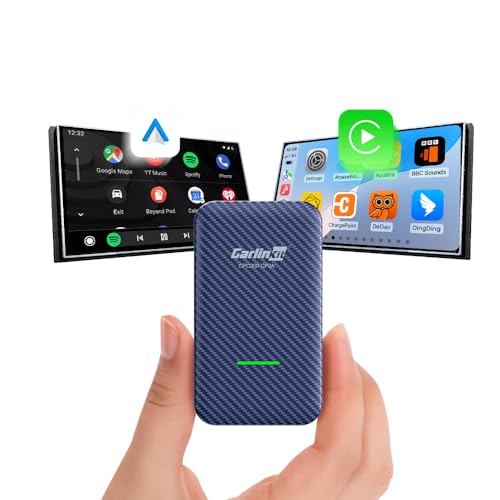
Three internal antennas run a 2T2R wireless configuration rated up to 866Mbps, roughly double the throughput of the single-antenna, 433Mbps setup on older dongles. Bluetooth pairs alongside Wi-Fi on the carbon-fiber shell version for faster reconnects in vehicles with more metal shielding around the console.
Pros
- Three-antenna design holds a signal where single-antenna dongles drop out
- Bluetooth-assisted pairing speeds up reconnection
- Carbon-fiber shell helps manage heat near the USB port
Cons
- CarPlay only, with no Android Auto option
- Bulkier housing than the Mini Ultra 3

CarlinKit CPC200-CCPA
Aftermarket Android-based head units running Android 4.4.2 or later are the target here, not factory infotainment. An Atmel AT91SAM9260 CPU pairs with a Broadcom BCM4358 Wi-Fi module and Bluetooth 4.1. Wireless CarPlay and wireless Android Auto both get added to a radio that previously only ran a wired CarPlay app.
Pros
- Only adapter in this lineup built specifically for aftermarket Android radios
- Adds wireless Android Auto alongside wireless CarPlay
- Supports firmware upgrades over Wi-Fi
Cons
- Not designed for factory-installed infotainment systems
- Bluetooth 4.1 trails the Bluetooth 5.x found in newer dongles

Drimfly Wireless CarPlay Adapter
A 5GHz Wi-Fi connection handles the wireless link, with a stated reconnect window of 7 to 14 seconds. Compatibility spans iPhone 5 through iPhone 13 Pro Max on cars with factory wired CarPlay. Setup needs just a single USB plug-in, with no companion app to configure.
Pros
- Lowest entry cost into wireless CarPlay in this lineup
- Wide iPhone compatibility range including older handsets
- No app or account setup required
Cons
- Reconnect times run longer than the 5G-chip competitors here
- Vehicle compatibility varies enough that Drimfly recommends checking its chart first
Compared at a glance
| # | Model | Chipset | Best for | Score | Price |
|---|---|---|---|---|---|
| 1 | CarlinKit Mini Ultra 3 | Arm Cortex-A7 dual-core processor | Best overall | 9.4 | Check price |
| 2 | AAWireless TWO+ | AAWireless proprietary Wi-Fi and Bluetooth module | Best for multi-driver households | 9.1 | Check price |
| 3 | Ottocast U2-Air | 5G quick-response processor | Best for retaining full factory controls | 8.9 | Check price |
| 4 | CarlinKit CPC200-U2W Plus | Quick-connect processor for CarPlay-only pairing | Best value | 8.7 | Check price |
| 5 | CarlinKit CPC200-CP2A | Carlinkit 4.0 wireless-to-wired bridge processor | Best for connection stability in older or larger vehicles | 8.4 | Check price |
| 6 | CarlinKit CPC200-CCPA | Atmel AT91SAM9260 CPU | Best for aftermarket Android head units | 8.2 | Check price |
| 7 | Drimfly Wireless CarPlay Adapter | Standard Wi-Fi and Bluetooth pairing module | Best budget | 8.0 | Check price |
How to pick the right one
What to look for in a wireless CarPlay adapter Chipset and Wi-Fi band decide how fast a dongle reconnects each time the car starts. Dual-band 2.4GHz and 5GHz hardware avoids interference from nearby routers and other vehicles. Some dongles use a single USB-A plug, while others ship both USB-A and USB-C cables for different factory ports. Compatibility splits into two camps: CarPlay-only adapters for iPhone owners, and dual adapters that add Android Auto for a shared vehicle.
Best adapters for factory wired CarPlay cars Ottocast’s U2-Air and CarlinKit’s CPC200-U2W Plus target vehicles that already have a wired CarPlay port from the factory, roughly 2016 model year and newer. Steering wheel buttons, voice command, and touchscreen functions keep working exactly as they did over a cable on the Ottocast. CarlinKit’s model trades that control-retention focus for a lower cost and a 5.8GHz band that dodges common 2.4GHz congestion.
Best setup for CarPlay and Android Auto in one household AAWireless’s TWO+ and CarlinKit’s CPC200-CCPA cover households or vehicles where more than one phone platform needs a wireless path. A physical button on the AAWireless unit lets a second driver swap profiles without opening a menu. The CarlinKit CCPA instead targets aftermarket Android head units, running an Atmel AT91SAM9260 CPU to add wireless CarPlay and wireless Android Auto to a radio that only shipped with a wired app.
Best for connection stability in older or shared vehicles CarlinKit’s CPC200-CP2A uses three antennas in a 2T2R layout rated up to 866Mbps, double the throughput of single-antenna dongles, which helps in larger cabins or vehicles with more metal shielding around the console. Drimfly’s adapter costs less but supports a wider span of iPhone generations, from iPhone 5 through iPhone 13 Pro Max, making it a fallback for older phones that newer dongles skip.
Questions worth asking
How does a wireless CarPlay adapter work?
It plugs into the same USB port your CarPlay cable used, pairs with your phone over Bluetooth to exchange Wi-Fi credentials, then switches to a Wi-Fi connection so the cable is no longer needed.
Is a wireless CarPlay adapter worth it over a cable?
For drivers who plug in daily, yes, since it removes cable wear and lets the phone stay in a pocket or bag. Owners report the tradeoff is a short pairing delay of roughly 10 to 15 seconds compared with an instant wired connection.
Does a wireless CarPlay adapter work with older cars?
Only if the car already has factory wired CarPlay. These dongles convert an existing wired port to wireless and cannot add CarPlay to a car that never had it.
Can one adapter handle both CarPlay and Android Auto?
Models like AAWireless’s TWO+ and CarlinKit’s Mini Ultra 3 mirror whichever phone connects, giving CarPlay to an iPhone and Android Auto to an Android phone, though not both at the same time.
Wireless CarPlay adapter vs wired cable, what actually changes?
The dashboard experience stays the same, since CarPlay still renders the same apps. Setup time on the first drive and no cable to plug in afterward mark the real difference.
Which wireless CarPlay adapter works for aftermarket Android head units?
CarlinKit’s CPC200-CCPA is built specifically for aftermarket Android-based radios running Android 4.4.2 or later, unlike the other adapters here that target factory infotainment.
Can a wireless CarPlay adapter cause lag or dropped connections?
Dual-band 2.4GHz and 5GHz chipsets, like the one in the CarlinKit Mini Ultra 3, reduce dropouts compared with single-band hardware. Owners in large SUVs or trucks sometimes see more benefit from a three-antenna design such as the CarlinKit CPC200-CP2A.
What is the best wireless CarPlay adapter for multiple drivers sharing one car?
AAWireless’s TWO+ includes a physical multifunction button built for swapping between two paired phones, which fits households or shared vehicles better than a single-profile dongle.
How long does a wireless CarPlay adapter take to reconnect?
Reconnect times listed across this lineup range from about 7 seconds to 14 seconds, with dual-band and multi-antenna chipsets generally landing on the faster end.
Our pick
CarlinKit’s Mini Ultra 3 earns the top spot for its dual-band Wi-Fi, compact housing, and support for both CarPlay and Android Auto depending on which phone connects. Drivers who need steering wheel and voice controls preserved exactly as they were with a cable should choose the Ottocast U2-Air instead. Anyone running an aftermarket Android head unit rather than factory infotainment should skip both and pick the CarlinKit CPC200-CCPA.